
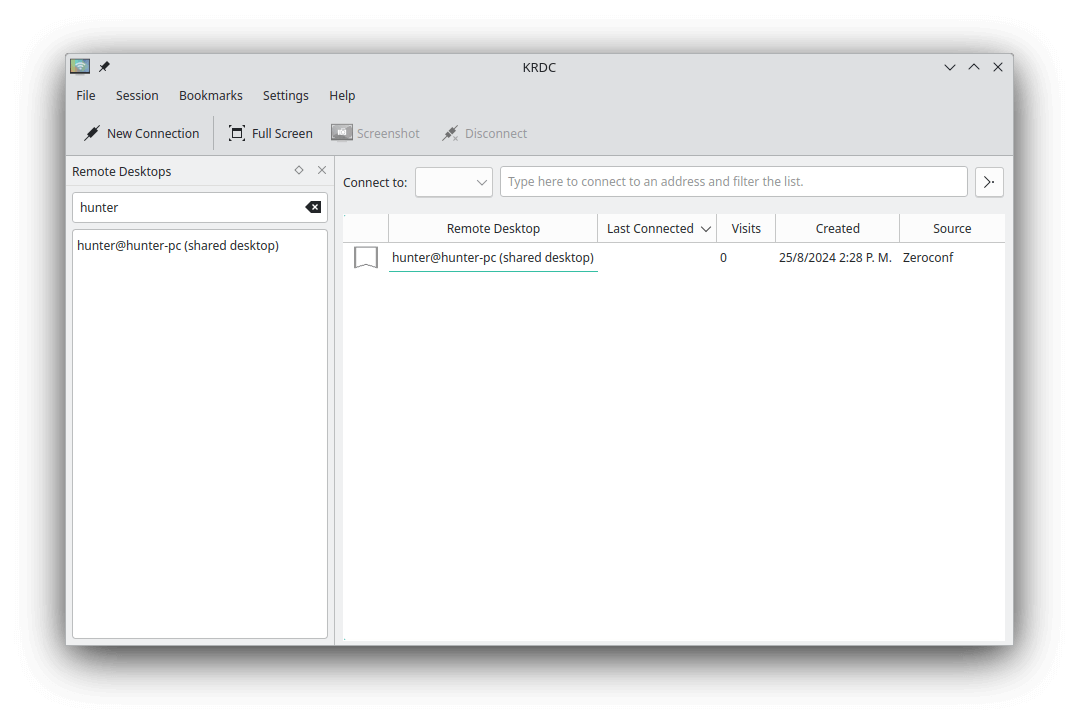
KRDC (KDE Remote Desktop Connection) is a graphical client for accessing and controlling remote computers. It supports RDP, VNC, and SPICE, allowing users to work with remote desktop sessions from a single application.
The software integrates with the KDE Plasma desktop and is suitable for connecting to Windows computers, Linux desktops, and virtual machines running compatible remote display servers. Connections are organized into tabs, making it possible to work with several remote systems without opening separate application windows.
KRDC provides configurable display, authentication, and connection settings, with additional controls depending on the selected protocol. It can also establish connections through SSH tunnels where the necessary support is available.
This is free and open source software.
Key Features
- Supports Remote Desktop Protocol (RDP), Virtual Network Computing (VNC), and SPICE through configurable protocol plugins.
- Connects to multiple remote desktops using a tabbed interface.
- Provides bookmarks, connection history, and discovery of VNC services advertised through Zeroconf.
- Offers full-screen and windowed viewing modes with optional display scaling and aspect ratio preservation.
- Supports view-only sessions, clipboard sharing controls, local cursor rendering, and keyboard shortcut forwarding.
- Captures screenshots of remote desktops and copies them to the local clipboard.
- Provides configurable VNC connection quality profiles for different network conditions.
- Supports RDP display resolution, colour depth, keyboard layout, graphics acceleration, and multiple monitors.
- Offers RDP audio redirection, local directory sharing, and smartcard redirection.
- Includes configurable RDP authentication, TLS security settings, HTTP and SOCKS proxies, and remote desktop gateways.
- Supports SPICE display scaling, resolution configuration, and audio playback.
- Can establish remote desktop connections through SSH tunnels where supported.
- Allows users to restore previous sessions and configure password storage, system tray behaviour, and window preferences.
- Supports launching remote desktop connections from the command line.
Website: invent.kde.org/network/krdc
Support:
Developer: KDE
License: GNU General Public License v2.0
KRDC is written in C++. Learn C++ with our recommended free books and free tutorials.
Related Software
| Remote Display Clients | |
|---|---|
| TigerVNC | Platform-neutral implementation of VNC |
| Remmina | GTK+/Gnome Remote Desktop Client |
| KRDC | Connect with RDP or VNC to another computer |
| X2Go | Fast terminal server suite based on NoMachine's NX libraries |
| RustDesk | Works out of the box with no configuration required |
| Veyon | Computer monitoring and classroom management |
| TurboVNC | TightVNC-compatible remote desktop software |
| FreeRDP | Remote Desktop Protocol Implementation |
| Waypipe | Forward individual Wayland applications over SSH connections |
| Moonlight Qt | Stream games and desktop applications from remote computers |
| noVNC | VNC client web application |
| Connections | Aims at replacing Vinagre as the remote desktop client for GNOME |
| Xpra | Multi-platform persistent remote display server with built-in HTML5 client |
| Guacamole | Clientless remote desktop gateway |
| Dayon! | Easy to use, cross-platform remote desktop assistance solution |
| RustConn | Connection orchestrator for Linux with a GTK4/Wayland-native interface |
| electerm | Terminal emulator supporting SSH, SFTP and RDP connections |
| HopToDesk | Remote desktop tool with end-to-end encryption |
| Field Monitor | Remote desktop client designed for GNOME |
Read our verdict in the software roundup.
 LinuxLinks helps you discover the best free and open source software for Linux. Explore our extensive collection of recommended applications, including alternatives to popular proprietary software. We also publish software reviews, Linux tutorials, hardware reviews, free programming books and articles covering the wider open source community. Browse our Linux resources to discover more. Know a useful free and open source Linux application we haven't covered? Suggest a program for inclusion. Has your software been featured on LinuxLinks? Display one of our Featured on LinuxLinks badges on your website or GitHub README. |
Please read our Comment Policy before commenting.