
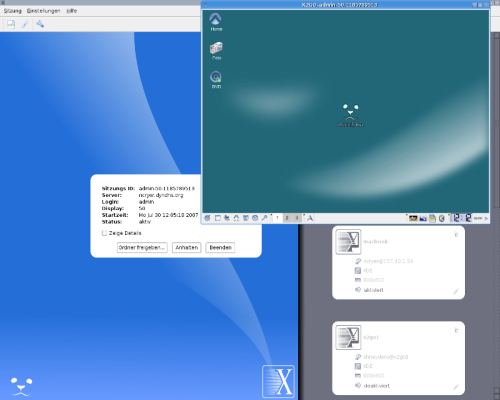
X2Go provides remote graphical access to Linux systems using NX technology. It is designed to make a desktop or individual graphical applications available across a network while keeping bandwidth requirements substantially lower than conventional uncompressed remote X11 operation.
A defining feature is persistence. Users can disconnect from a session without terminating its applications and later resume the same working environment, including from another client. Session traffic is tunnelled through SSH, so X2Go can use the authentication and encryption infrastructure already available on the remote Linux host.
This is free and open source software.
Key Features
- Provides complete remote Linux desktop sessions as well as individual published applications.
- Allows users to suspend a graphical session and reconnect later without closing running applications.
- Can resume an existing session from a different client computer.
- Transports remote sessions through SSH and supports public-key authentication.
- Uses NX compression techniques intended to keep interactive sessions responsive across slower network links.
- Forwards audio from the remote Linux system to the client.
- Supports sharing client-side files and folders with the remote session.
- Can make client-side printers available to applications running in the X2Go session.
- Provides desktop sharing for viewing or assisting with an existing graphical session.
- Supports SSH proxy connections where the X2Go server cannot be reached directly.
- Allows multiple users to maintain separate sessions on the same server, subject to available system resources.
Website: wiki.x2go.org
Support:
Developer: Hein-M. Graesing
License: GNU General Public License v2.0
x2go is written in C++. Learn C++ with our recommended free books and free tutorials.
Related Software
| Remote Display Clients | |
|---|---|
| TigerVNC | Platform-neutral implementation of VNC |
| Remmina | GTK+/Gnome Remote Desktop Client |
| KRDC | Connect with RDP or VNC to another computer |
| X2Go | Fast terminal server suite based on NoMachine's NX libraries |
| RustDesk | Works out of the box with no configuration required |
| Veyon | Computer monitoring and classroom management |
| TurboVNC | TightVNC-compatible remote desktop software |
| FreeRDP | Remote Desktop Protocol Implementation |
| Waypipe | Forward individual Wayland applications over SSH connections |
| Moonlight Qt | Stream games and desktop applications from remote computers |
| noVNC | VNC client web application |
| Connections | Aims at replacing Vinagre as the remote desktop client for GNOME |
| Xpra | Multi-platform persistent remote display server with built-in HTML5 client |
| Guacamole | Clientless remote desktop gateway |
| Dayon! | Easy to use, cross-platform remote desktop assistance solution |
| RustConn | Connection orchestrator for Linux with a GTK4/Wayland-native interface |
| electerm | Terminal emulator supporting SSH, SFTP and RDP connections |
| HopToDesk | Remote desktop tool with end-to-end encryption |
| Field Monitor | Remote desktop client designed for GNOME |
Read our verdict in the software roundup.
| Remote Desktop Servers | |
|---|---|
| TigerVNC | Platform-neutral implementation of VNC |
| GNOME Remote Desktop | Designed for GNOME using pipewire. |
| X2Go | Fast terminal server suite based on NoMachine's NX libraries |
| RustDesk | Works out of the box with no configuration required |
| TurboVNC | TightVNC-compatible remote desktop software |
| FreeRDP | Remote Desktop Protocol Implementation |
| TightVNC | Remote network access to graphical desktops |
| xrdp | Accepts connections from variety of RDP clients |
| Xpra | Multi-platform persistent remote display server |
| Guacamole | Clientless remote desktop gateway |
| OpenSSH | Encrypted communication sessions using the ssh protocol |
| Veyon | Computer monitoring and classroom management |
| KasmVNC | Browser-based VNC server for secure remote desktop access |
| IronRDP | Rust implementation of RDP |
| Dayon! | Easy to use, cross-platform remote desktop assistance solution |
| wayvnc | VNC server for wlroots-based Wayland compositors |
| Lamco RDP Server | Wayland-native RDP server for Linux |
| hypr-rdp | Native RDP server for Hyprland |
Read our verdict in the software roundup.
 LinuxLinks helps you discover the best free and open source software for Linux. Explore our extensive collection of recommended applications, including alternatives to popular proprietary software. LinuxLinks helps you discover the best free and open source software for Linux. Explore our extensive collection of recommended applications, including alternatives to popular proprietary software.We also publish software reviews, Linux tutorials, hardware reviews, free programming books and articles covering the wider open source community. Browse our Linux resources to discover more. Know a useful free and open source Linux application we haven't covered? Suggest a program for inclusion. Has your software been featured on LinuxLinks? Display one of our Featured on LinuxLinks badges on your website or GitHub README. |