
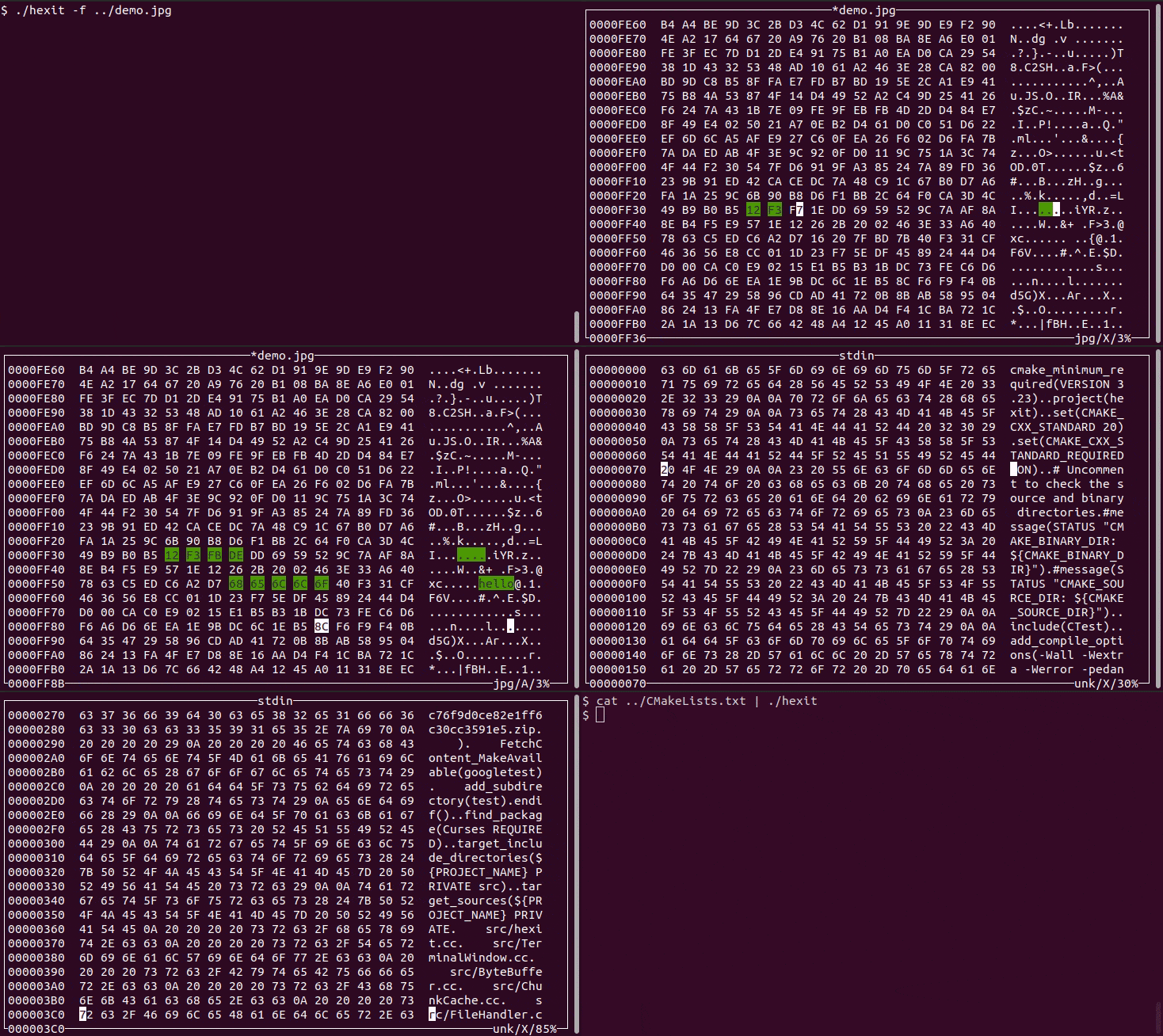
Hexit is a terminal-based hex editor written in C++ for inspecting and editing binary data from a text user interface.
It uses an ncurses-based layout to show byte offsets, hexadecimal values, and ASCII output side by side, and is designed to keep memory usage low by loading file data in chunks instead of reading an entire file into memory at once.
This is free and open source software.
Key Features
- Lets you jump directly to absolute byte offsets inside a file.
- Supports searching for both hexadecimal byte sequences and ASCII strings.
- Attempts to identify file types by matching leading bytes against known file signatures.
- Can read from standard input, making it useful as a shell filter.
- Includes keyboard-driven controls for saving, navigation, mode switching, and find operations.
Website: github.com/marprok/hexit
Support:
Developer: Marios Prokopakis
License: MIT License
Hexit is written in C++. Learn C++ with our recommended free books and free tutorials.
Related Software
| Console-Based Hex Editors | |
|---|---|
| hexyl | Colored command-line hex viewer |
| hyx | Minimalistic hex editor |
| hexedit | View and edit hexadecimal files |
| hexer | Multi-buffer editor for binary files |
| dz6 | Terminal hex editor with Vim-inspired key bindings |
| hx | Hex editor using plain C and POSIX libs |
| poke | Extensible editor for inspecting and modifying structured binary data |
| Hextazy | Colorful hexadecimal editor |
| HexPatch | Interactive TUI for viewing, editing and patching binary files |
| hexhog | Configurable hex viewer and editor |
| DHEX | ncurses-based hex editor with diff mode |
| fileobj | ncurses based hex editor |
| vbl | Terminal-based hexadecimal viewer and editor for binary files |
| HexMe | Written in C++ that uses the Curses library |
| hexcurse-ng | Written in C |
| ddhx | Simple multi-platform modal text UI hex editor |
| bvi | Based on the vi text editor |
| XVI | Hex editor using ncurses |
| Hexit | Minimalistic hex editor |
Read our verdict in the software roundup.
 LinuxLinks helps you discover the best free and open source software for Linux. Explore our extensive collection of recommended applications, including alternatives to popular proprietary software. LinuxLinks helps you discover the best free and open source software for Linux. Explore our extensive collection of recommended applications, including alternatives to popular proprietary software.We also publish software reviews, Linux tutorials, hardware reviews, free programming books and articles covering the wider open source community. Browse our Linux resources to discover more. Know a useful free and open source Linux application we haven't covered? Suggest a program for inclusion. Has your software been featured on LinuxLinks? Display one of our Featured on LinuxLinks badges on your website or GitHub README. |
Please read our Comment Policy before commenting.