

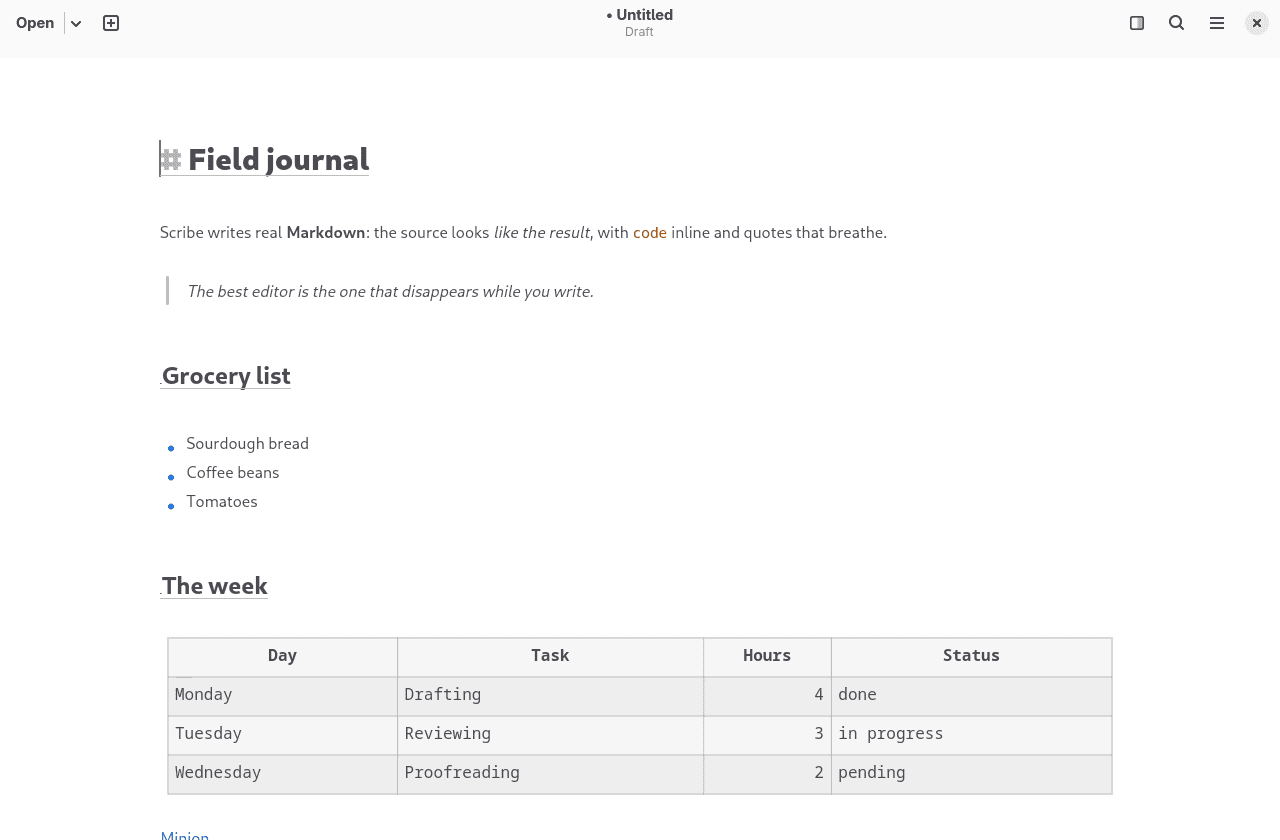
Scribe is a Markdown editor for GNOME that renders formatted text directly in the document as it is edited.
Unlike editors that require a separate preview pane or an embedded browser engine to display formatted Markdown, Scribe applies formatting to the underlying text buffer. Headings, emphasis and other Markdown elements are presented visually while the original source remains editable.
The application is designed for writing notes, documentation and other Markdown documents. It uses GTK4, libadwaita and GtkSourceView to provide a native desktop interface, with documents stored as ordinary Markdown files rather than in a proprietary database.
Scribe also offers a range of writing tools and document presentation options, including configurable syntax visibility and PDF export.
This is free and open source software.
Key Features
- Live Markdown rendering directly within the editing buffer.
- Supports headings, bold, italic, strikethrough, code blocks, quotations, links, footnotes, tables and task lists.
- Configurable Markdown syntax visibility, with options to dim, conceal or reveal formatting markers.
- Focus mode dims surrounding paragraphs to reduce distractions.
- Typewriter mode keeps the editing cursor vertically centred.
- Optional split preview displays a rendered view alongside the document.
- Displays local images and supports remote images with disk caching.
- Renders YouTube links as thumbnail cards that open videos in the default browser.
- Provides search and replace, document outline navigation and recently opened files.
- Supports automatic list continuation and renumbering of ordered lists.
- Includes spell checking with suggestions and dictionary management.
- PDF export with configurable typography, page layouts, themes and print preview.
- Supports custom stylesheets for controlling PDF output.
- Configurable autosave, atomic file writes and unsaved-changes warnings.
- Light and dark appearance with English and Spanish interface translations.
Website: github.com/gnacho/scribe
Support:
Developer: gnacho
License: GNU Affero General Public License v3.0
Scribe is written in Rust. Learn Rust with our recommended free books and free tutorials.
Related Software
| Markdown Editors | |
|---|---|
| Mark Text | Simple and elegant Markdown editor |
| Zettlr | Billed as the Markdown editor for the 21st century |
| CodiMD | Realtime collaborative markdown notes |
| ghostwriter | Distraction-free Markdown editor |
| Yank Note | Extensible note app with plugins, diagrams, and code execution |
| NoteGen | Cross-platform note manager with local storage and clean organisation |
| MindForger | Thinking notebook and Markdown editor |
| MarkFlowy | Modern and intelligent Markdown editor |
| ReText | Supports Markdown and reStructuredText markup languages |
| Apostrophe | Distraction free Markdown editor |
| HedgeDoc | Real-time collaborative note-taking for teams and documentation |
| StackEdit | Full-featured Markdown editor based on PageDown |
| PanWriter | Distraction-free Markdown writing environment |
| Looksyk | Simple personal knowledge platform |
| Remarkable | Python-based editor with live preview, MathJax support and more |
| Folio | Markdown note-taking app for GNOME |
| Scratchmark | Organized Markdown editor |
| Rucola | Terminal-based markdown note manager |
| Marker | Simple yet robust Markdown editor |
| ThiefMD | Markdown and Fountain editor and file manager inspired by Ulysses |
| Marknote | Create rich text notes |
| SoloMD | Local-first writing tool focused on privacy and offline editing |
| Norka | Continuous text editing |
| MerMark Editor | Live editor with Mermaid diagram previews and export tools |
| Notes-Up | Write beautiful notes fast and easy using Markdown |
| Marko | WYSIWYG writing app with instant preview and clean formatting |
| Cedilla | Distraction-free editor for structured notes and long-form drafts |
| Abricotine | Markdown editor built for desktop |
Read our verdict in the software roundup.
 LinuxLinks helps you discover the best free and open source software for Linux. Explore our extensive collection of recommended applications, including alternatives to popular proprietary software. We also publish software reviews, Linux tutorials, hardware reviews, free programming books and articles covering the wider open source community. Browse our Linux resources to discover more. Know a useful free and open source Linux application we haven't covered? Suggest a program for inclusion. Has your software been featured on LinuxLinks? Display one of our Featured on LinuxLinks badges on your website or GitHub README. |
Please read our Comment Policy before commenting.