

LogLens is a powerful log processing engine with an interactive Terminal UI for viewing and analyzing system logs.
Think of it as a Linux equivalent to Windows Event Viewer.
This is free and open source software.
Key Features
Core Engine
- Pluggable Sources: Extensible architecture for different log sources
- journalctl (systemd journal) – fully implemented
- File-based logs (text & JSON Lines)
- Easy to add: Docker, nginx, remote syslog, cloud APIs
- Structured Output: Normalized LogRecord objects with:
- ISO-8601 timestamps (auto-converted to local timezone)
- Severity numbers (0-7) and labels (EMERG, ALERT, CRIT, ERROR, WARNING, NOTICE, INFO, DEBUG)
- Message content
- Raw data preservation for debugging
- Powerful Filtering:
- Exact severity match
- Minimum severity threshold (e.g., “WARNING and above”)
- Keyword search (case-sensitive or insensitive)
- Combinable filters with AND logic
Interactive TUI
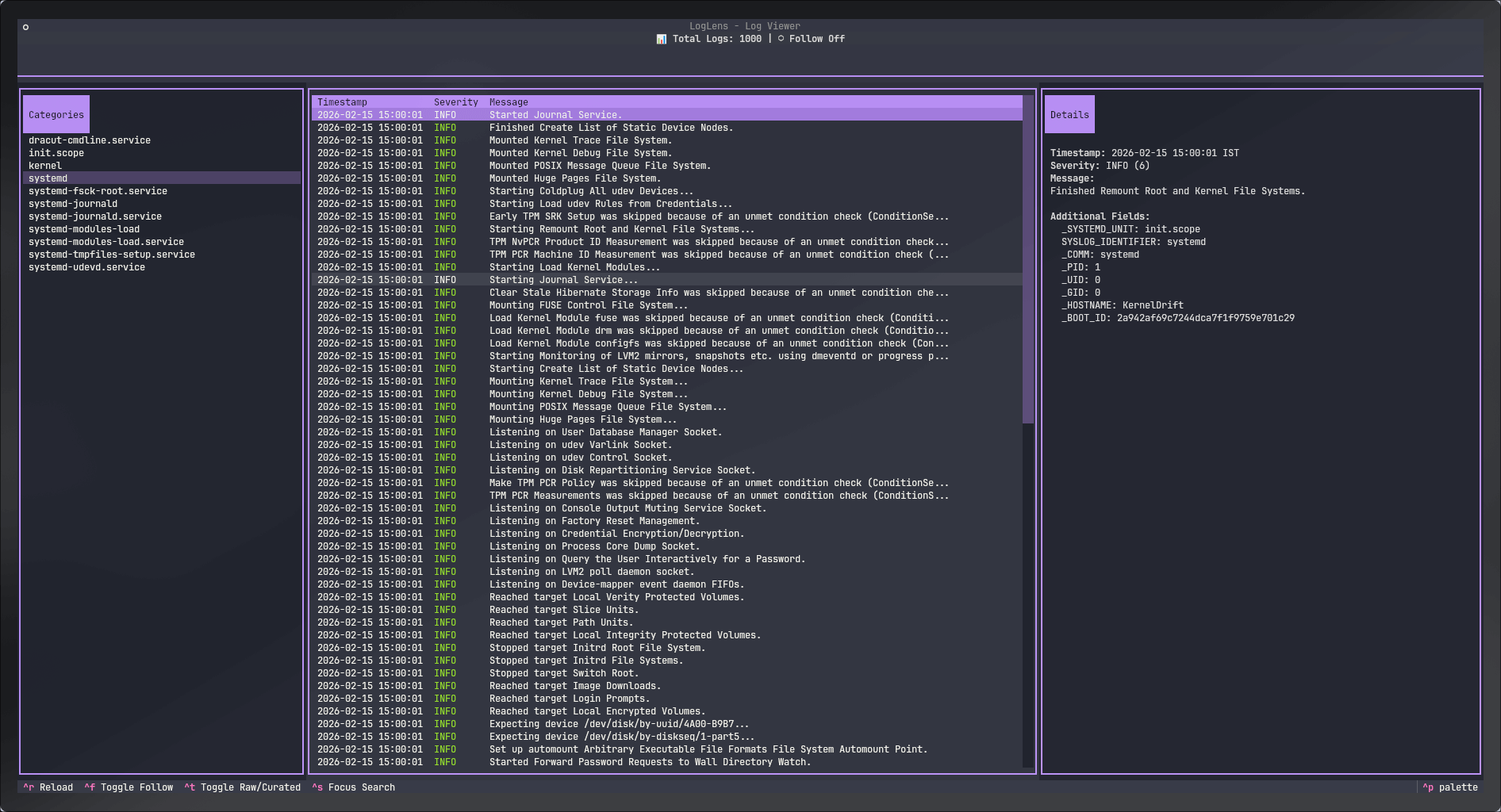
- 3-Pane Layout: Categories sidebar | Log table | Details panel
- Color-Coded Severity Levels: Instantly spot critical issues
- EMERG/ALERT: Bright red/magenta
- ERROR: Red
- WARNING: Yellow
- INFO: Green
- DEBUG: Dim
- Real-Time Filtering: Click categories in sidebar for instant filtering
- Dual Details View: Toggle between curated (human-readable) and raw (full JSON)
- Time Range Queries: Filter logs by time with no memory limits when –since is used
- Latest-First Sorting: Most recent logs always on top
- Keyboard Navigation: Full keyboard control for efficient workflow
Website: github.com/nirakar24/loglens
Support:
Developer: LogLens Contributors
License: MIT License
LogLens is written in Python. Learn Python with our recommended free books and free tutorials.
Related Software
| LogFile Viewers | |
|---|---|
| lnav | Curses-based utility for viewing and analyzing log files. |
| tailspin | Terminal log file highlighter designed for inspecting log output in the shell |
| journalctl | Query and display messages from the journal |
| hl | Inspect structured logs from the terminal |
| Nerdlog | Remote-first terminal log viewer |
| lazyjournal | Inspect logs from multiple sources |
| KSystemLog | System log viewer for KDE |
| Logdy | Lightweight log viewer that works just like grep, awk, sed, or jq |
| humanlog | Reads logs from stdin and prints them back to stdout, but prettier. |
| toolong | View, tail, merge, and search log files |
| Xlogmaster | GTK+ based program to keep track of logfiles and devices |
| QJournalctl | Graphical User Interface for systemd’s journalctl |
| logrifle | Designed to "rifle through" large logfiles |
| Gnome-logs | View and search logs with this graphical utility |
| frontail | Stream logs to your web browser |
| nless | Pager for exploring structured and semi-structured data |
| glogg | Qt graphical log explorer |
| Chipmunk | Fast logfile viewer that can deal with huge logfiles (>10 GB) |
| SEE | Inspect logs from systemd services |
| MultiTail | View multiple logfiles windowed on the console |
| Logria | Log aggregation tool |
| logana | Work efficiently with very large log files, including multi-GB logs |
| QLogExplorer | Qt-based tool for exploring log files |
| Grafito | Simple, self-contained web-based log viewer for journalctl |
| swatch | Logfile viewer with regexp matching, highlighting & hooks |
| logmaster-gtk-d | Log viewer for Linux built with GTK and D |
| LogLens | Linux equivalent to Windows Event Viewer |
Read our verdict in the software roundup.
 Explore our carefully curated directory of recommended free and open source software, covering every major software category. Explore our carefully curated directory of recommended free and open source software, covering every major software category.The directory forms part of our extensive collection of articles for Linux enthusiasts. It includes hundreds of detailed reviews, together with free and open source alternatives to proprietary software from companies such as Google, Microsoft, Apple, Adobe, IBM, Cisco, Oracle, and Autodesk. LinuxLinks also covers interesting projects worth exploring, Linux-compatible hardware, free programming books and tutorials, and much more. Know a useful free and open source Linux application that we haven’t covered? Tell us about it using our submission form. |
Please read our Comment Policy before commenting.