

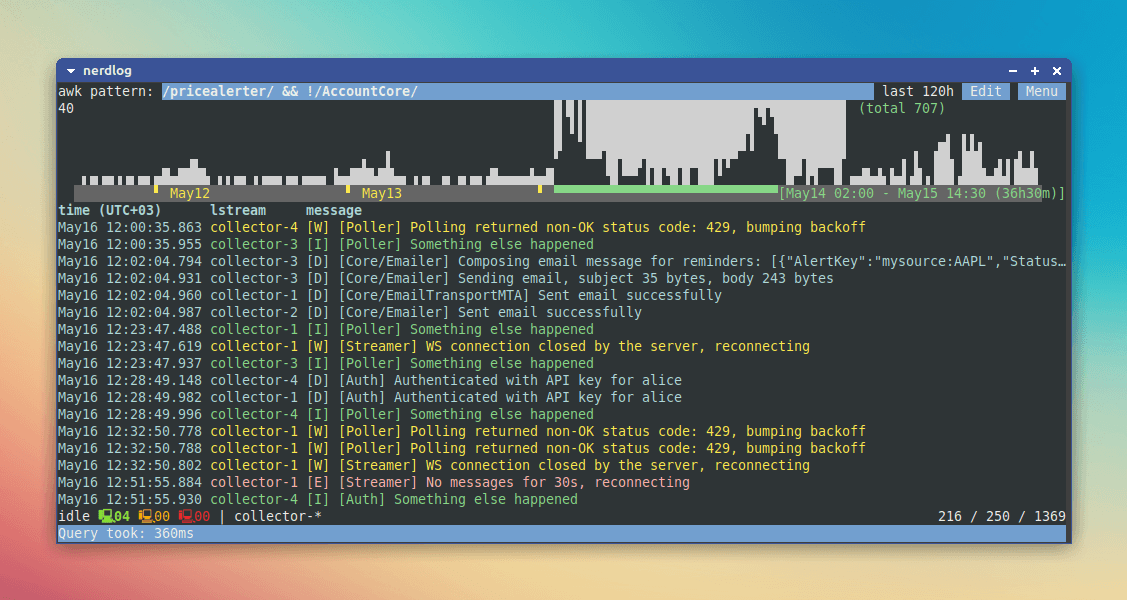
Nerdlog is a terminal-based log viewer designed for investigating messages collected on multiple remote computers. Rather than requiring a central logging server, it connects directly to individual systems and brings their results together within one interface.
The application is particularly useful when troubleshooting services running across several Linux machines. Its architecture performs most of the analysis on the remote systems, avoiding the need to transfer complete log files to the local computer.
Nerdlog is intended to provide some of the investigative convenience of larger log management platforms while retaining a lightweight workflow. Administrators can examine patterns across hosts, narrow investigations to particular periods and locate relevant messages without deploying additional infrastructure.
This is free and open source software.
Key Features
- Multi-host searching – queries logs on several remote computers simultaneously.
- SSH connectivity – establishes direct connections without requiring a central logging server.
- Remote processing – performs log analysis on individual hosts and retrieves selected results.
- Unified log display – merges messages from different computers into a single view.
- Timeline histogram – visualises the volume and distribution of log messages over time.
- Time-range filtering – restricts investigations to selected periods.
- Pattern searching – searches log messages using configurable expressions.
- Journald integration – reads systemd journal output alongside conventional log files.
- SSH configuration support – recognises configured hosts and supports wildcard host selection.
- Custom connection commands – allows alternative session-establishment methods.
- Query history – retains previous searches for convenient reuse.
- Result export – saves retrieved log messages to files.
- Cross-platform support – runs on Linux, macOS, and Windows.
Website: github.com/dimonomid/nerdlog
Support:
Developer: Dmitry Frank
License: BSD 2-Clause ‘Simplified’ License
Nerdlog is written in Go. Learn Go with our recommended free books and free tutorials.
Related Software
| Terminal Log Viewers | |
|---|---|
| lnav | Powerful navigation, filtering and analysis of system and application logs |
| Nerdlog | Remote-first monitoring with powerful querying and filtering capabilities |
| lazyjournal | Browse systemd journal entries with intuitive keyboard controls |
| toolong | Tail, merge and search multiple files in real time |
| logrifle | Quickly browse and search records with a keyboard-driven interface |
| nless | Interactive pager with structured data navigation |
| MultiTail | Monitor multiple files simultaneously with colour-coded output |
| Logria | Aggregate multiple data streams with live filtering and highlighting |
| logana | Fast, interactive exploration with filtering and search |
| JSON Log Viewer | Explore structured JSON records with interactive filtering and navigation |
Read our verdict in the software roundup.
 LinuxLinks helps you discover the best free and open source software for Linux. Explore our extensive collection of recommended applications, including alternatives to popular proprietary software. LinuxLinks helps you discover the best free and open source software for Linux. Explore our extensive collection of recommended applications, including alternatives to popular proprietary software.We also publish software reviews, Linux tutorials, hardware reviews, free programming books and articles covering the wider open source community. Browse our Linux resources to discover more. Know a useful free and open source Linux application we haven't covered? Suggest a program for inclusion. Has your software been featured on LinuxLinks? Display one of our Featured on LinuxLinks badges on your website or GitHub README. |
Please read our Comment Policy before commenting.