

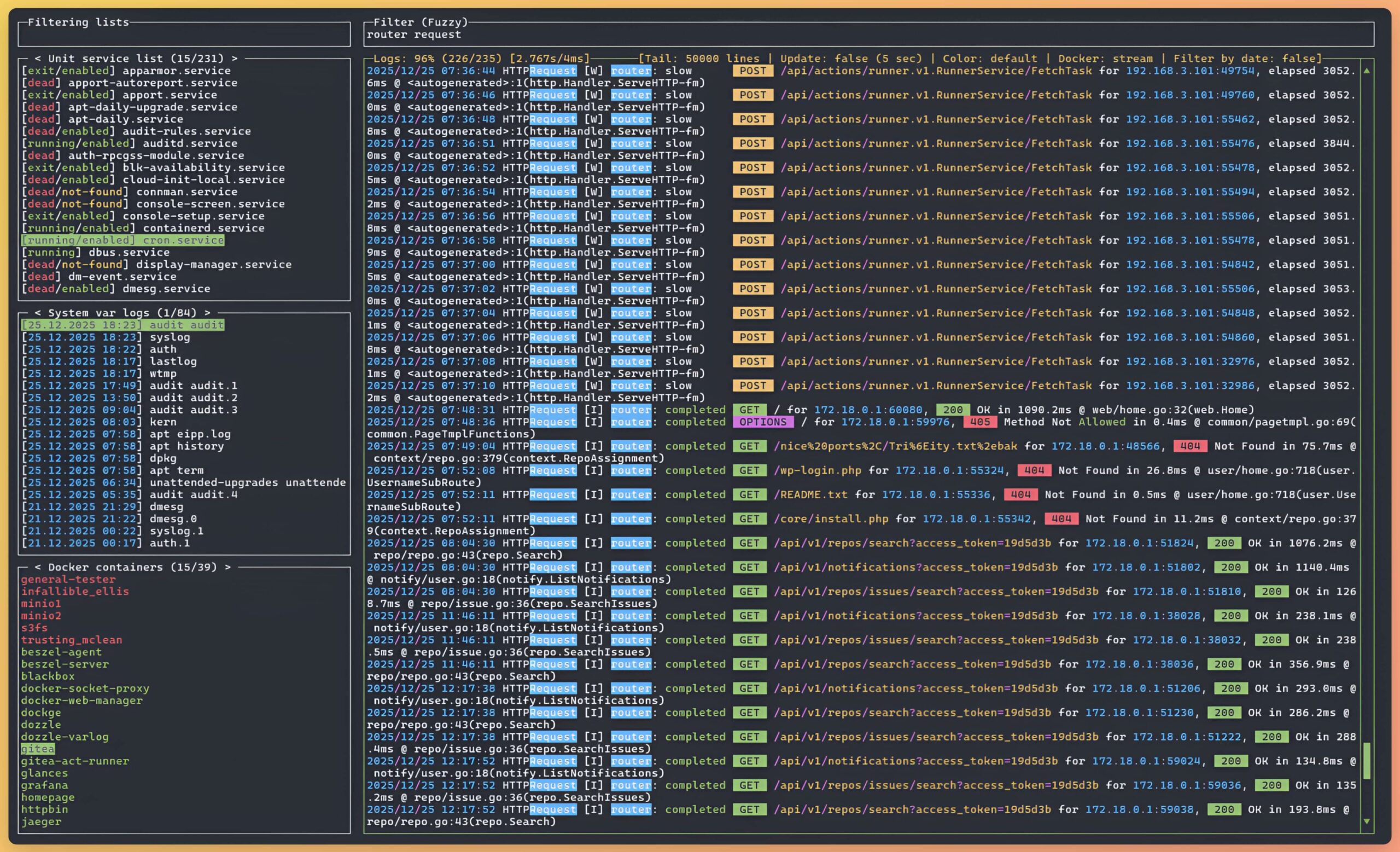
lazyjournal is a terminal application for examining logs from different system and application sources through a unified interface. It provides an alternative to repeatedly switching between logging commands when investigating problems on Linux computers and servers.
The application is designed for environments where diagnostic information may be distributed between the system journal, ordinary files, containers and orchestrated services. It brings these different sources together in a navigable interface that can also be used when working with remote systems.
lazyjournal is particularly useful for administrators managing systems that combine traditional services with containerised applications. Its interface helps users locate relevant log sources and investigate their contents without needing a separate logging platform.
This is free and open source software.
Key Features
- Journald integration – examines system and user journal entries.
- Audit log support – reads security and auditing information generated by auditd.
- File-based logs – opens ordinary log files, including rotated and archived logs.
- Container monitoring – reads logs from Docker and Podman containers.
- Compose integration – examines logs associated with container stacks.
- Kubernetes integration – accesses pod logs with support for switching contexts and namespaces.
- Remote access – supports retrieving logs over SSH and rsyslog-based collection.
- Live streaming – follows incoming messages as they are generated.
- Flexible filtering – provides exact-match, fuzzy, regular-expression and date-based filters.
- Syntax highlighting – includes built-in highlighting and support for external highlighters.
- Systemd navigation – displays available services and boot entries.
- Web access – can expose the terminal interface through a browser when deployed in a suitable container.
- Cross-platform support – runs on Linux, macOS, and Windows.
Website: github.com/Lifailon/lazyjournal
Support:
Developer: Lifailon
License: MIT License
lazyjournal is written in Go. Learn Go with our recommended free books and free tutorials.
Related Software
| Terminal Log Viewers | |
|---|---|
| lnav | Powerful navigation, filtering and analysis of system and application logs |
| Nerdlog | Remote-first monitoring with powerful querying and filtering capabilities |
| lazyjournal | Browse systemd journal entries with intuitive keyboard controls |
| toolong | Tail, merge and search multiple files in real time |
| logrifle | Quickly browse and search records with a keyboard-driven interface |
| nless | Interactive pager with structured data navigation |
| MultiTail | Monitor multiple files simultaneously with colour-coded output |
| Logria | Aggregate multiple data streams with live filtering and highlighting |
| logana | Fast, interactive exploration with filtering and search |
| JSON Log Viewer | Explore structured JSON records with interactive filtering and navigation |
Read our verdict in the software roundup.
 LinuxLinks helps you discover the best free and open source software for Linux. Explore our extensive collection of recommended applications, including alternatives to popular proprietary software. LinuxLinks helps you discover the best free and open source software for Linux. Explore our extensive collection of recommended applications, including alternatives to popular proprietary software.We also publish software reviews, Linux tutorials, hardware reviews, free programming books and articles covering the wider open source community. Browse our Linux resources to discover more. Know a useful free and open source Linux application we haven't covered? Suggest a program for inclusion. Has your software been featured on LinuxLinks? Display one of our Featured on LinuxLinks badges on your website or GitHub README. |
Please read our Comment Policy before commenting.