

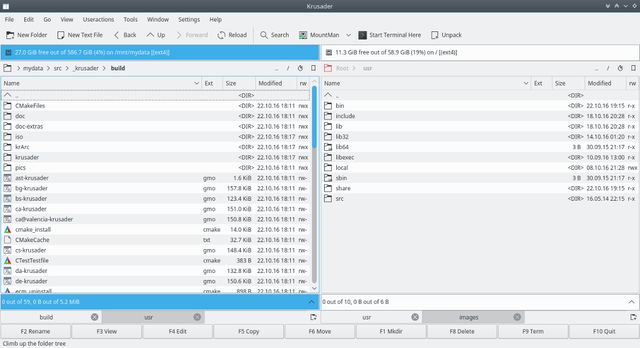
Krusader is an advanced twin-panel file manager for KDE Plasma and other Unix-like desktop environments. Its commander-style interface is designed for efficient file management using either the keyboard or mouse.
The two panels can work with local files, archives and remote locations, while an integrated command line and terminal complement the graphical interface. Tabs, history, bookmarks and configurable keyboard shortcuts help with navigating large collections of files.
Krusader also includes tools for searching, comparing and synchronising directories, managing archives, calculating disk usage and performing queued file operations. Current releases use Qt 6 and KDE Frameworks 6.
This is free and open source software.
Key Features
- Twin-panel interface with tabs, history, bookmarks and strong keyboard-oriented operation.
- Integrated command line and optional terminal emulator which follows the active directory.
- Handles local files, mounted filesystems, archives and remote locations through KDE’s KIO framework.
- Remote file access includes SFTP, SCP, FTP, SMB, WebDAV and other protocols supported by KIO.
- Extensive archive handling allows browsing, creating, extracting and testing many common archive formats.
- Advanced search can inspect local and remote files as well as files stored inside archives.
- Directory synchronisation compares locations and selectively copies or removes files to bring them into sync.
- File and directory comparison tools include filtering and content comparison using external diff utilities.
- Queue manager handles copy and move jobs without requiring each operation to complete before another is prepared.
- Internal viewer and editor use KDE components to display and modify a wide variety of file types.
- Disk Usage tool visualises space consumed by files and directories, while Mount Manager provides access to mounted filesystems.
- Checksum creation and verification supports commonly used cryptographic and file-verification formats.
- User Actions and configurable menus allow scripts and external programs to be integrated into file-management workflows.
Website: krusader.org
Support:
Developer: Krusader Krew
License: GNU General Public License v2.0 / v3.0
Krusader is written in C++. Learn C++ with our recommended free books and free tutorials.
Related Software
| File Managers | |
|---|---|
| Krusader | Advanced orthodox file manager for KDE |
| nnn | Fast and flexible file manager |
| Dolphin | Default file manager for KDE |
| Midnight Commander | User-friendly yet powerful orthodox file manager |
| Double Commander | File manager with two panels side by side |
| superfile | Modern terminal file manager |
| Ranger | Console file manager with VI key bindings |
| PCManFM-Qt | Lightweight Qt-based file manager which uses GLib |
| PCManFM | Default file manager for LXDE |
| Files | File browser designed for elementary OS |
| GNOME Files | Spatial file manager; default file manager for GNOME |
| Spacedrive | Powered by a virtual distributed filesystem |
| lf | Terminal file manager written in Go |
| GNOME Commander | Orthodox file manager for the GNOME desktop environment |
| Yazi | Fast, well optimized, and beautiful file manager. |
| CliFM | Shell-like, command line terminal file manager |
| Xfe | Very similiar to Windows Explorer |
Read our verdict in the software roundup.
| Orthodox File Managers | |
|---|---|
| Krusader | Advanced twin panel (commander style) file manager for KDE |
| Midnight Commander | User-friendly yet powerful text-mode file manager and visual shell |
| Double Commander | Inspired by Total Commander |
| Ranger | File manager with an ncurses frontend written in Python |
| GNOME Commander | Built on the GTK-toolkit and GnomeVFS |
| Xfe | Very similar to Windows Explorer but with twin panes |
| muCommander | Lightweight, cross-platform file manager |
| far2l | AR Manager fork bringing panels, plugins and archives to Linux |
| Vifm | Vim-style two-pane navigator with modal keyboard control |
| File Commander | Total Commander-like orthodox file manager |
| Sunflower | Small and highly customizable twin-panel file manager |
| trolCommander | Fork of muCommander |
| FileRunner | Simple and efficient file manager written in Tcl |
| F2 Commander | Lean text-mode commander for browsing and batch operations |
| Tux Commander | Uses the old GTK2 windowing toolkit |
| Midday Commander | Dual-pane console navigator with Midnight Commander-style flow |
| Worker | In the style of the Amiga's DirOpus |
| Waydir | Wayland-native desktop browser focused on speed and simplicity |
| WCMCommander | Mimicking the look-n-feel of Far Manager |
| gentoo | Two-pane file manager |
| emelFM2 | Orthodox file manager using GTK+ 2 |
Read our verdict in the software roundup.
 LinuxLinks helps you discover the best free and open source software for Linux. Explore our extensive collection of recommended applications, including alternatives to popular proprietary software. LinuxLinks helps you discover the best free and open source software for Linux. Explore our extensive collection of recommended applications, including alternatives to popular proprietary software.We also publish software reviews, Linux tutorials, hardware reviews, free programming books and articles covering the wider open source community. Browse our Linux resources to discover more. Know a useful free and open source Linux application we haven't covered? Suggest a program for inclusion. Has your software been featured on LinuxLinks? Display one of our Featured on LinuxLinks badges on your website or GitHub README. |
Please read our Comment Policy before commenting.