

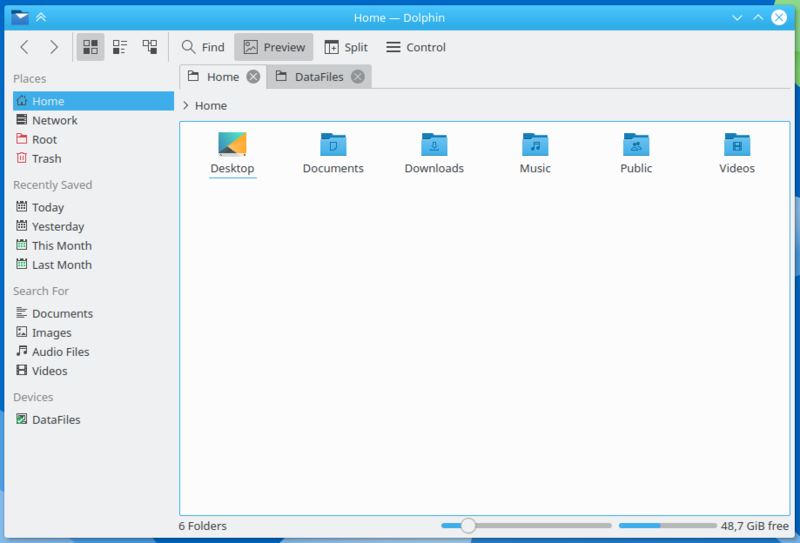
Dolphin is the default file manager for the KDE Plasma desktop environment. It provides a graphical interface for browsing local and remote filesystems, organising directories and performing common file operations. Its interface combines straightforward navigation with configurable panels and additional functionality for users who regularly work with large collections of files.
The application supports multiple tabs and a split-view layout, allowing two directories to be displayed side by side. Users can browse directories using a breadcrumb navigation bar or enter locations directly, while the Places sidebar provides shortcuts to frequently accessed locations and connected storage devices. Dolphin integrates with KDE’s KIO framework for accessing network resources and other supported locations. Its embedded terminal, configurable service menus and plugin architecture extend file management beyond copying and moving files, including integration with version control systems.
This is free and open source software.
Key Features
- Icon grid, detailed list and tree views.
- Tabbed browsing with separate navigation histories.
- Split view for working with two directories simultaneously.
- Breadcrumb navigation and editable location bar.
- Configurable Places, Folders and Information panels.
- Embedded terminal that follows the current directory.
- Search files and directories by name and other supported properties.
- File previews and thumbnails for images, documents and multimedia files.
- Batch renaming of selected files.
- Undo supported file operations.
- Remote filesystem access through protocols including SMB, SFTP, FTP and WebDAV.
- Context menus with configurable custom actions and service menus.
- Compress files, create archives and share folders through supported integrations.
- Plugins for Git integration and other revision control systems.
- Configurable keyboard shortcuts and toolbar actions.
- Adjust folder sorting, icon sizes and view properties.
- Support for additional network and cloud storage locations through KDE plugins.
- Cross-platform support – runs on Linux and Windows.
Website: apps.kde.org/dolphin
Support:
Developer: KDE Community
License: GNU General Public License v2.0
Dolphin is written in C++. Learn C++ with our recommended free books and free tutorials.
Related Software
| Qt File Managers | |
|---|---|
| Krusader | Advanced, twin-panel (commander-style) file manager |
| Dolphin | Simple to use and dedicated file manager |
| Double Commander | Inspired by Total Commander |
| PCManFM-Qt | Started as the Qt port of PCManFM |
| Konqueror | File manager, web browser, and universal viewer |
| CoreFM | Simple, lightweight, and easy to use file manager |
| File Commander | Total Commander-like orthodox (dual-panel) file manager |
| Deepin FM | File manager for deepin desktop environment |
| Index | Qt-based file manager that's part of the Maui ecosystem |
| SplitCommander | Dual-pane KDE tool for efficient copying moving and organisation |
| Rootlink | Native Wayland browser offering a clean focused desktop experience |
| HyprFM | Modern Qt 6 and QML browser designed for Wayland desktops |
| Dentry | Keyboard-driven TUI for fast browsing and filesystem navigation |
| Cutefish File Manager | Another simple file manager |
Read our verdict in the software roundup.
 LinuxLinks helps you discover the best free and open source software for Linux. Explore our extensive collection of recommended applications, including alternatives to popular proprietary software. We also publish software reviews, Linux tutorials, hardware reviews, free programming books and articles covering the wider open source community. Browse our Linux resources to discover more. Know a useful free and open source Linux application we haven't covered? Suggest a program for inclusion. Has your software been featured on LinuxLinks? Display one of our Featured on LinuxLinks badges on your website or GitHub README. |
Please read our Comment Policy before commenting.