

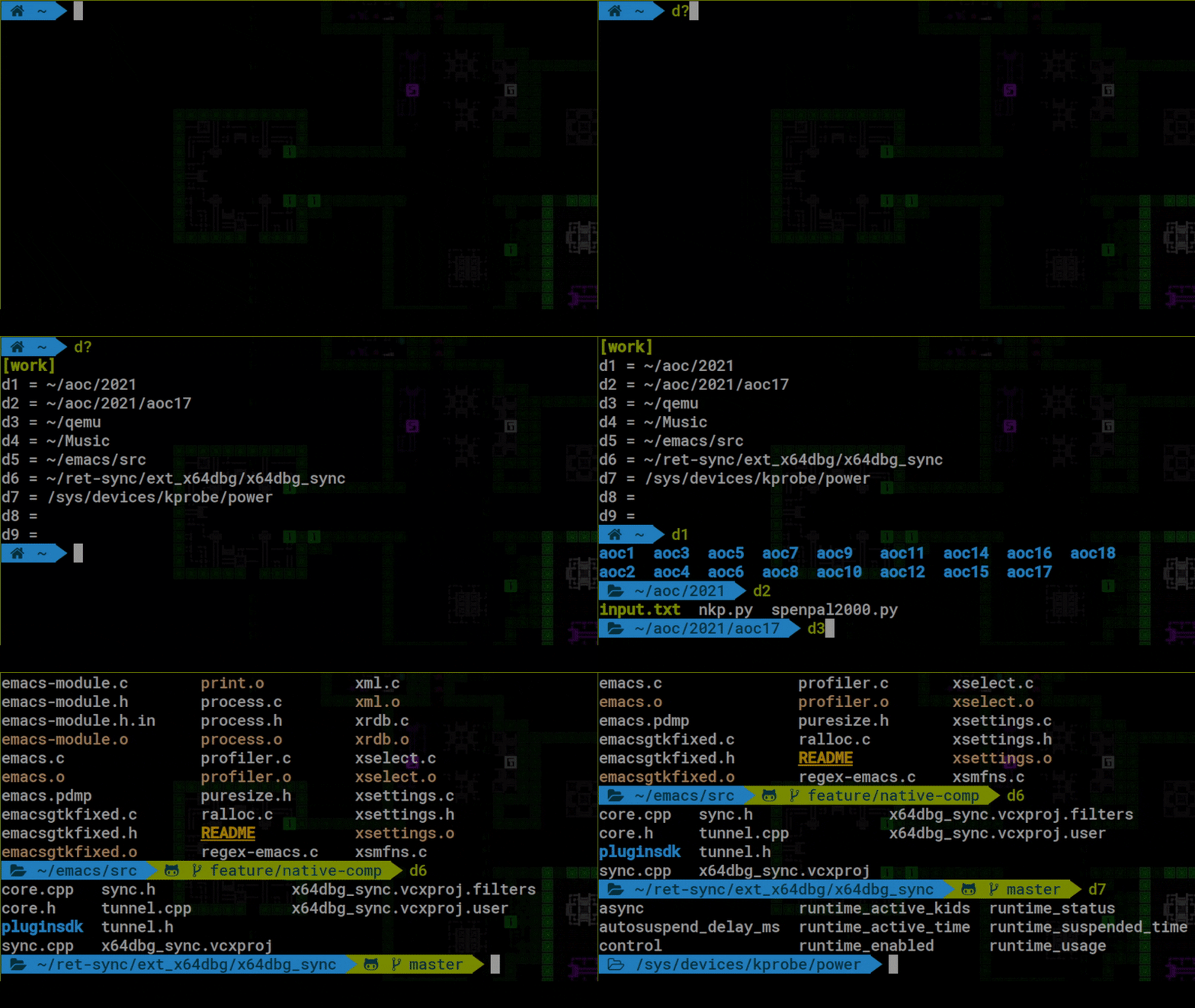
fastdiract (fastdir + fastaction) is a pair of shell tools based on key-value storage for quick shell navigation and command execution.
Each tool saves directories/commands to one of 10 “memory” slots in a file for quick retrieval via 2-character aliases
This is free and open source software.
Key Features
- fastdir – shell navigation tool to help you store and jump to your most frequently used directories (aka fastdirs), stored in slot
- fastaction – tool to save frequently executed commands, stored in slots f0-f9. To save a command to slot f7, run something like f7.
"echo hello there > myfile", making sure to wrap the command in double or single quotes. You can then execute the command easily by runningf7.
Website: github.com/dp12/fastdiract
Support:
Developer: Daniel Ting
License: MIT License
fastdiract is written in Python. Learn Python with our recommended free books and free tutorials.
Related Software
| Shell tools | |
|---|---|
| fzf | Command-line fuzzy finder for your shell |
| zoxide | Smarter cd command, inspired by z and autojump |
| broot | Reviewed under our Excellent Utilities series |
| McFly | Also reviewed under our Excellent Utilities series |
| z | Maintains a jump-list of the directories you actually use |
| autojump | Offers a fast way to navigate your filesystem |
| z.lua | Helps you navigate faster by learning your habits |
| HSTR | Bash and zsh shell history suggest box |
| enhancd | Next-generation cd command |
| fzy | Simple, fast fuzzy finder for the terminal |
| Navita | Rapid directory traversal |
| Jump | Quick and fuzzy directory jumper |
| walk | Simple and minimalistic terminal navigator |
| lacy | cd alternative that makes navigating much more efficient |
| DF-SHOW | Directory File Show |
| fz | Adds fuzzy search to tab completion of z |
| v | z for vim |
| pazi | Fast autojump helper |
| jumper | Files/directories jumper |
| cdhist | Linux shell cd history directory stack |
| icd | Shell utility that makes changing directories quicker and more convenient |
| fasd | Command-line productivity booster. It seeks inspiration from autojump, z and v |
| kn | Navigate folders quickly |
| Dongle | Move around deep directory trees |
| cdwe | cd with env vars |
| slingshot | Lightweight tool to browse files in the terminal |
| ff | Manage favourite folders |
| fastdiract | Quick shell navigation and command execution |
| zm | cd for lazy people |
| qcd | Quickly change directory |
| pm | Switch between projects |
| nav | Quickly navigate through directories |
| menucd | Directory browser and changer |
| jmp | The superior cd |
| gump | Smarter cd command |
Read our verdict in the software roundup.
 Explore our carefully curated directory of recommended free and open source software, covering every major software category. Explore our carefully curated directory of recommended free and open source software, covering every major software category.The directory forms part of our extensive collection of articles for Linux enthusiasts. It includes hundreds of detailed reviews, together with free and open source alternatives to proprietary software from companies such as Google, Microsoft, Apple, Adobe, IBM, Cisco, Oracle, and Autodesk. LinuxLinks also covers interesting projects worth exploring, Linux-compatible hardware, free programming books and tutorials, and much more. Know a useful free and open source Linux application that we haven’t covered? Tell us about it using our submission form. |
Please read our Comment Policy before commenting.