
Over the years PDF has become an extremely important file format. If you want to create documents that can be viewed under all major operating systems, PDF is the ticket, as it maintains the overall look and feel of documents regardless of what platform they are viewed under. Businesses and consumers increase productivity using PDF documents and forms.
Besides offering universal compatibility, the format is reliable, ease of creation, security, and version independence. The format also supports annotations, and a very practical format.
Since late 2014, Adobe’s proprietary but useful Adobe Acrobat Reader has been no longer supported under Linux. Adobe’s website still only lists Windows, Mac OS and Android as supported operating systems. This is one of the many dangers of closed source software – at the whim of corporate bosses, development and distribution can simply disappear overnight, possibly never coming back.
Fortunately, there are some excellent open source alternatives to Adobe Acrobat Reader. The software featured in this article offer more than displaying PDF files; many are versatile document viewers.
Here’s our verdict on the PDF viewers captured in a legendary LinuxLinks-style ratings chart.. We only include free and open source software here.
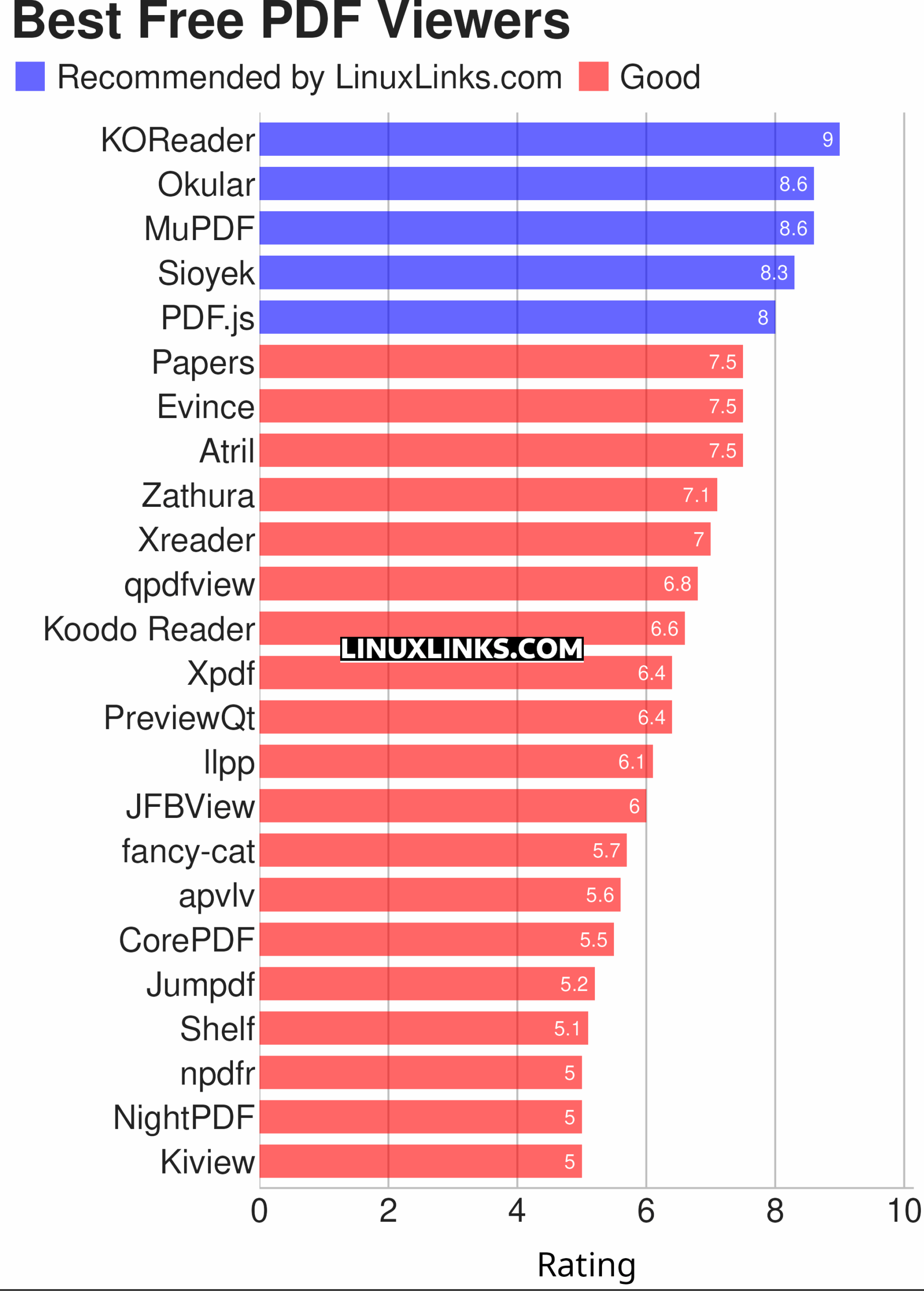
Let’s explore the 24 PDF viewers. For each application we have compiled its own portal page, a full description with an in-depth analysis of its features, an image of the software in action, together with links to relevant resources.
| PDF Viewers | |
|---|---|
| KOReader | Document viewer for a wide variety of file formats including PDF |
| Okular | Universal document viewer supporting advanced document features |
| MuPDF | Lightweight PDF and XPS viewer |
| Sioyek | Designed for viewing research papers and technical books |
| PDF.js | JavaScript library that renders Portable Document Format files |
| Papers | Fork of Evince |
| Evince | Multi-page document viewer |
| Atril | A simple multi-page document viewer for MATE |
| Zathura | Highly customizable and functional document viewer |
| Xreader | Simple multi-page document viewer |
| qpdfview | Tabbed document viewer. It uses Poppler for PDF support |
| Koodo Reader | All-in-one ebook reader and PDF viewer |
| Xpdf | PDF viewer and toolkit |
| PreviewQt | Preview all kinds of files |
| llpp | Fast and featureful PDF, EPUB, XPS and CBZ viewer |
| JFBView | PDF and image viewer for the Linux framebuffer |
| fancy-cat | PDF reader for terminal emulators |
| apvlv | PDF/EPUB/TXT/FB2/MOBI/CBZ/HTML …viewer |
| CorePDF | Simple lightweight PDF viewer |
| Jumpdf | Keyboard-focused PDF viewer |
| Shelf | Browse and view documents |
| npdfr | Command-line PDF reader prioritizing fast searches |
| NightPDF | Dark mode PDF reader |
| Kiview | Quick file preview |
This article has been revamped in line with our recent announcement.
 Explore our comprehensive directory of recommended free and open source software. Our carefully curated collection spans every major software category. Explore our comprehensive directory of recommended free and open source software. Our carefully curated collection spans every major software category.This directory is part of our ongoing series of informative articles for Linux enthusiasts. It features hundreds of detailed reviews, along with open source alternatives to proprietary solutions from major corporations such as Google, Microsoft, Apple, Adobe, IBM, Cisco, Oracle, and Autodesk. You’ll also find interesting projects to try, hardware coverage, free programming books and tutorials, and much more. Know a useful open source Linux program that we haven’t covered yet? Let us know by completing this form. |
Do any free/open-source PDF tools support adobe XFA forms?
Last time I tried okular didn’t support Adobe XFA forms. But I believe Foxit Reader has partial support.
Guess what, MuPdf is much better than Evice and Okular.
It would be good to test these for form filling as that is a common requirement these days. I found the tool tips for the fields did not appear in most of the readers I tried and in some it was not possible to choose an option (radio) button.