

arbtt (Automatic Rule-Based Time Tracker) is a background activity recorder that helps you understand how you spend your time at the desktop. Unlike conventional time trackers, it doesn’t require you to start and stop timers or manually identify what you’re working on.
The software consists of two main components. arbtt-capture collects information about desktop activity, while arbtt-stats analyses the accumulated data using rules defined in a configuration file. You can change these rules later and apply them to previously recorded activity, making it possible to investigate patterns you hadn’t originally considered.
The standard capture component relies on X11 and doesn’t natively support Wayland. A separate GNOME Shell extension provides Wayland-compatible recording. Logs are stored locally and may contain sensitive information, including window titles.
Linux compatibility: The standard arbtt-capture daemon uses X11 window information and is not a native KDE Plasma Wayland activity monitor. Its automatic window-tracking capabilities should not be assumed to work under Wayland.
This is free and open source software.
Key Features
- Automatic recording of window titles, program names, active windows, workspaces and user inactivity.
- Records activity every minute by default, with an adjustable sampling interval.
- Flexible rule-based categorisation using regular expressions, logical conditions and user-defined tags.
- Classify activities by application, window title, project, time of day or other recorded properties.
- Supports aliases to give applications more meaningful names in reports.
- Identify periods of inactivity and exclude them from time calculations.
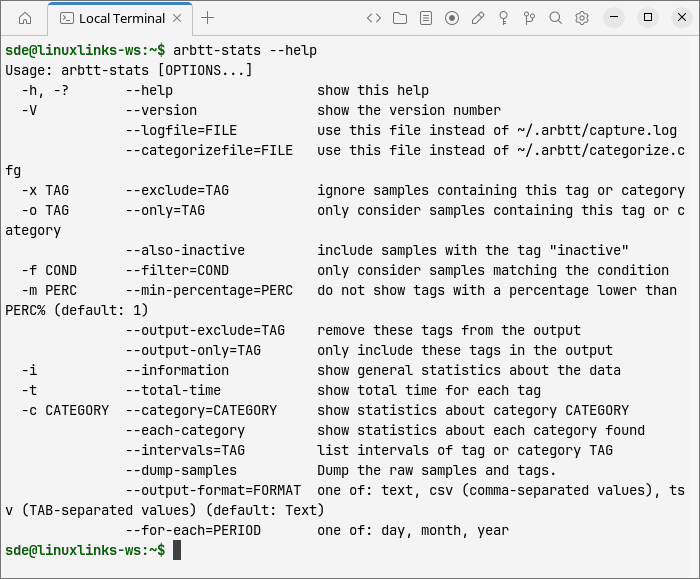
- Generate command-line statistics showing time spent on different activities, including totals and percentages.
- Filter statistics by dates, time periods, categories and other conditions.
- Inspect raw samples and identify activities that existing categorisation rules have missed.
- Export statistics in CSV format for further analysis in applications such as R.
Website: arbtt.nomeata.de
Support:
Developer: Joachim Breitner and contributors
License: GNU General Public License v2.0
arbtt is written in Haskell. Learn Haskell with our recommended free books and free tutorials.
Related Software
| Terminal-Based Time Tracking | |
|---|---|
| doing | A CLI for a What Was I Doing system |
| Timewarrior | Records time and associates blocks of time with tags |
| Watson | Superb CLI to track your time |
| timetrap | Command line time tracker written in Ruby |
| timetrace | CLI to track working time supporting tags |
| arttime | Intriguing clock, timer, time manager with text art |
| tiempo | Stores entries as UTC |
| utt | Ultimate Time Tracker written in the Python programming language |
| Tock | Simple timetracker |
| Bartib | Simple timetracker |
| Timet | Time tracking gem with time reports |
| WorkTUImer | Keyboard-driven TUI for time-tracking |
| klog | Track working hours and activities using plain-text logs |
| harsh | Habit tracking for geeks |
| arbtt | Automatic rule-base time tracker |
| hours | No-frills time tracking |
| MyTimer | Geeky timer for terminal lovers |
| ctt | Time tracking for geeks |
| timr | TUI to organize your time |
| habitctl | Track and examine your habits |
| Tomat | Pomodoro timer |
| tmpo | Minimal CLI time tracker for developers |
| Productivity Timer | Pomodoro timer application for keyboard addicts and terminal fans |
| DevChron | TUI Pomodoro timer |
| Tmux Pomodoro Plus | Incorporate the Pomodoro technique |
| Y.A.c.H.T. | Habit tracker |
| timetracking | Simple utility to keep track of time |
| Timer-CLI | Very simple Python CLI tool to start a countdown timer |
| Taskmaster | Keep track of time worked and a simple todo list. |
| pomoru | Minimalist Pomodoro TUI |
| pom | Pomodoro timer |
| MatteriaTrack | Mystical Final Fantasy-themed CLI time tracker |
| fokus | Minimalist focus timer and stopwatch with daily logging |
| dijo | Scriptable, curses-based, digital habit tracker |
| Dayplan | Plan and track your time |
| cations | Build and maintain good habits through incremental progress |
Read our verdict in the software roundup.
 LinuxLinks helps you discover the best free and open source software for Linux. Explore our extensive collection of recommended applications, including alternatives to popular proprietary software. We also publish software reviews, Linux tutorials, hardware reviews, free programming books and articles covering the wider open source community. Browse our Linux resources to discover more. Know a useful free and open source Linux application we haven't covered? Suggest a program for inclusion. Has your software been featured on LinuxLinks? Display one of our Featured on LinuxLinks badges on your website or GitHub README. |
Please read our Comment Policy before commenting.