

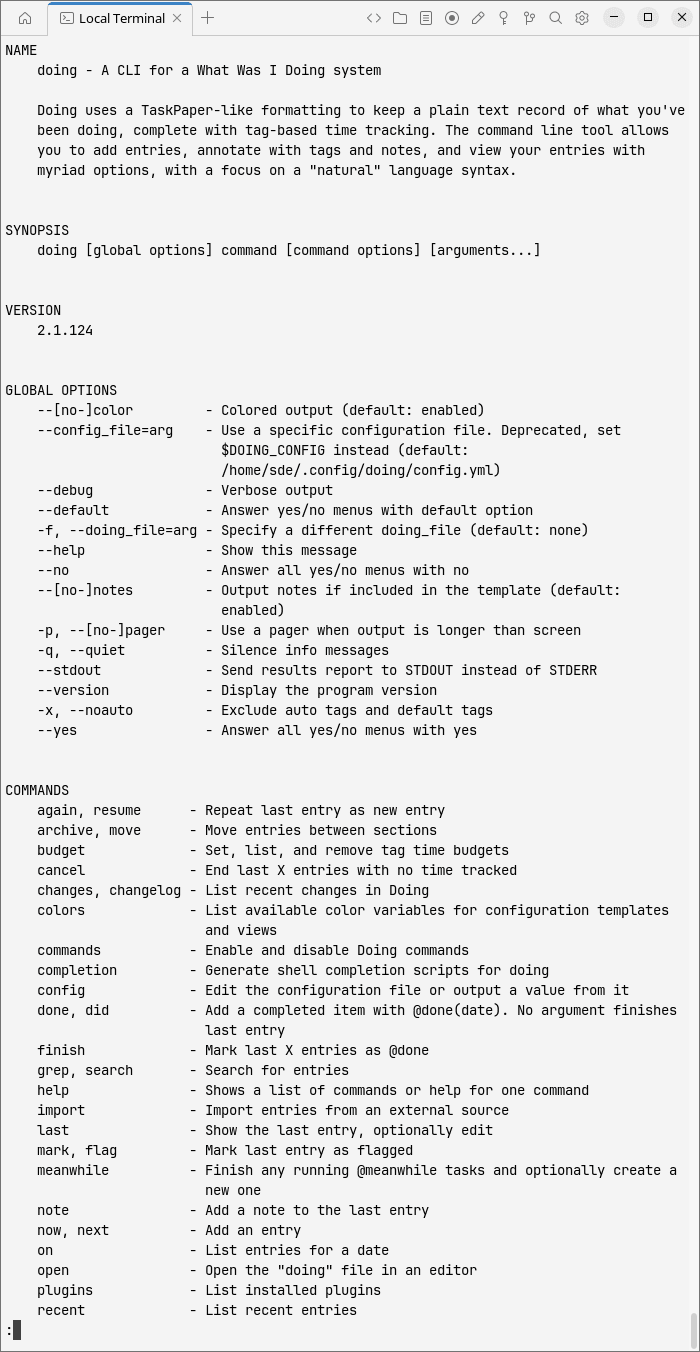
doing is a command-line tool for recording what you’re working on and keeping a record of what you’ve accomplished. It’s designed for people who want a quick way to jot down their activities without leaving the terminal or managing a complicated time-tracking system.
The program stores entries in a TaskPaper-compatible text file. Each entry has a timestamp and can include tags, notes and completion information. Activities can be organised into separate sections, making it easy to distinguish between projects, personal tasks and other commitments.
doing is particularly useful if you frequently switch between tasks and later struggle to remember how your time was spent. It relies on manual entries rather than automatically monitoring desktop activity, giving you control over what gets recorded.
This is free and open source software.
Key Features
- Record activities with simple commands such as
doing now,doing doneanddoing later. - Track elapsed time between starting and completing tasks, with support for backdating entries and specifying durations.
- Browse recent activities, today’s entries or work recorded during a particular date range.
- Search entries using fuzzy text matching or regular expressions, with filters for sections, tags and dates.
- Generate time reports with totals grouped by tags or sections, including averages and different time formats.
- Create custom views and output templates to control how recorded information is displayed.
- Use an interactive fuzzy-search menu to select, edit, tag, finish or archive multiple entries.
- Resume previous activities, attach notes and highlight important entries.
- Export records in formats including CSV, JSON, HTML and TaskPaper.
- Automatic tagging rules, configurable settings and per-directory configuration.
- Archive older entries and rotate records into separate files.
Website: github.com/ttscoff/doing
Support:
Developer: Brett Terpstra
License: MIT License
doing is written in Ruby. Learn Ruby with our recommended free books and free tutorials.
Related Software
| Terminal-Based Time Tracking | |
|---|---|
| doing | A CLI for a What Was I Doing system |
| Timewarrior | Records time and associates blocks of time with tags |
| Watson | Superb CLI to track your time |
| timetrap | Command line time tracker written in Ruby |
| timetrace | CLI to track working time supporting tags |
| arttime | Intriguing clock, timer, time manager with text art |
| tiempo | Stores entries as UTC |
| utt | Ultimate Time Tracker written in the Python programming language |
| Tock | Simple timetracker |
| Bartib | Simple timetracker |
| Timet | Time tracking gem with time reports |
| WorkTUImer | Keyboard-driven TUI for time-tracking |
| harsh | Habit tracking for geeks |
| arbtt | Automatic rule-base time tracker |
| Zeit | Track time spent on tasks and projects. |
| hours | No-frills time tracking |
| MyTimer | Geeky timer for terminal lovers |
| ctt | Time tracking for geeks |
| timr | TUI to organize your time |
| habitctl | Track and examine your habits |
| Tomat | Pomodoro timer |
| tmpo | Minimal CLI time tracker for developers |
| Productivity Timer | Pomodoro timer application for keyboard addicts and terminal fans |
| DevChron | TUI Pomodoro timer |
| Tmux Pomodoro Plus | Incorporate the Pomodoro technique |
| Y.A.c.H.T. | Habit tracker |
| timetracking | Simple utility to keep track of time |
| Timer-CLI | Very simple Python CLI tool to start a countdown timer |
| Taskmaster | Keep track of time worked and a simple todo list. |
| pomoru | Minimalist Pomodoro TUI |
| pom | Pomodoro timer |
| MatteriaTrack | Mystical Final Fantasy-themed CLI time tracker |
| fokus | Minimalist focus timer and stopwatch with daily logging |
| dijo | Scriptable, curses-based, digital habit tracker |
| Dayplan | Plan and track your time |
| cations | Build and maintain good habits through incremental progress |
Read our verdict in the software roundup.
 Explore our carefully curated directory of recommended free and open source software, covering every major software category. Explore our carefully curated directory of recommended free and open source software, covering every major software category.The directory forms part of our extensive collection of articles for Linux enthusiasts. It includes hundreds of detailed reviews, together with free and open source alternatives to proprietary software from companies such as Google, Microsoft, Apple, Adobe, IBM, Cisco, Oracle, and Autodesk. LinuxLinks also covers interesting projects worth exploring, Linux-compatible hardware, free programming books and tutorials, and much more. Know a useful free and open source Linux application that we haven’t covered? Tell us about it using our submission form. |
Please read our Comment Policy before commenting.