

Tomat is a Pomodoro timer designed for command-line operation and integration with desktop status bars. It provides a way to organise periods of concentrated work and scheduled breaks without having to keep a separate timer window open.
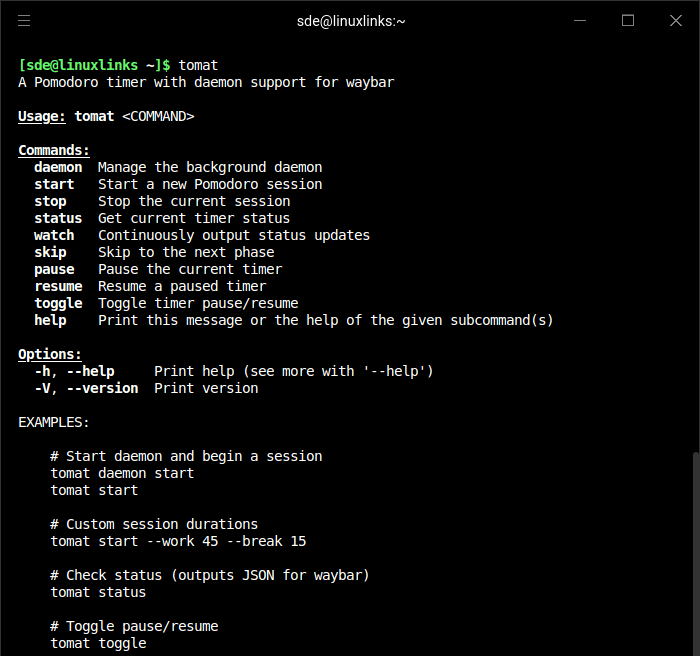
The application separates timer management from the commands used to control it. A background service maintains the timer state, while a command-line client starts sessions, changes their status and retrieves information about the current interval.
This architecture allows external applications and status bars to interact with the same running timer. It also avoids resetting the timer whenever a status bar reloads or a client process terminates.
Tomat supports configurable work sessions, short breaks and long breaks. Its automation facilities make it possible to execute external commands when timer events occur, providing additional flexibility for users who want to integrate focus sessions with their desktop environment.
This is free and open source software.
Key Features
- Manage Pomodoro work sessions, short breaks and long breaks.
- Configure the duration of each interval and the number of sessions in a cycle.
- Automatically advance between selected work and break phases.
- Control timers using start, stop, pause, resume and skip operations.
- Maintain timer state through a separate background service.
- Query the current timer status from multiple client processes.
- Provide continuously updated timer information using the watch command.
- Generate status information suitable for Waybar and other desktop panels.
- Support JSON and plain-text output formats.
- Customise status text, symbols and displayed progress information.
- Provide desktop notifications when timer phases change.
- Configure sound alerts and notification behaviour.
- Execute custom commands in response to timer events using hooks.
- Store persistent timer and notification preferences in a TOML configuration file.
- Cross-platform support – runs on Linux and macOS.
Website: github.com/jolars/tomat
Support:
Developer: Johan Larsson
License: MIT License
This article was contributed by a visitor who completed this form. Help the site by suggesting new open source software.
Tomat is written in Rust. Learn Rust with our recommended free books and free tutorials.
Related Software
| Terminal-Based Time Tracking | |
|---|---|
| doing | A CLI for a What Was I Doing system |
| Timewarrior | Records time and associates blocks of time with tags |
| Watson | Superb CLI to track your time |
| timetrap | Command line time tracker written in Ruby |
| timetrace | CLI to track working time supporting tags |
| arttime | Intriguing clock, timer, time manager with text art |
| tiempo | Stores entries as UTC |
| utt | Ultimate Time Tracker written in the Python programming language |
| Tock | Simple timetracker |
| Bartib | Simple timetracker |
| Timet | Time tracking gem with time reports |
| WorkTUImer | Keyboard-driven TUI for time-tracking |
| klog | Track working hours and activities using plain-text logs |
| harsh | Habit tracking for geeks |
| arbtt | Automatic rule-base time tracker |
| hours | No-frills time tracking |
| MyTimer | Geeky timer for terminal lovers |
| ctt | Time tracking for geeks |
| timr | TUI to organize your time |
| habitctl | Track and examine your habits |
| Tomat | Pomodoro timer |
| tmpo | Minimal CLI time tracker for developers |
| Productivity Timer | Pomodoro timer application for keyboard addicts and terminal fans |
| DevChron | TUI Pomodoro timer |
| Tmux Pomodoro Plus | Incorporate the Pomodoro technique |
| Y.A.c.H.T. | Habit tracker |
| timetracking | Simple utility to keep track of time |
| Timer-CLI | Very simple Python CLI tool to start a countdown timer |
| Taskmaster | Keep track of time worked and a simple todo list. |
| pomoru | Minimalist Pomodoro TUI |
| pom | Pomodoro timer |
| MatteriaTrack | Mystical Final Fantasy-themed CLI time tracker |
| fokus | Minimalist focus timer and stopwatch with daily logging |
| dijo | Scriptable, curses-based, digital habit tracker |
| Dayplan | Plan and track your time |
| cations | Build and maintain good habits through incremental progress |
Read our verdict in the software roundup.
 LinuxLinks helps you discover the best free and open source software for Linux. Explore our extensive collection of recommended applications, including alternatives to popular proprietary software. We also publish software reviews, Linux tutorials, hardware reviews, free programming books and articles covering the wider open source community. Browse our Linux resources to discover more. Know a useful free and open source Linux application we haven't covered? Suggest a program for inclusion. Has your software been featured on LinuxLinks? Display one of our Featured on LinuxLinks badges on your website or GitHub README. |
Please read our Comment Policy before commenting.