

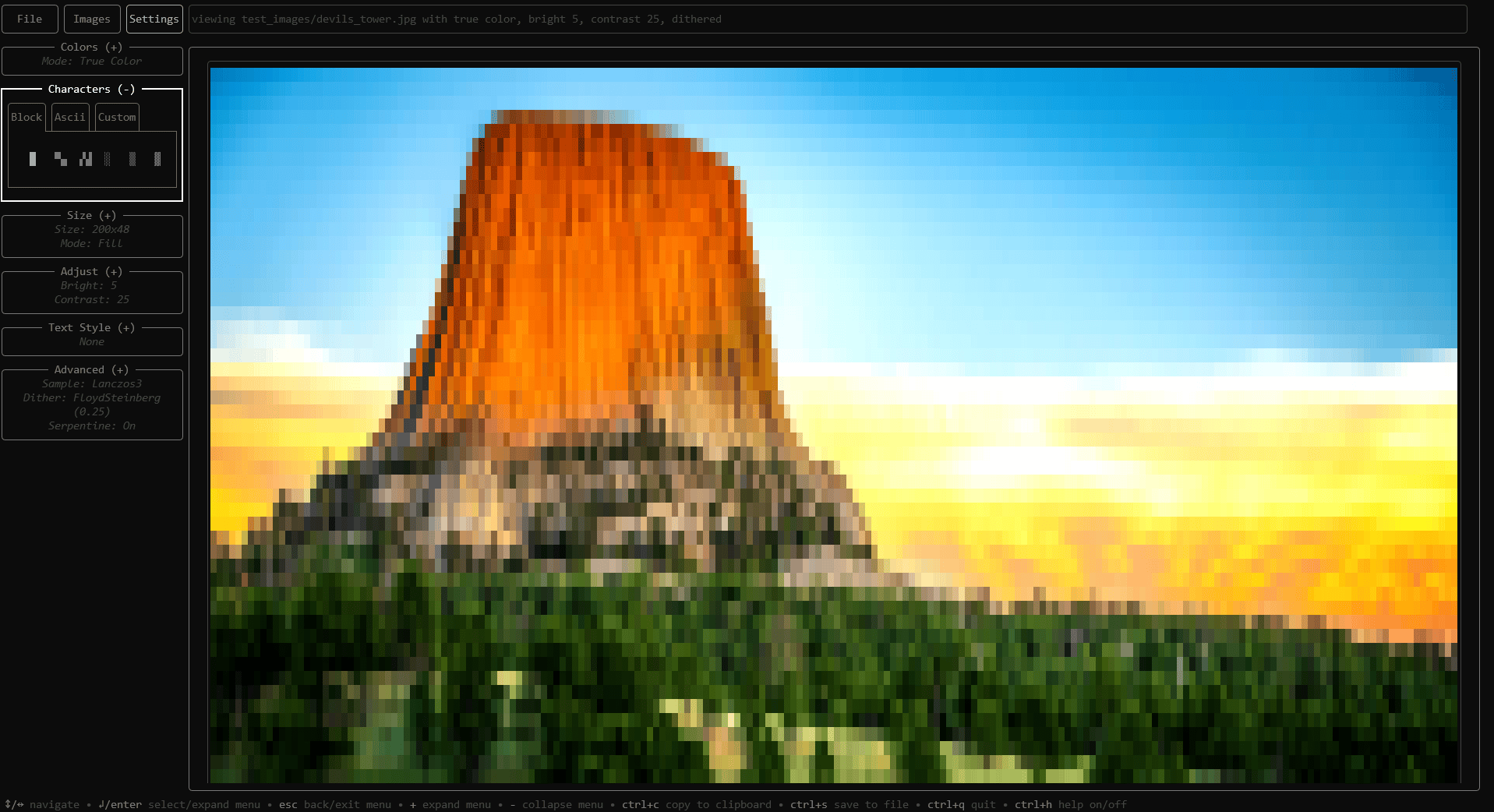
Ansizalizer is a terminal user interface for converting images to ANSI art.
The program provides a built-in file browser and a real-time preview of the rendered output. Images can be represented using Unicode block characters, ASCII characters or custom text, with true colour or a limited colour palette.
Ansizalizer supports static images and animated GIFs. It also offers batch conversion, palette generation, dithering, image adjustments, transparency handling, settings presets and export to an ANSI text file or the clipboard.
This is free and open source software.
Key Features
- Converts PNG, JPEG and GIF images to ANSI art.
- Provides a keyboard-navigable terminal interface with contextual help.
- Displays a real-time preview of the rendered output.
- Supports Unicode block characters, ASCII characters and custom text.
- Offers full, half, quarter and shaded Unicode block modes.
- Uses true colour or a limited colour palette.
- Browses and downloads colour palettes from Lospec.
- Generates palettes by sampling colours from an image.
- Loads custom palettes from hexadecimal colour files.
- Provides fit, fill and stretch resizing modes.
- Adjusts image brightness and contrast.
- Offers configurable sampling, dithering and serpentine processing.
- Renders animated GIFs frame by frame with an adjustable delay.
- Handles alpha transparency and partial-block rendering.
- Applies bold, italic, underline and strikethrough text styles.
- Includes six built-in interface themes.
- Saves and restores rendering settings as JSON presets.
- Exports ANSI output to a text file or copies it to the clipboard.
- Batch converts directories and their subdirectories.
Website: github.com/Zebbeni/ansizalizer
Support:
Developer: Andrew Albers
License: MIT License
Ansizalizer is written in Go. Learn Go with our recommended free books and free tutorials.
Related Software
| ASCII Art Tools | |
|---|---|
| gif-for-cli | Convert media to animated ASCII art |
| ASCIIQuarium | Embrace marine life from the terminal with beautiful ASCII art |
| Calligraphy | Converts short texts into large, imposing banners |
| CMatrix | Terminal based “The Matrix” |
| Diagon | Transforms markdown-style expression into an ascii-art representation |
| Aewan | Ascii-art Editor Without a Name |
| Steam Locomotive | C program written in 295 lines. It's harmless fun |
| boxes | ASCII box drawing |
| Durdraw | ASCII, Unicode and ANSI art editor |
| FIGlet | Make large letters out of ordinary screen characters |
| pipes.sh | Animated pipes terminal screensaver |
| jp2a | Convert JPEG images to ASCII |
| asciify | Turn images into attractive ASCII art |
| lolcat | Rainbows and unicorns |
| Artem | Convert images to ASCII art |
| TOIlet | Similar in many ways to FIGlet with additional features |
| textdraw | Draw geometric figures and text |
| PyBonsai | Generates procedural ASCII art trees |
| No More Secrets | Recreates the data decryption effect seen in the 1992 film Sneakers |
| Letterpress | Converts your images into a picture made up of ASCII characters |
| draw | Simple drawing tool for the terminal |
| ASCII Art Converter | Converts images into ASCII art |
| cbonsai | Generate bonsai trees |
| cadubi | Creative ASCII drawing utility |
| cacafire | Color ASCII Fire |
| cowsay | Generates ASCII pictures of a cow with a message in a speech bubble |
| Mezzotone | Convert images into ASCII art |
| img2ascii | Command-line tool for converting images to ASCII art |
| gti | Typo-based curio inspired by Steam Locomotive |
| ctree | Christmas tree on your terminal |
| ASCII Draw | Sketch anything using characters |
| catspeak | Like cowsay but catty |
Read our verdict in the software roundup.
 Explore our carefully curated directory of recommended free and open source software, covering every major software category. Explore our carefully curated directory of recommended free and open source software, covering every major software category.The directory forms part of our extensive collection of articles for Linux enthusiasts. It includes hundreds of detailed reviews, together with free and open source alternatives to proprietary software from companies such as Google, Microsoft, Apple, Adobe, IBM, Cisco, Oracle, and Autodesk. LinuxLinks also covers interesting projects worth exploring, Linux-compatible hardware, free programming books and tutorials, and much more. Know a useful free and open source Linux application that we haven’t covered? Tell us about it using our submission form. |
Please read our Comment Policy before commenting.