

Boxes is an open source text filter which can draw ASCII art boxes around its input text. Box design choices range from simple boxes to complex ASCII art. A box can also be removed and repaired, even if it has been badly damaged by editing of the text inside.
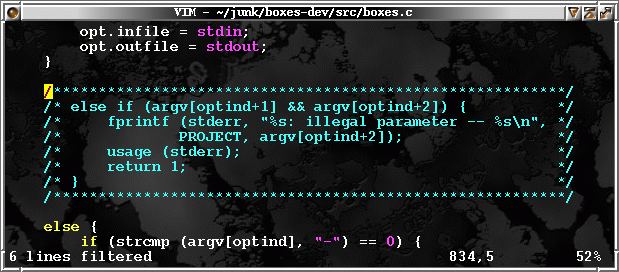
Since boxes may be open on any side, boxes can also be used to create regional comments in any programming language. New box designs of all sorts can easily be added and shared by appending to a free format configuration file.
boxes was originally intended to be used with the vim text editor, but it can be tied to any text editor which supports filters, as well as called from the command line as a standalone
tool.
This utility is useful for making the function headers in programming languages look more attractive, for spicing up news postings and emails, or just for decorating documentation files.
Key Features
- Draw ASCII art boxes around input text.
- Generation of regional comments in any programming language.
- Freely and conveniently user-configurable boxes.
- Alignment and positioning of text inside a box.
- Removal of boxes, even if box is damaged by editing of contained text.
- A number of preconfigured box designs in example config file.
- Many useful command line options (such as box size specification etc.).
- Regular expression substitutions on input text (e.g. used for quoting closing comment tags in a C comment box).
- Cross-platform support – Linux, Mac OS X, and Windows.
Website: boxes.thomasjensen.com
Support: Documentation, FAQ, GitHub
Developer: Thomas Jensen and contributors
License: GNU General Public License v2.0
Filters are generally programs which read some input text from standard input, perform some modifications on it, and write the modified text to standard output. While a single filter can be used individually, they are frequently strung together to form a pipeline. Boxes is such a filter program.
Boxes is written in C. Learn C with our recommended free books and free tutorials.
Related Software
| ASCII Art Tools | |
|---|---|
| gif-for-cli | Convert media to animated ASCII art |
| ASCIIQuarium | Embrace marine life from the terminal with beautiful ASCII art |
| Calligraphy | Converts short texts into large, imposing banners |
| CMatrix | Terminal based “The Matrix” |
| Diagon | Transforms markdown-style expression into an ascii-art representation |
| Aewan | Ascii-art Editor Without a Name |
| Steam Locomotive | C program written in 295 lines. It's harmless fun |
| boxes | ASCII box drawing |
| Durdraw | ASCII, Unicode and ANSI art editor |
| FIGlet | Make large letters out of ordinary screen characters |
| pipes.sh | Animated pipes terminal screensaver |
| jp2a | Convert JPEG images to ASCII |
| asciify | Turn images into attractive ASCII art |
| lolcat | Rainbows and unicorns |
| Artem | Convert images to ASCII art |
| TOIlet | Similar in many ways to FIGlet with additional features |
| textdraw | Draw geometric figures and text |
| PyBonsai | Generates procedural ASCII art trees |
| No More Secrets | Recreates the data decryption effect seen in the 1992 film Sneakers |
| Letterpress | Converts your images into a picture made up of ASCII characters |
| draw | Simple drawing tool for the terminal |
| ASCII Art Converter | Converts images into ASCII art |
| cbonsai | Generate bonsai trees |
| cadubi | Creative ASCII drawing utility |
| cacafire | Color ASCII Fire |
| cowsay | Generates ASCII pictures of a cow with a message in a speech bubble |
| Mezzotone | Convert images into ASCII art |
| img2ascii | Command-line tool for converting images to ASCII art |
| gti | Typo-based curio inspired by Steam Locomotive |
| ctree | Christmas tree on your terminal |
| ASCII Draw | Sketch anything using characters |
| catspeak | Like cowsay but catty |
Read our verdict in the software roundup.
 Explore our comprehensive directory of recommended free and open source software. Our carefully curated collection spans every major software category. Explore our comprehensive directory of recommended free and open source software. Our carefully curated collection spans every major software category.This directory is part of our ongoing series of informative articles for Linux enthusiasts. It features hundreds of detailed reviews, along with open source alternatives to proprietary solutions from major corporations such as Google, Microsoft, Apple, Adobe, IBM, Cisco, Oracle, and Autodesk. You’ll also find interesting projects to try, hardware coverage, free programming books and tutorials, and much more. Discovered a useful open source Linux program that we haven’t covered yet? Let us know by completing this form. |
Please read our Comment Policy before commenting.