

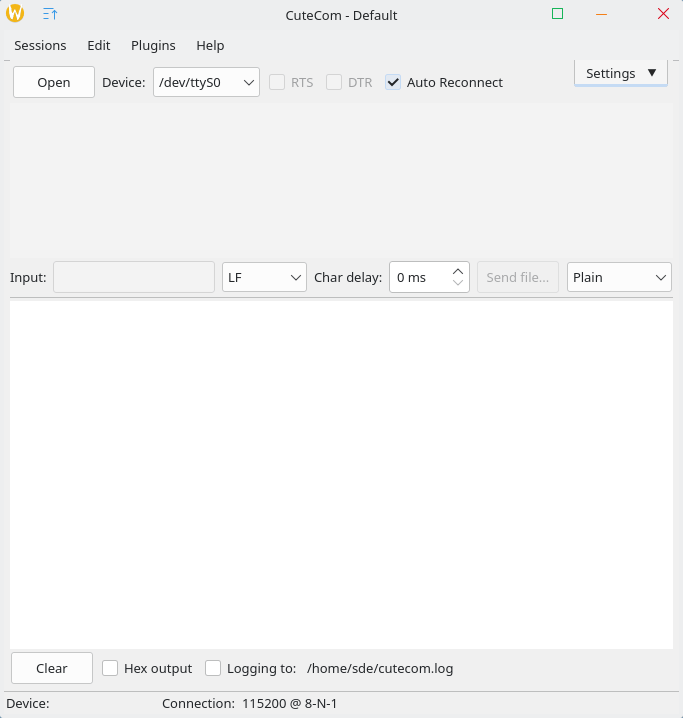
CuteCom is a graphical serial terminal that’s aimed mainly at hardware developers or other people who need a terminal to talk to their devices.
This is free and open source software.
Key Features
- Easy to use GUI.
- No cryptic keyboard shortcuts.
- Lineoriented interface instead of character-oriented.
- Ctrl+C, Ctrl+Q and Ctrl+S control sequences work.
- Input history.
- xmodem, ymodem, zmodem support (requires the sz tools).
- Easy to differentiate between typed text and echoed text.
- Select between read/write, read-only and write-only open mode.
- Open the device without changing its settings.
- Hexadecimal input and output.
- Configurable line end characters (LF, CR, LFCR).
- Configurable delay between characters.
Website: cutecom.sourceforge.net
Support:
Developer: Alexander Neundorf
License: GNU General Public License v3.0
CuteCom is written in C++. Learn C++ with our recommended free books and free tutorials.
Related Software
| Graphical Serial Terminal Tools | |
|---|---|
| Tabby | Polished tabs host shell and UART workspaces under one roof |
| Electerm | Remote consoles meet transfer tools alongside COM line access |
| GTKTerm | Simple, graphical serial port terminal emulator |
| moserial | Clean, friendly GTK-based serial terminal for the GNOME desktop |
| WhippyTerm | Has a number of unique features such as bookmarks and built in hex dumps |
| PuTTY | SSH and telnet client |
| SerialGUI-Rs | Rusty monitor captures frames, toggles baud, highlights chatter |
| NinjaTerm | Embedded debugging feels swift with macros, hex views, reconnection |
| 8N1Term | Direct 8N1 sessions pair lean controls, cables, prompts, logs |
| Omnicom | Visual port handling suits modems, sensors, test rigs |
| HTerm | Uses wxWidgets, fmt, and spdlog |
| CuteCom | Graphical serial terminal |
Read our verdict in the software roundup.
 Explore our carefully curated directory of recommended free and open source software, covering every major software category. Explore our carefully curated directory of recommended free and open source software, covering every major software category.The directory forms part of our extensive collection of articles for Linux enthusiasts. It includes hundreds of detailed reviews, together with free and open source alternatives to proprietary software from companies such as Google, Microsoft, Apple, Adobe, IBM, Cisco, Oracle, and Autodesk. LinuxLinks also covers interesting projects worth exploring, Linux-compatible hardware, free programming books and tutorials, and much more. Know a useful free and open source Linux application that we haven’t covered? Tell us about it using our submission form. |
Please read our Comment Policy before commenting.