

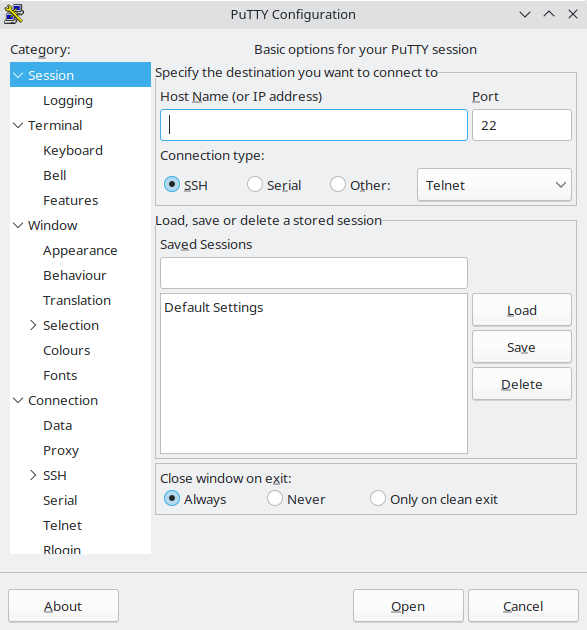
PuTTY is a graphical terminal client and terminal emulator for accessing remote computers. Although the software originated on Windows, it also runs on Unix platforms including Linux and provides the familiar PuTTY configuration interface together with its terminal window.
SSH is its most important protocol, but PuTTY can also handle several older or specialist forms of terminal connection. Configuration can be saved as named sessions, making it easy to retain host, terminal, proxy, authentication and forwarding settings for systems that are accessed repeatedly.
This is free and open source software.
Key Features
- Supports SSH, Telnet, Rlogin, SUPDUP, raw network connections, serial connections, and bare SSH connection sessions.
- Save named sessions containing host details and detailed connection, terminal and authentication settings.
- Public-key authentication with integration with PuTTYgen for creating and converting SSH key material.
- Pageant authentication agent can hold private keys and make them available to PuTTY and other compatible clients.
- Local, remote and dynamic SSH port forwarding together with X11 forwarding support.
- Proxy support for reaching remote systems through intermediate HTTP, SOCKS and Telnet-style proxy servers.
- Control terminal emulation behaviour including keyboard handling, colours, character sets, scrollback and window settings.
- Session logging can record terminal output, printable output, or SSH packets for later inspection.
- Includes command-line companions such as Plink for remote commands, PSCP for secure copying, and PSFTP for interactive file transfer.
- Can run a command before establishing the network connection, useful for tasks such as Wake-on-LAN or port knocking.
- Supports modern SSH cryptography and continues to receive security fixes for the SSH client, key tools and authentication agent.
Website: www.chiark.greenend.org.uk/~sgtatham/putty
Support:
Developer: Simon Tatham
License: MIT License
PuTTY is written in C. Learn C with our recommended free books and free tutorials.
Related Software
| Graphical SSH Frontends | |
|---|---|
| XPipe | Shell connection hub and remote file manager |
| Termora | Cross-platform terminal emulator and SSH client |
| Termix | Self-hosted all-in-one server management platform |
| Nexterm | Self-hosted platform for managing remote servers |
| Tabby | Modern terminal emulator with SSH and serial support |
| electerm | Terminal, SSH, SFTP and file transfer client |
| RustConn | Connection orchestrator with a GTK4/Wayland-native interface |
| Ásbrú Connection Manager | Full-featured connection manager written in Perl |
| sshPilot | Lightweight SSH connection manager |
| PuTTY | SSH and telnet client with sessions |
| EasySSH | Connection manager written in Vala |
| Kerminal | Modern terminal emulator and SSH manager |
| OpenSSH GUI | Frontend for managing your SSH Keys |
Read our verdict in the software roundup.
| Graphical Serial Terminal Tools | |
|---|---|
| Tabby | Polished tabs host shell and UART workspaces under one roof |
| Electerm | Remote consoles meet transfer tools alongside COM line access |
| GTKTerm | Simple, graphical serial port terminal emulator |
| moserial | Clean, friendly GTK-based serial terminal for the GNOME desktop |
| WhippyTerm | Has a number of unique features such as bookmarks and built in hex dumps |
| PuTTY | SSH and telnet client |
| SerialGUI-Rs | Rusty monitor captures frames, toggles baud, highlights chatter |
| NinjaTerm | Embedded debugging feels swift with macros, hex views, reconnection |
| 8N1Term | Direct 8N1 sessions pair lean controls, cables, prompts, logs |
| Omnicom | Visual port handling suits modems, sensors, test rigs |
| HTerm | Uses wxWidgets, fmt, and spdlog |
| CuteCom | Graphical serial terminal |
Read our verdict in the software roundup.
 LinuxLinks helps you discover the best free and open source software for Linux. Explore our extensive collection of recommended applications, including alternatives to popular proprietary software. We also publish software reviews, Linux tutorials, hardware reviews, free programming books and articles covering the wider open source community. Browse our Linux resources to discover more. Know a useful free and open source Linux application we haven't covered? Suggest a program for inclusion. Has your software been featured on LinuxLinks? Display one of our Featured on LinuxLinks badges on your website or GitHub README. |
Please read our Comment Policy before commenting.