

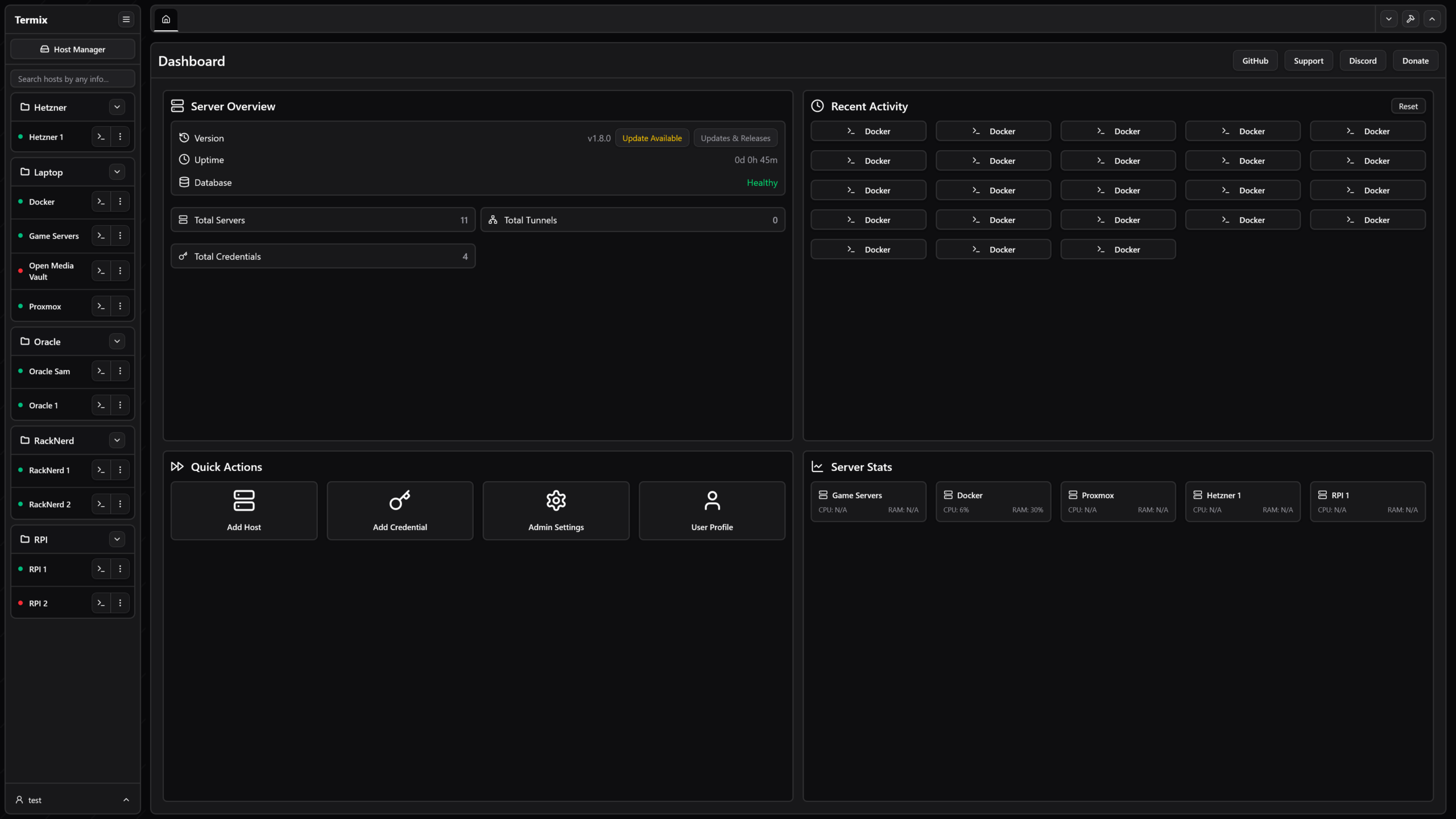
Termix is a self-hosted all-in-one server management platform. It provides a multi-platform solution for managing your servers and infrastructure through a single, intuitive interface. Termix offers SSH terminal access, SSH tunneling capabilities, remote file management, and many other tools. Termix is the perfect free and self-hosted alternative to Termius available for all platforms.
This is free and open source software.
Key Features
- SSH Terminal Access – Full-featured terminal with split-screen support (up to 4 panels) with a browser-like tab system. Includes support for customizing the terminal including common terminal themes, fonts, and other components.
- SSH Tunnel Management – Create and manage SSH tunnels with automatic reconnection and health monitoring and support for -l or -r connections.
- Remote File Manager – Manage files directly on remote servers with support for viewing and editing code, images, audio, and video. Upload, download, rename, delete, and move files seamlessly with sudo support.
- Docker Management – Start, stop, pause, remove containers. View container stats. Control container using docker exec terminal. It was not made to replace Portainer or Dockge but rather to simply manage your containers compared to creating them.
- SSH Host Manager – Save, organize, and manage your SSH connections with tags and folders, and easily save reusable login info while being able to automate the deployment of SSH keys.
- Server Stats – View CPU, memory, and disk usage along with network, uptime, system information, firewall, port monitor, on most Linux based servers.
- Dashboard – View server information at a glance on your dashboard.
- RBAC – Create roles and share hosts across users/roles
- User Authentication – Secure user management with admin controls and OIDC and 2FA (TOTP) support. View active user sessions across all platforms and revoke permissions. Link your OIDC/Local accounts together.
- Database Encryption – Backend stored as encrypted SQLite database files.
- Data Export/Import – Export and import SSH hosts, credentials, and file manager data.
- Automatic SSL Setup – Built-in SSL certificate generation and management with HTTPS redirects.
- Modern UI – Clean desktop/mobile-friendly interface built with React, Tailwind CSS, and Shadcn.
- Choose between dark or light mode based UI. Use URL routes to open any connection in full-screen.
- Languages – Built-in support ~30 languages.
- Platform Support – Available as a web app, desktop application (Windows, Linux, and macOS), PWA, and dedicated mobile/tablet app for iOS and Android.
- SSH Tools – Create reusable command snippets that execute with a single click. Run one command simultaneously across multiple open terminals.
- Command History – Auto-complete and view previously ran SSH commands,
- Quick Connect – Connect to a server without having to save the connection data,
- Command Palette – Double tap left shift to quickly access SSH connections with your keyboard,
- SSH Feature Rich – Supports jump hosts, Warpgate, TOTP based connections, SOCKS5, password autofill, etc.
- Network Graph – Customize your Dashboard to visualize your homelab based off your SSH connections with status support,
Website: github.com/Termix-SSH/Termix
Support:
Developer: Luke Gustafson
License: Apache License 2.0
Termix is written in TypeScript. Learn TypeScript with our recommended free books and free tutorials.
Related Software
| Graphical SSH Frontends | |
|---|---|
| XPipe | Shell connection hub and remote file manager |
| Termix | Self-hosted all-in-one server management platform |
| RustConn | Connection orchestrator with a GTK4/Wayland-native interface |
| Ásbrú Connection Manager | Full-featured connection manager written in Perl |
| sshPilot | Lightweight SSH connection manager |
| PuTTY | SSH and telnet client with sessions |
| EasySSH | Connection manager written in Vala |
| Kerminal | Modern terminal emulator and SSH manager |
| OpenSSH GUI | Frontend for managing your SSH Keys |
Read our verdict in the software roundup.
 Explore our comprehensive directory of recommended free and open source software. Our carefully curated collection spans every major software category. Explore our comprehensive directory of recommended free and open source software. Our carefully curated collection spans every major software category.This directory is part of our ongoing series of informative articles for Linux enthusiasts. It features hundreds of detailed reviews, along with open source alternatives to proprietary solutions from major corporations such as Google, Microsoft, Apple, Adobe, IBM, Cisco, Oracle, and Autodesk. You’ll also find interesting projects to try, hardware coverage, free programming books and tutorials, and much more. Discovered a useful open source Linux program that we haven’t covered yet? Let us know by completing this form. |
Please read our Comment Policy before commenting.