

SSH was designed as a replacement for Telnet and for unsecured remote shell protocols such as the Berkeley rsh and the related rlogin and rexec protocols. Those protocols send information, notably passwords, in plaintext, rendering them susceptible to interception and disclosure using packet analysis. The encryption used by SSH is intended to provide confidentiality and integrity of data over an unsecured network, such as the Internet. The SSH protocol supports port forwarding.
Ásbrú Connection Manager (Ásbrú) is a user interface that helps organizing remote terminal sessions and automating repetitive tasks. The project began as a fork of PAC (Perl Auto Connector) Manager.
Installation
There are packages for Debian/Ubuntu, Fedora, and a compressed tarball.
We tested the software in Manjaro. There’s a package in the Arch User Repository which goes by the name asbru-cm. We didn’t encounter any issues installing this package. Unusually the package installs the software into a sub-directory off /opt/.
In Operation
This is the window you’ll see when you first start up the software. It’s certainly not the most elegant layout on first inspection.
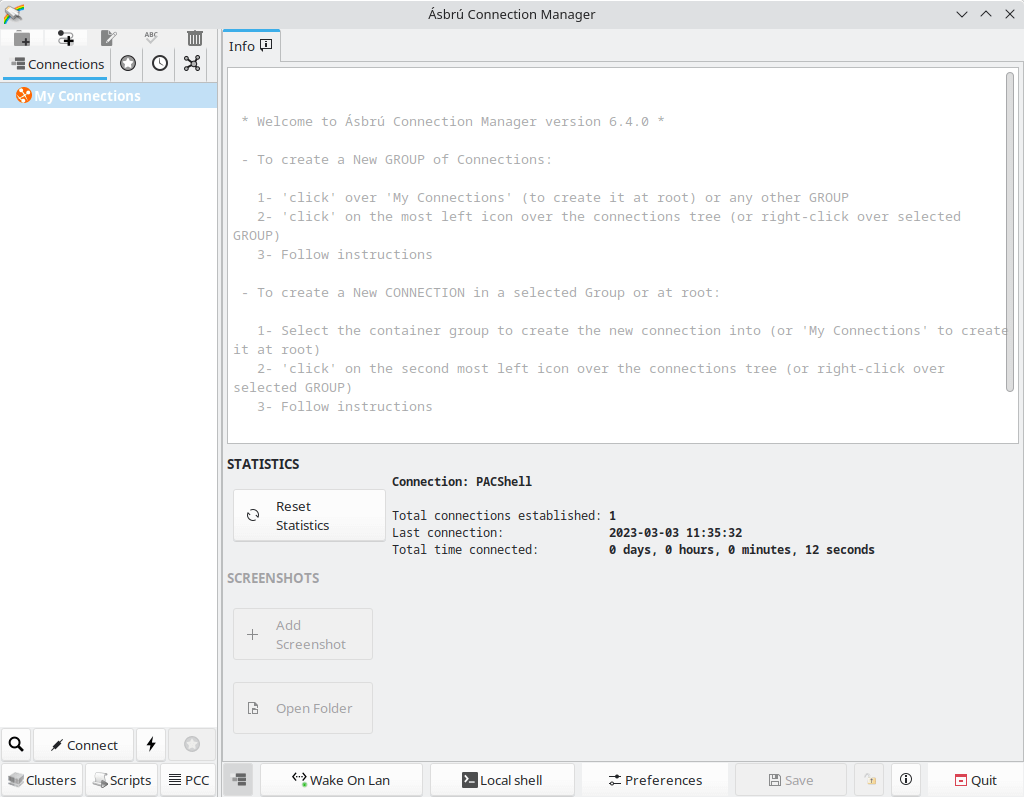
The complexity of the interface is due, in part, due to the amount of functionality included. Ásbrú is a lot more than a simple interface to establish and manage SSH sessions. To get started focus on the top icon bar and the left hand pane as it lets you create individual connections and groups.
The first thing to do is to create some groups and connections. When creating a connection you’ll see the window.
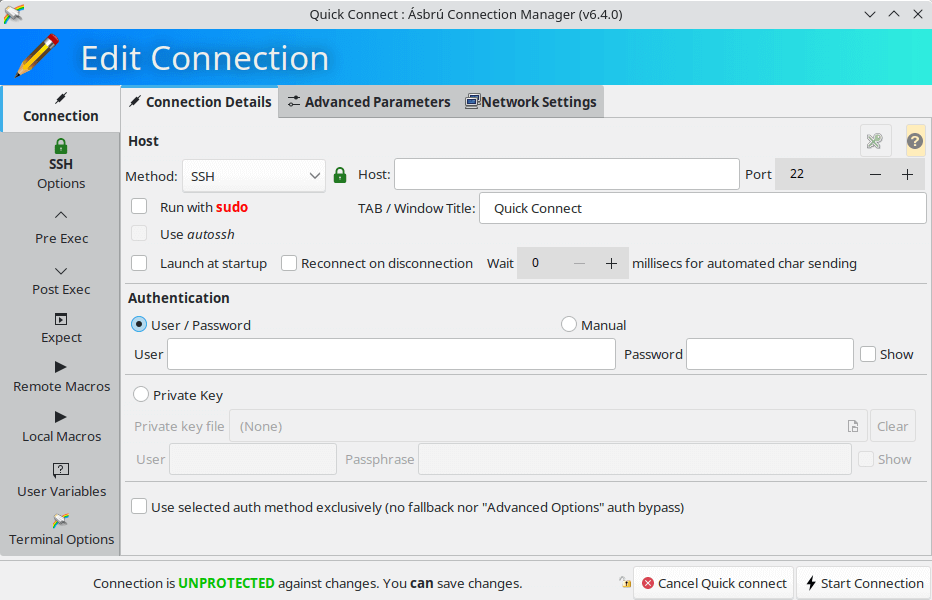
As you can see, there are a wealth of options available for each connection. Besides SSH, there’s support for a wide range of protocols. We can connect via FTP, IBM 3270/5250, MOSH, RDP (rdesktop and xfreerdp), SFTP, Serial (cu), Serial (remote-tty), telnet, VNC, and WebDAV. When connecting to SSH servers, we recommend using a private key, rather than user/password authentication.
For SSH there are lots of options available including X11 forwarding, using compression, as well as the connection to the agent automatically being forwarded to the remote side.
The software stores your configured connections. It uses a KeePass database file for security purposes.
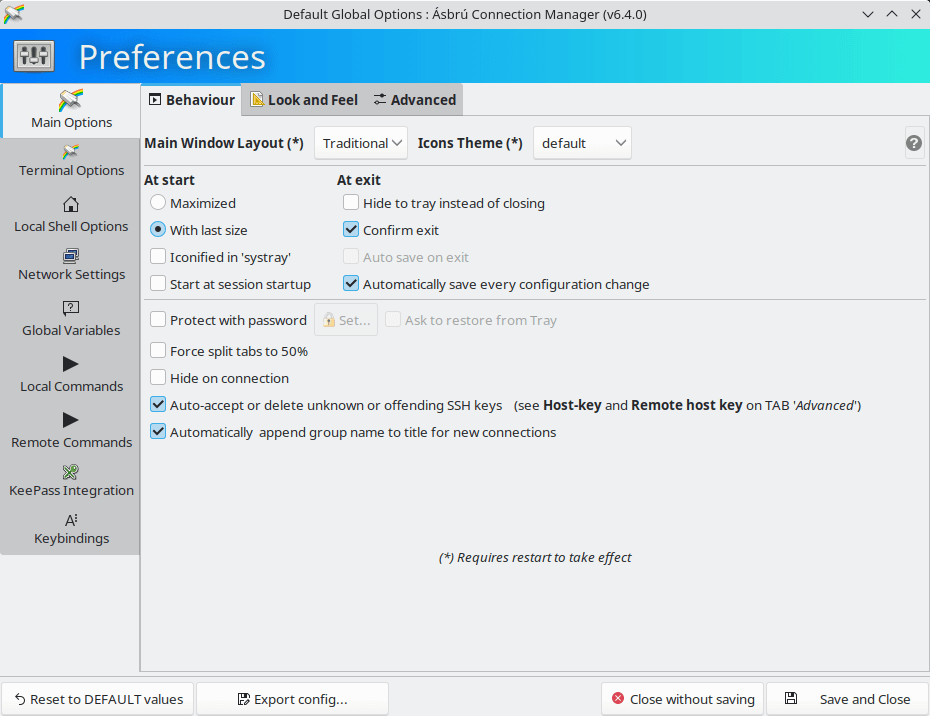
There are a wealth of customization options available.
Summary
Ásbrú is our recommended open source graphical frontend for SSH. There are so many highlights such as its awesome scripts manager, cluster connections, and the vast array of customization options. The cluster functionality with its power cluster controller lets you group similar servers together and then run the same commands on all the servers in that cluster.
Other highlights include tabbed/windowed terminals, KeePassXC integration, Wake on LAN, the option to connect to machines through a proxy server, pre/post connection local commands executions, remote and local macros, and conditional executions.
Ásbrú is so more much than software to manage SSH connections. It’s a great system admin tool. Just don’t be put off by its idiosyncratic interface.
Website: www.asbru-cm.net
Support: Documentation, GitHub Code Repository
Developer: Gaëtan Frenoy and contributors
License: GNU General Public License version 3.0
Ásbrú Connection Manager is written in Perl. Learn Perl with our recommended free books and free tutorials.
Related Software
| Graphical SSH Frontends | |
|---|---|
| XPipe | Shell connection hub and remote file manager |
| Termix | Self-hosted all-in-one server management platform |
| RustConn | Connection orchestrator with a GTK4/Wayland-native interface |
| Ásbrú Connection Manager | Full-featured connection manager written in Perl |
| sshPilot | Lightweight SSH connection manager |
| PuTTY | SSH and telnet client with sessions |
| EasySSH | Connection manager written in Vala |
| Kerminal | Modern terminal emulator and SSH manager |
| OpenSSH GUI | Frontend for managing your SSH Keys |
Read our verdict in the software roundup.
 Explore our comprehensive directory of recommended free and open source software. Our carefully curated collection spans every major software category. Explore our comprehensive directory of recommended free and open source software. Our carefully curated collection spans every major software category.This directory is part of our ongoing series of informative articles for Linux enthusiasts. It features hundreds of detailed reviews, along with open source alternatives to proprietary solutions from major corporations such as Google, Microsoft, Apple, Adobe, IBM, Cisco, Oracle, and Autodesk. You’ll also find interesting projects to try, hardware coverage, free programming books and tutorials, and much more. Discovered a useful open source Linux program that we haven’t covered yet? Let us know by completing this form. |
Please read our Comment Policy before commenting.