
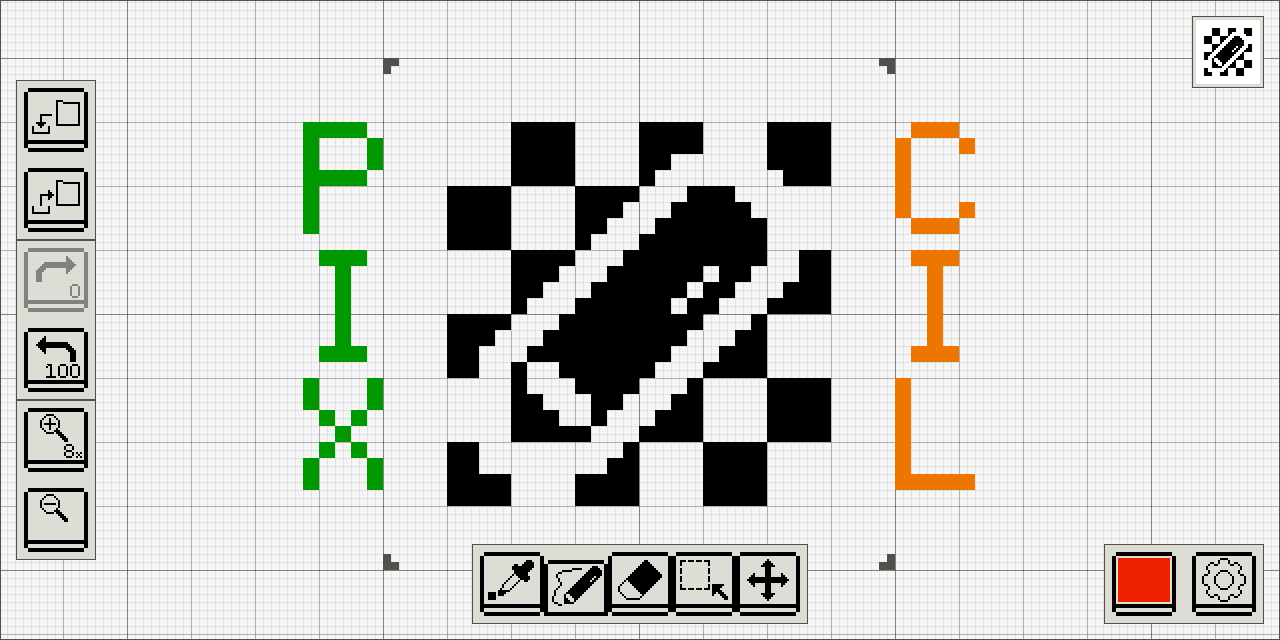
Pixcil is a pixel art editor built around an almost infinite canvas. Instead of limiting the workspace to the final image bounds, it provides surrounding blank space that can be used as a scratch area, temporary colour palette or working buffer while constructing artwork.
The central frame represents the image that will be exported. Pixcil can also treat neighbouring frames as part of a larger structure: vertical frames can represent layers and successive horizontal frames can act as animation frames. On Linux, Pixcil can be used through its browser-based interface or from its Visual Studio Code extension.
This is free and open source software.
Key Features
- Work on an almost infinite canvas rather than a fixed image-sized workspace.
- Use the surrounding blank area as temporary drawing space, a colour reference area or a working buffer.
- Export the central frame as the finished image.
- Open existing PNG images and edit them pixel by pixel.
- Save artwork as PNG while retaining additional Pixcil metadata.
- Arrange continuous vertical frames as layers when the corresponding setting is enabled.
- Treat successive horizontal frames as animation frames.
- Switch between previous and next frames with keyboard shortcuts.
- Includes pick, draw, fill, erase, select and move tools.
- Undo and redo edits from the keyboard.
- Switch directly between editing tools with dedicated key bindings.
- Change tools sequentially with Tab and BackTab.
- Available as a Progressive Web App that runs in a modern web browser.
- Available as a Visual Studio Code extension for editing pixel art inside the editor.
- Uses WebAssembly for the browser build.
- Keeps the interface deliberately compact and focused on pixel-level editing instead of general-purpose image manipulation.
Website: github.com/sile/pixcil
Support:
Developer: Takeru Ohta
License: MIT License or Apache License 2.0
Pixcil is written in Rust. Learn Rust with our recommended free books and free tutorials.
Related Software
| Pixel Art Editors | |
|---|---|
| Pixelorama | 2D sprite editor, made with the Godot Engine |
| PixiEditor | Create beautiful sprites for your games, animations, edit images, create logos |
| Piskel | Simple web-based tool for spriting and pixel art |
| LibreSprite | Create 2D animations for videogames |
| rx | Modern and extensible pixel editor implemented in Rust |
| GrafX2 | Billed as the ultimate 256-color bitmap paint program |
| mtPaint | Painting program to create pixel art and manipulate digital photos |
| PyDPainter | Usable pixel art program. |
| Slate | Qt-based pixel art editor |
| PikoPixel | Draw and edit pixel art images |
| Fizzy | Pixel art editor and animation editor |
| voidsprite | Pixel art editor in an early stage of development |
| csprite | Tiny pixel art tool |
| Tilf | Simple yet powerful pixel art editor |
| PixlPunkt | Modern, cross-platform pixel art editor |
| Pixed | Pixel art editor |
Read our verdict in the software roundup.
 Explore our carefully curated directory of recommended free and open source software, covering every major software category. Explore our carefully curated directory of recommended free and open source software, covering every major software category.The directory forms part of our extensive collection of articles for Linux enthusiasts. It includes hundreds of detailed reviews, together with free and open source alternatives to proprietary software from companies such as Google, Microsoft, Apple, Adobe, IBM, Cisco, Oracle, and Autodesk. LinuxLinks also covers interesting projects worth exploring, Linux-compatible hardware, free programming books and tutorials, and much more. Know a useful free and open source Linux application that we haven’t covered? Tell us about it using our submission form. |
Please read our Comment Policy before commenting.