

cadubi is an open source application that allows you to draw text-based images that are viewable on typical Unix-based consoles.
Usually the applications that emulate these consoles support various text modes, such as background and foreground colors, bold, and inverse. This text art, commonly called “ASCII art”, is used in various places such as online BBSes, email, and login prompts.
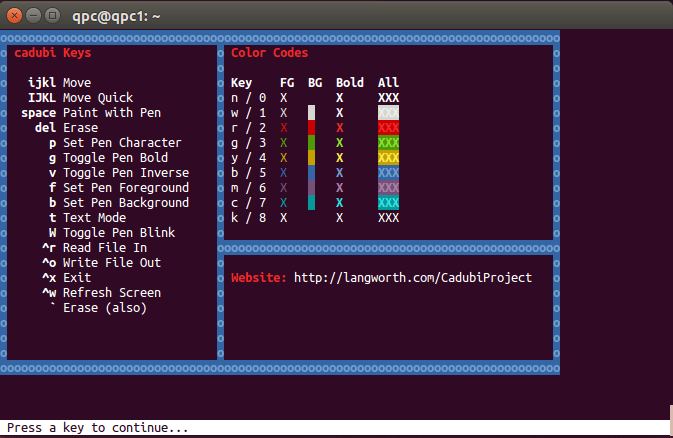
cadubi has a ‘pen’ which describes the current mode. Properties of the pen are the painting character, foreground color, background color, bold, inverse, and blink. Whenever you paint or use the text mode, the characters drawn on the screen will have the properties of the pen. The current mode of the pen is shown at the bottom of the console and is what will be drawn on screen when you paint.
Cadubi optimizes its output files to display properly and take up as little space as possible. All cadubi output can be viewed with the ‘cat’ utility.
Key Features
- pico-like interface with a status bar.
- Text mode that lets you quickly type strings in the current color and or mode. Once in the text mode you can type as if you were using a normal text editor, and all the characters drawn onscreen will use the same mode as the pen.
- Quick Help screen for easy key reference.
- The ability to read any text file with ASCII art.
Website: github.com/statico/cadubi
Support: cadubi package in Ubuntu
Developer: Ian Langworth
License: MIT License
cadubi is written in Perl. Learn Perl with our recommended free books and free tutorials.
Related Software
| ASCII Art Tools | |
|---|---|
| gif-for-cli | Convert media to animated ASCII art |
| ASCIIQuarium | Embrace marine life from the terminal with beautiful ASCII art |
| Calligraphy | Converts short texts into large, imposing banners |
| CMatrix | Terminal based “The Matrix” |
| Diagon | Transforms markdown-style expression into an ascii-art representation |
| Aewan | Ascii-art Editor Without a Name |
| Steam Locomotive | C program written in 295 lines. It's harmless fun |
| boxes | ASCII box drawing |
| Durdraw | ASCII, Unicode and ANSI art editor |
| FIGlet | Make large letters out of ordinary screen characters |
| pipes.sh | Animated pipes terminal screensaver |
| jp2a | Convert JPEG images to ASCII |
| asciify | Turn images into attractive ASCII art |
| lolcat | Rainbows and unicorns |
| Artem | Convert images to ASCII art |
| TOIlet | Similar in many ways to FIGlet with additional features |
| textdraw | Draw geometric figures and text |
| PyBonsai | Generates procedural ASCII art trees |
| No More Secrets | Recreates the data decryption effect seen in the 1992 film Sneakers |
| Letterpress | Converts your images into a picture made up of ASCII characters |
| draw | Simple drawing tool for the terminal |
| ASCII Art Converter | Converts images into ASCII art |
| cbonsai | Generate bonsai trees |
| cadubi | Creative ASCII drawing utility |
| cacafire | Color ASCII Fire |
| cowsay | Generates ASCII pictures of a cow with a message in a speech bubble |
| Mezzotone | Convert images into ASCII art |
| img2ascii | Command-line tool for converting images to ASCII art |
| gti | Typo-based curio inspired by Steam Locomotive |
| ctree | Christmas tree on your terminal |
| ASCII Draw | Sketch anything using characters |
| catspeak | Like cowsay but catty |
Read our verdict in the software roundup.
 Explore our comprehensive directory of recommended free and open source software. Our carefully curated collection spans every major software category. Explore our comprehensive directory of recommended free and open source software. Our carefully curated collection spans every major software category.This directory is part of our ongoing series of informative articles for Linux enthusiasts. It features hundreds of detailed reviews, along with open source alternatives to proprietary solutions from major corporations such as Google, Microsoft, Apple, Adobe, IBM, Cisco, Oracle, and Autodesk. You’ll also find interesting projects to try, hardware coverage, free programming books and tutorials, and much more. Discovered a useful open source Linux program that we haven’t covered yet? Let us know by completing this form. |
Please read our Comment Policy before commenting.