

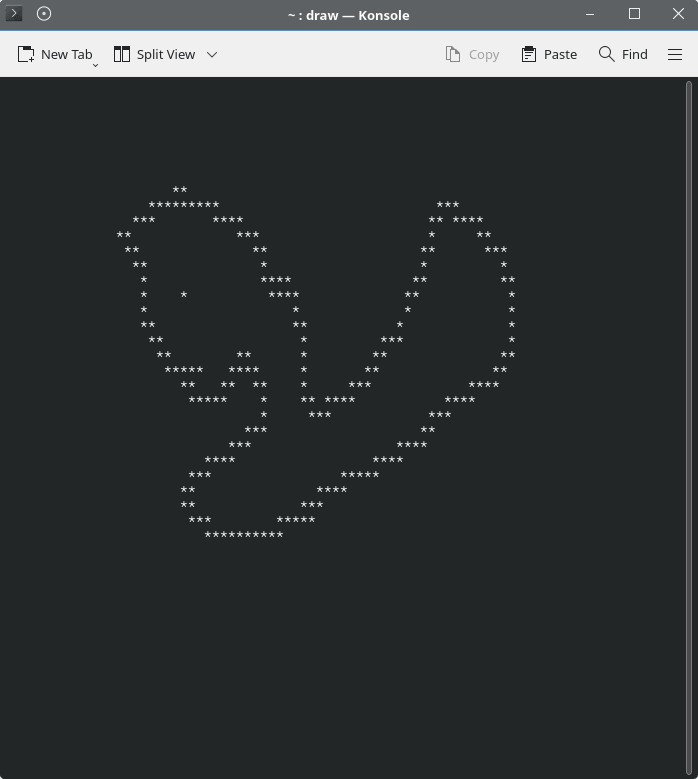
draw is a simple application that allows users to create character-based illustrations directly inside a terminal window. Rather than relying entirely on keyboard navigation, it uses mouse input to provide an interactive drawing experience.
Users can sketch by holding down a mouse button and moving the pointer across the terminal. The program also supports creating rectangular shapes and inserting text at selected positions.
draw is intended for quick illustrations rather than elaborate image editing. It is useful for producing rough diagrams, decorative messages and other artwork that can be represented using ordinary text characters.
The application saves its output as a text file. This means completed drawings can be displayed later using standard terminal tools or incorporated into other text-based material.
This is free and open source software.
Key Features
- Provides mouse-driven drawing inside a terminal.
- Supports freehand character-based illustrations.
- Allows different characters to be used as drawing brushes.
- Creates rectangles by dragging the mouse.
- Inserts text at a selected position on the canvas.
- Provides several foreground colours.
- Supports keyboard shortcuts for changing drawing characters.
- Automatically saves the current drawing as text.
- Allows a custom destination file to be specified.
- Produces artwork that can be displayed with ordinary terminal commands.
Website: github.com/maaslalani/draw
Support:
Developer: Maas Lalani
License: MIT License
draw is written in Go. Learn Go with our recommended free books and free tutorials.
Related Software
| ASCII Art Tools | |
|---|---|
| gif-for-cli | Convert media to animated ASCII art |
| ASCIIQuarium | Embrace marine life from the terminal with beautiful ASCII art |
| Calligraphy | Converts short texts into large, imposing banners |
| CMatrix | Terminal based “The Matrix” |
| Diagon | Transforms markdown-style expression into an ascii-art representation |
| Steam Locomotive | C program written in 295 lines. It's harmless fun |
| boxes | ASCII box drawing |
| Durdraw | ASCII, Unicode and ANSI art editor |
| oh-my-logo | Creates colourful ASCII art logos with gradient effects |
| FIGlet | Make large letters out of ordinary screen characters |
| pipes.sh | Animated pipes terminal screensaver |
| asciify | Turn images into attractive ASCII art |
| lolcat | Rainbows and unicorns |
| Artem | Convert images to ASCII art |
| TOIlet | Similar in many ways to FIGlet with additional features |
| textdraw | Draw geometric figures and text |
| PyBonsai | Generates procedural ASCII art trees |
| No More Secrets | Recreates the data decryption effect seen in the 1992 film Sneakers |
| Letterpress | Converts your images into a picture made up of ASCII characters |
| draw | Simple drawing tool for the terminal |
| Bit | Interactive terminal designer for ANSI logos and bitmap text |
| ASCII Art Converter | Converts images into ASCII art |
| cbonsai | Generate bonsai trees |
| cadubi | Creative ASCII drawing utility |
| cacafire | Color ASCII Fire |
| cowsay | Generates ASCII pictures of a cow with a message in a speech bubble |
| Mezzotone | Convert images into ASCII art |
| img2ascii | Command-line tool for converting images to ASCII art |
| gti | Typo-based curio inspired by Steam Locomotive |
| ctree | Christmas tree on your terminal |
| ASCII Draw | Sketch anything using characters |
| Ansizalizer | Converts images into colourful ANSI art with live previews |
| catspeak | Like cowsay but catty |
| charmascii | Generates stylised ASCII art text with fonts and borders |
Read our verdict in the software roundup.
 LinuxLinks helps you discover the best free and open source software for Linux. Explore our extensive collection of recommended applications, including alternatives to popular proprietary software. We also publish software reviews, Linux tutorials, hardware reviews, free programming books and articles covering the wider open source community. Browse our Linux resources to discover more. Know a useful free and open source Linux application we haven't covered? Suggest a program for inclusion. Has your software been featured on LinuxLinks? Display one of our Featured on LinuxLinks badges on your website or GitHub README. |
Please read our Comment Policy before commenting.