

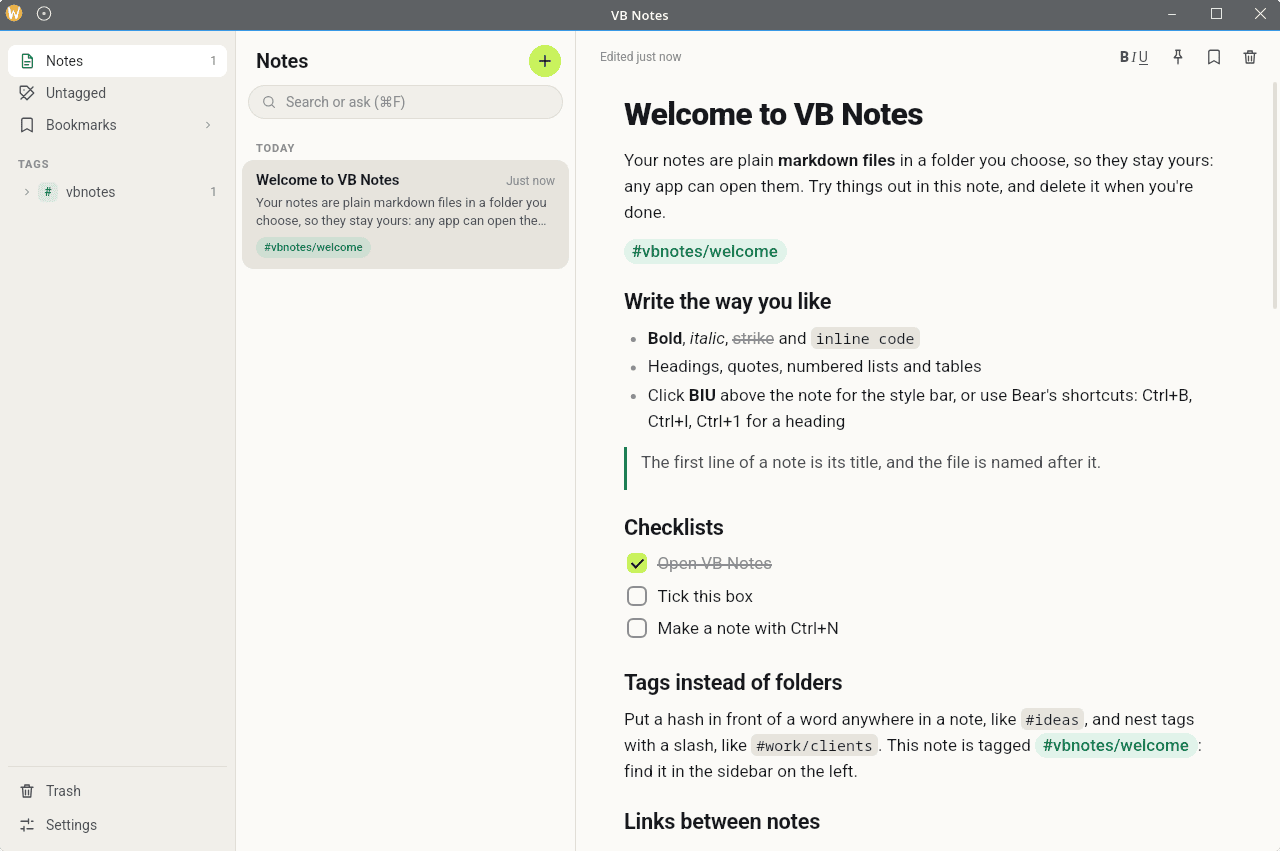
VB Notes is a note-taking application that stores your writing as ordinary Markdown files in a folder of your choosing. Rather than relying on a proprietary database or hosted service, it keeps notes accessible to other text editors and allows you to synchronize them using your preferred file synchronization software.
The application combines a rich text editor with tools for organizing, searching and connecting information. It offers a consistent experience across desktop and mobile devices, with support for local semantic search that can find relevant notes even when they do not contain the exact words used in a query.
VB Notes does not require an account or a server. Notes remain under your control, while optional AI integration provides additional ways to interact with your collection.
This is free and open source software.
Key Features
- Markdown editor supports headings, lists, checklists, tables, quotations, syntax-highlighted code blocks and Mermaid diagrams.
- Organize notes using nested tags such as #work/clients, with a hierarchical library view and the ability to hide selected tags from the main notes list.
- On-device semantic search combines meaning-based retrieval with keyword matching. Alternative embedding models include a multilingual option.
- Optional AI chat lets you ask questions about individual notes or your entire collection, using relevant passages to generate answers.
- AI integration supports OpenAI, Anthropic, Google Gemini, OpenRouter and other providers, as well as locally hosted models through Ollama.
- Connect related notes using wiki-style links with [[Note title]] syntax. Links can also create notes that do not yet exist.
- Attach pictures and audio recordings to notes, with media stored alongside the Markdown files.
- Bookmark and pin frequently accessed notes. Deleted notes are managed through a Trash folder.
- Desktop formatting toolbar provides quick access to common editing operations and keyboard shortcuts.
- Optional line numbers for notes and code blocks without changing the underlying Markdown content.
- Import existing notes, attachments and folders by dragging them into the desktop application.
- Keyboard-driven note finder supports quickly opening existing notes or creating new ones.
- Multiple themes include Solarized, Nord, Dracula, Gruvbox, Catppuccin and Tokyo Night.
- Cross-platform support – runs on Linux, macOS, and Windows.
Website: github.com/elavneet/vbnotes.com
Support:
Developer: Lavneet Sharma
License: MIT License
VB Notes is written in TypeScript and Rust. Learn TypeScript with our recommended free books and free tutorials. Learn Rust with our recommended free books and free tutorials.
Related Software
| Simple GUI Based Text Editors | |
|---|---|
| Notepad Next | Cross-platform text and source code editor |
| Pulsar | Hyper-hackable text editor |
| Lite XL | Lightweight cross-platform text editor derived from lite |
| Kate | Multi-document editor |
| GNOME Text Editor | Default text editor for the GNOME desktop environment |
| CudaText | Replacement for the discontinued SynWrite |
| Pluma | Powerful text editor for MATE |
| Mousepad | Simple text editor for the Xfce desktop environment |
| FeatherPad | Lightweight Qt plain-text editor |
| Nota | Browse, create, and edit text files |
| CorePad | Document editor for C Suite, a minimalistic application suite |
| xed | Small and lightweight text editor |
| gedit | Small and lightweight text editor for GNOME |
| Jottr | Designed for writers, journalists and researchers |
| typobuster | Simplified text editor with transformations and automatic correction |
| Jollpi | A nimble editor with syntax highlighting, tabs and a handy minimap |
| Howl | General purpose editor |
| Parchment | Strips away the clutter to put words firmly centre stage |
| Janus | Simple native Linux notepad meant for text editing |
| Webkit Word | Text editor built with GTK4/Libadwaita |
| v2 | Local-first rich-text editor with versioning capabilities |
| Mini Text | Very small and basic text editor |
Read our verdict in the software roundup.
 LinuxLinks helps you discover the best free and open source software for Linux. Explore our extensive collection of recommended applications, including alternatives to popular proprietary software. We also publish software reviews, Linux tutorials, hardware reviews, free programming books and articles covering the wider open source community. Browse our Linux resources to discover more. Know a useful free and open source Linux application we haven't covered? Suggest a program for inclusion. Has your software been featured on LinuxLinks? Display one of our Featured on LinuxLinks badges on your website or GitHub README. |
Please read our Comment Policy before commenting.