

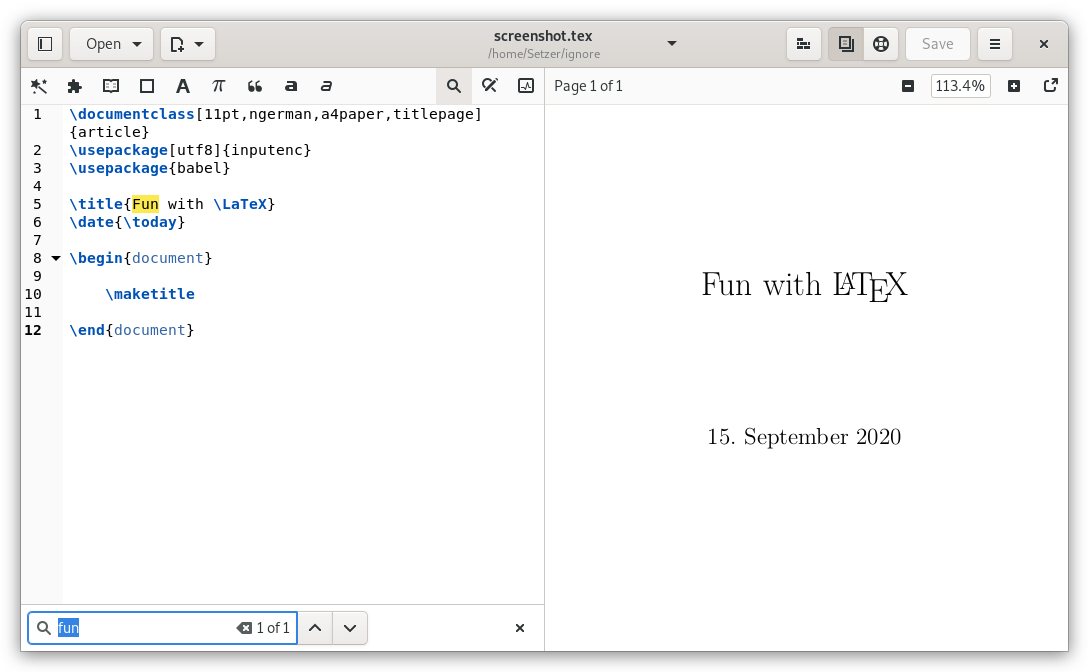
Setzer is a LaTeX editor designed for the GNOME desktop environment. It combines a source editor with an integrated PDF viewer, allowing authors to write LaTeX documents and inspect their output in the same application. The interface follows GNOME design conventions and concentrates on providing essential document editing tools without the extensive menus and panels found in some larger LaTeX environments.
The application includes templates, mathematical symbol insertion and editing assistance to reduce repetitive work when writing structured documents. Compilation feedback is presented through a build log that helps users identify and correct errors. Setzer also provides document management facilities, making it suitable for academic papers, technical reports and other LaTeX projects. Its layout can be adjusted to give more space to the source editor or PDF preview as required.
This is free and open source software.
Key Features
- Edit LaTeX source files with syntax highlighting.
- Provide an integrated PDF viewer for inspecting typeset documents.
- Display the source editor and PDF preview alongside one another.
- Offer completion for LaTeX commands and common structures.
- Insert mathematical symbols and frequently used LaTeX elements through graphical controls.
- Provide keyboard shortcuts for common editing operations.
- Create documents using a dedicated document creation wizard.
- Manage documents and their associated files through the interface.
- Compile LaTeX documents using configurable typesetting commands.
- Display compilation errors and warnings in a build log.
- Provide descriptive error messages to assist with troubleshooting.
- Navigate between source code and generated PDF content.
- Offer configurable application preferences for editing and previewing.
- Support dark mode and desktop appearance settings.
- Adapt its layout to different window sizes.
- Integrate with GNOME desktop conventions and accessibility features.
Website: github.com/cvfosammmm/Setzer
Support:
Developer: Robert Griesel
License: GNU General Public License v3.0
Setzer is written in Python. Learn Python with our recommended free books and free tutorials.
Related Software
| LaTeX Tools | |
|---|---|
| LyX | The power and flexibility of TeX/LaTeX with an intuitive graphical interface |
| KBibTeX | Reference management software primarily for BibTeX |
| TeXstudio | Fully featured open source LaTeX editor |
| VimTeX | Vim and Neovim filetype and syntax plugin |
| TeXmacs | WYSIWYG mathematical text editor using TeX fonts |
| JabRef | Graphical frontend to manage BibTeX databases |
| Biber | BibTeX replacement for users of BibLaTeX |
| TeXmaker | Integrates many different tools |
| Tectonic | Modernised, self-contained TeX and LaTeX engine |
| TeXworks | Simple front-end modeled on TeXShop |
| Atom-LaTeX | Typesetting with GitHub's Atom text editor |
| SiSU | Documents - structuring, publishing in multiple formats and search |
| Kile | KDE Integrated LaTeX Environment |
| BibLaTex | Programmable bibliographies and citations |
| Enter TeX | Integrated LaTeX Environment for the GNOME desktop |
| AUCTeX | Environment for editing LaTeX, ConTeXt, docTeX, Texinfo, and TeX files |
| TexMaths | LaTeX equation editor for LibreOffice |
| Setzer | Full-featured LaTeX editor |
| Gummi | Simple LaTeX editor |
| TexLab | Cross-platform implementation of the Language Server Protocol for LaTeX |
| Pybliographer | Tool for managing bibliographic databases |
| LaTeXDraw | Graphical drawing editor for LaTeX |
| latexindent.pl | Highly configurable formatter for LaTeX source code |
| tex-fmt | Fast formatter for LaTeX source files |
| Latexmk | Automates the process of compiling LaTeX documents |
| KLatexFormula | Useful utility for creating images from LaTeX equations |
| Hieroglyphic | Find LaTeX symbols |
| Hand TeX | Handwritten LaTeX symbol classifier |
Read our verdict in the software roundup.
 LinuxLinks helps you discover the best free and open source software for Linux. Explore our extensive collection of recommended applications, including alternatives to popular proprietary software. We also publish software reviews, Linux tutorials, hardware reviews, free programming books and articles covering the wider open source community. Browse our Linux resources to discover more. Know a useful free and open source Linux application we haven't covered? Suggest a program for inclusion. Has your software been featured on LinuxLinks? Display one of our Featured on LinuxLinks badges on your website or GitHub README. |
Please read our Comment Policy before commenting.