

LyX is an advanced open source document processor. It is called a “document processor”, because unlike standard word processors, LyX encourages an approach to writing based on the structure of documents, not their appearance.
Based on a document preparation system for TeX typesetting, LyX can handle documents ranging from books, notes, theses to articles in refereed journals. It also supports right-to-left languages such as Arabic, Farsi, and Hebrew.
LyX is very popular among technical authors and scientists for its advanced mathematical modes. However, it is also frequently used by social scientists, as it features polished bibliographic database integration and multiple file managing and organizing features.
On screen, LyX looks like any word processor; its printed output — or richly cross-referenced PDF, just as readily produced — looks like nothing else.
With the Hollywood template, LyX becomes a powerful screen writing tool.
Key Features
- Graphical User Interface that gives access to all functions via menus and mouse, as well as configurable keybindings.
- Standard word processor operations, like cut/paste, multiple open documents, infinite undo/redo, spellchecking (uses ispell in the background).
- Different textclasses allow you to type letters, articles, books, movie scripts, LinuxDoc, slides. Textclasses for scientific societies, such as AMS, APS, IEEE, or specific journals like Astronomy and Astrophysics.
- Numbered section headings, table of contents (with hypertext functionality), nested lists (aka “outline mode”).
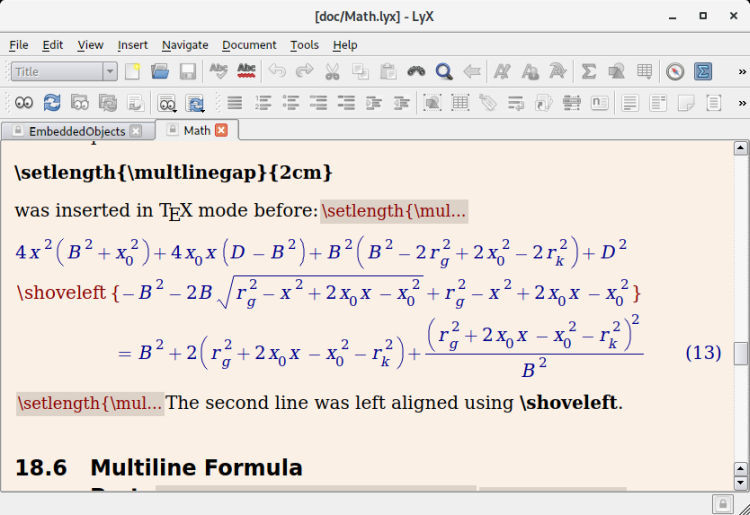
- Interactive WYSIWYG math editor.
- Support for writing documents in most European languages, as well as Right-to-Left languages like Hebrew and Arabic, including multi-lingual documents.
- Postscript figures, with rotation, scaling, and captions.
- Interactive WYSIWYG tables.
- Footnotes and margin notes.
- Labels/references and bibliography (including BibTeX support).
- Access to all LaTeX functionality with plain-latex-style.
- Import LaTeX. Export LaTeX, Postscript, DVI, ASCII, or send a fax.
- SGML-tools support (both LinuxDoc and DocBook DTDs).
- Literate programming support, via the “noweb” tool.
- Menus, error messages, and keybindings are available in many languages.
- Extensive documentation, including a beginner’s tutorial.
- Multiple work areas.
- Split views.
- Citation and Symbols dialogs.
- Fullscreen capabilities.
- Visual mode for bidrectional cursor movement.
- Language and script support.
- Support for the LaTeX-package hyperref.
- Math macros.
Website: www.lyx.org
Support:
Developer: The LyX team
License: GNU GPL v2
LyX is written in C++. Learn C++ with our recommended free books and free tutorials.
Related Software
| Document Processors | |
|---|---|
| LyX | Power and flexibility of TeX/LaTeX with an intuitive interface |
| TeXstudio | Fully featured open source LaTeX editor |
| TeXmacs | WYSIWYG mathematical text editor using TeX fonts |
| TeXmaker | Integrates many different tools |
| typst | Fast markup-based system for high-quality typesetting |
| TeXworks | Simple front-end modeled on TeXShop |
| Kile | KDE Integrated LaTeX Environment |
| SILE | Simon’s Improved Layout Engine |
| Enter TeX | Integrated LaTeX Environment for the GNOME desktop |
| AUCTeX | Edit LaTeX, ConTeXt, docTeX, Texinfo, and TeX files |
| Gummi | Simple LaTeX editor |
| Typewriter | Create documents with typst |
| Typesetter | Focused GTK writing environment with automatic previews |
| Katvan | Strong RTL support with live preview and editing tools |
| Open LaTeX Studio | LaTeX editor supporting remote collaboration between users |
Read our verdict in the software roundup.
| Script Writing Tools | |
|---|---|
| Trelby | Simple, powerful, full-featured program for writing movie screenplays |
| Manuskript | Use the snowflake method to grow your ideas |
| Pago | Screenwriting plugin for the Vim text editor |
| Screenwriter-mode | A plug-in for Emacs |
| Screenplain | Plain text to readable screenplay |
| KIT Scenarist | Fully-featured studio for creating movie screenplays |
| LyX | The Hollywood document class equips LyX for script writing |
| Afterwriting | Post-processing tools for Fountain screenplay |
| Story Architect | Reinventing the screenwriting software |
| lottie | Fountain screenplay editor |
| obsidian-fountain | Fountain support for Obsidian |
| Barefoot | Convert Fountain screenplay files to plain text |
Read our verdict in the software roundup.
| LaTeX Tools | |
|---|---|
| LyX | The power and flexibility of TeX/LaTeX with an intuitive graphical interface |
| KBibTeX | Reference management software primarily for BibTeX |
| TeXstudio | Fully featured open source LaTeX editor |
| VimTeX | Vim and Neovim filetype and syntax plugin |
| TeXmacs | WYSIWYG mathematical text editor using TeX fonts |
| JabRef | Graphical frontend to manage BibTeX databases |
| Biber | BibTeX replacement for users of BibLaTeX |
| TeXmaker | Integrates many different tools |
| Tectonic | Modernised, self-contained TeX and LaTeX engine |
| TeXworks | Simple front-end modeled on TeXShop |
| Atom-LaTeX | Typesetting with GitHub's Atom text editor |
| SiSU | Documents - structuring, publishing in multiple formats and search |
| Kile | KDE Integrated LaTeX Environment |
| BibLaTex | Programmable bibliographies and citations |
| Enter TeX | Integrated LaTeX Environment for the GNOME desktop |
| AUCTeX | Environment for editing LaTeX, ConTeXt, docTeX, Texinfo, and TeX files |
| TexMaths | LaTeX equation editor for LibreOffice |
| Setzer | Full-featured LaTeX editor |
| Gummi | Simple LaTeX editor |
| TexLab | Cross-platform implementation of the Language Server Protocol for LaTeX |
| Pybliographer | Tool for managing bibliographic databases |
| LaTeXDraw | Graphical drawing editor for LaTeX |
| KLatexFormula | Useful utility for creating images from LaTeX equations |
| Hieroglyphic | Find LaTeX symbols |
| Hand TeX | Handwritten LaTeX symbol classifier |
Read our verdict in the software roundup.
 Explore our comprehensive directory of recommended free and open source software. Our carefully curated collection spans every major software category. Explore our comprehensive directory of recommended free and open source software. Our carefully curated collection spans every major software category.This directory is part of our ongoing series of informative articles for Linux enthusiasts. It features hundreds of detailed reviews, along with open source alternatives to proprietary solutions from major corporations such as Google, Microsoft, Apple, Adobe, IBM, Cisco, Oracle, and Autodesk. You’ll also find interesting projects to try, hardware coverage, free programming books and tutorials, and much more. Discovered a useful open source Linux program that we haven’t covered yet? Let us know by completing this form. |
Please read our Comment Policy before commenting.