

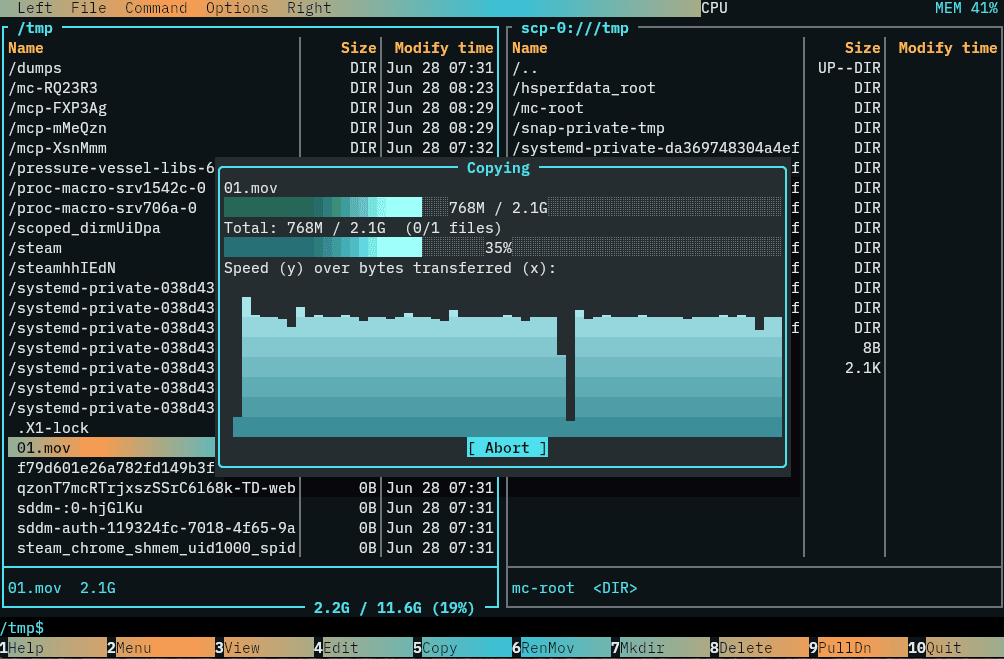
Rat Commander is a two-panel file manager inspired by classic orthodox file managers such as Norton Commander and Midnight Commander.
Core facilities such as the viewer, editor, archive handling, remote file access, disk explorer and process explorer are built into the application rather than delegated to separate programs.
The interface supports vertical and horizontal panel arrangements together with full, brief, details, tree, thumbnail grid and 3D views. Mouse input is supported, although keyboard-driven navigation remains central to the experience.
Rat Commander has a particularly capable built-in viewer. It handles text, hexadecimal data, Markdown, CSV and TSV files, images, audio, executables, certificates and 3D models. It can also display Git blame information and follow growing files in a similar fashion to tail -f. The integrated editor offers syntax highlighting, search and replace, undo and redo, hexadecimal editing, spreadsheet-style CSV/TSV editing, and syntax checking for JSON, TOML, YAML and XML.
Remote filesystems can be accessed using SFTP, SCP, FTP and FTPS. ZIP, tar and 7z archives can be browsed and modified, while formats including DEB, RPM, ISO, SQLite, JSON and TOML can be explored using the same directory-oriented interface.
This is free and open source software.
Key Features
- Two-panel file manager with vertical and horizontal layouts.
- Full, brief, details, tree, thumbnail grid and 3D panel views.
- Built-in text, hex, image, audio and binary viewers.
- Integrated text and hex editor with syntax highlighting.
- Copy, move, delete, rename, chmod, chown and symlink operations.
- Batch file renaming with live preview.
- Browse and modify ZIP, tar and 7z archives.
- Browse DEB, RPM, ISO, SQLite, JSON and TOML files.
- SFTP, SCP, FTP and FTPS remote filesystem support.
- Directory comparison and synchronization.
- Duplicate file finder and checksum tools.
- Git-aware panels with staging, diff and repository history browsing.
- Built-in process explorer and disk explorer.
- Configurable themes, true colour support and mouse operation.
Website: github.com/dividebysandwich/rat-commander
Support:
Developer: Ilya Yakelzon
License: GNU General Public License v2.0
Rat Commander is written in Rust. Learn Rust with our recommended free books and free tutorials.
Related Software
| Console File Managers | |
|---|---|
| nnn | Fast and flexible file manager |
| Midnight Commander | User-friendly yet powerful orthodox file manager |
| superfile | Very fancy and modern terminal file manager |
| Ranger | File manager with an ncurses frontend written in Python |
| lf | Terminal file manager heavily inspired by ranger |
| Yazi | File manager with asynchronous support |
| CliFM | Shell-like, command line terminal file manager |
| joshuto | Ranger-like file manager |
| far2l | Linux fork of FAR Manager v2 |
| Vifm | ncurses based file manager with vi like keybindings |
| fm | Double pane file manager written in Go |
| elio | Fast file browsing with rich previews in three panes |
| felix | TUI file manager with Vim-like key mapping |
| fman | Uses Bubbletea, Lipgloss, Bubblezone, stickers, Chroma, and go-arg |
| FCD | Continuation of rnr |
| projectable | TUI file manager built for projects |
| Last File Manager | 1 or 2 pane Python based file manager |
| WCM Commander | A Far Manager clone |
| TUIFI Manager | Termux-oriented file manager |
| sff | Simple file finder |
| jafff | Just another f* fast file manager |
| goful | Another file manager written in Go |
| rnr | Combines the best features of Midnight Commander and Ranger |
| fff | Simple file manager |
Read our verdict in the software roundup.
 Explore our carefully curated directory of recommended free and open source software, covering every major software category. Explore our carefully curated directory of recommended free and open source software, covering every major software category.The directory forms part of our extensive collection of articles for Linux enthusiasts. It includes hundreds of detailed reviews, together with free and open source alternatives to proprietary software from companies such as Google, Microsoft, Apple, Adobe, IBM, Cisco, Oracle, and Autodesk. LinuxLinks also covers interesting projects worth exploring, Linux-compatible hardware, free programming books and tutorials, and much more. Know a useful free and open source Linux application that we haven’t covered? Tell us about it using our submission form. |
Please read our Comment Policy before commenting.