

PCM Transport is a lightweight audio player for Linux focused on direct PCM playback, a transparent signal path and predictable digital signal processing.
The project openly discloses extensive use of AI coding tools. Maintainer Andrey Berestov says he defines the requirements and direction, reviews and integrates changes, and tests releases.
Choosing this program for review may appear to conflict with our policy on AI-heavy projects, but the policy is not an outright ban. I’m also more willing to exercise discretion when developers are transparent about AI use. PCM Transport clearly acknowledges it, and that openness weighs in its favour when deciding whether the project merits coverage.
Installation
I built PCM Transport from source for this review. My test system already had all the dependencies installed.
The project uses CMake. Compiling the software is very straightforward:
$ git clone https://github.com/andreyberestov/pcm-transport $ cd pcm-transport $ cmake -S . -B build $ cmake --build build -j 24
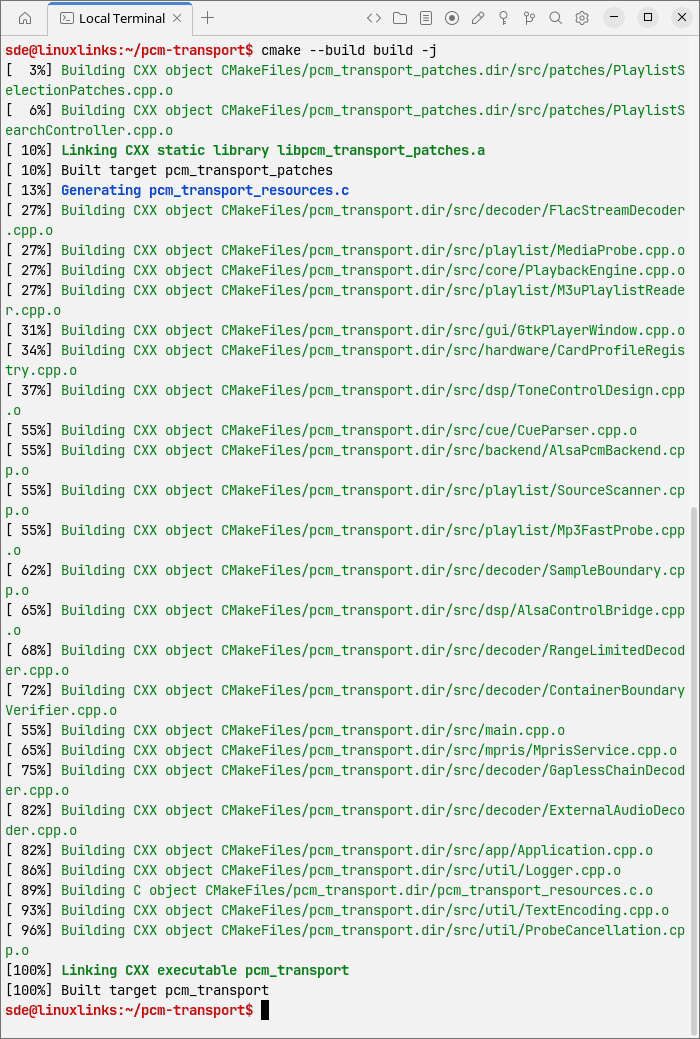
Run the player with:
$ ./build/pcm_transport
If you want desktop integration, including an application launcher and icons, the software can be installed system-wide under /usr/local with:
$ sudo cmake --install build --prefix /usr/local
There is also a ready-to-run x86-64 AppImage available from the project’s GitHub releases page. I didn’t test it.
In Operation
Here’s PCM Transport in action playing an album from our small test collection of Creative Commons-licensed music.
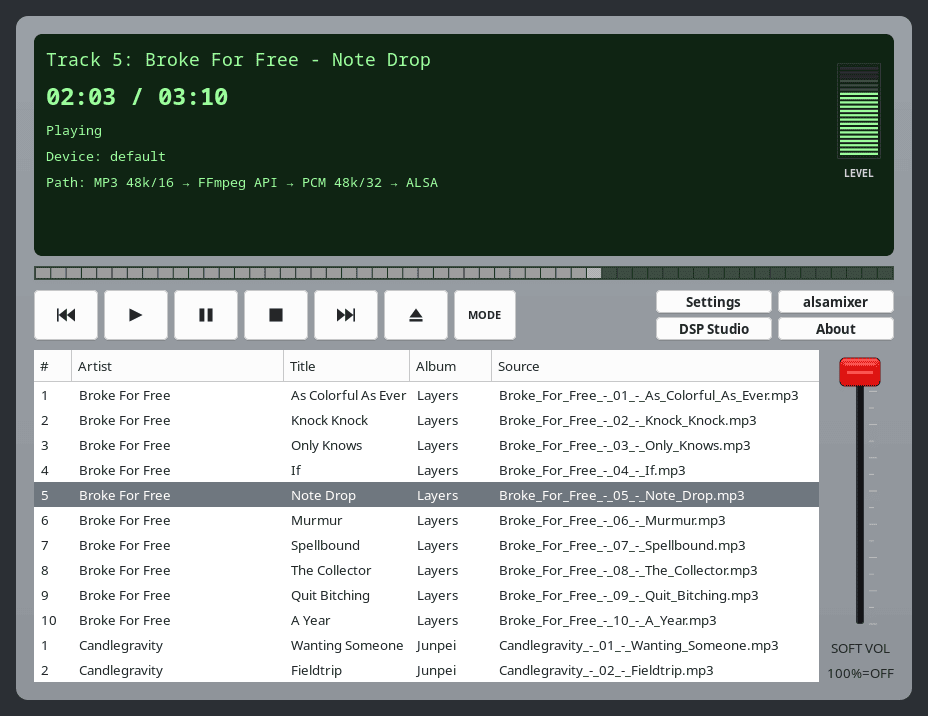
The interface is built with GTK 3 and looks decidedly old-fashioned, but it’s compact and functional. The main playback area uses a dark green background with bright green text, giving it a retro hi-fi or terminal-style appearance. The track information disappears when the player loses focus, although the rest of the playback display remains visible. That behaviour is a little distracting and makes the interface feel less polished.
Visually, the rest of the UI is fairly dull. The large transport controls are easy to understand, and the track list presents artist, title, album and source information clearly. The volume control is the weakest visual element: its bright red slider handle looks out of place against the otherwise muted grey interface and draws far too much attention to itself.
PCM Transport is not designed around a traditional indexed music library. Instead, you open audio files, playlists, CUE sheets or directories and add them to the player. Right-clicking the Eject button, which is the sixth transport control, lets you open a directory. PCM Transport handles multiple directories at the same level in a slightly unusual way. You do not select the individual sibling directories in the GTK folder chooser.
For example, if you have:
Music/Album 1/
Music/Album 2/
Music/Album 3/
open the Music directory in the chooser, leave Album 1, Album 2 and Album 3 unselected, and press Open. PCM Transport then loads the directories contained at that level. It is not particularly intuitive, but once you know how it works, it is simple enough.
Playback is where PCM Transport becomes considerably more interesting.
FLAC receives special attention. When sample-rate conversion is not required, decoding is performed directly using libFLAC. Other formats are decoded using the FFmpeg libraries. There’s broad format support, including WAV, AIFF, APE, WavPack, MP3, AAC, Ogg Vorbis and Opus, among many others. DSD files can also be opened, although they are converted to PCM rather than being sent as native DSD.
For me, gapless playback is close to essential. If a music player does not support it, there is a very good chance it will go straight in the bin, regardless of how impressive its other features might be. The good news is that PCM Transport supports gapless playback across compatible tracks. Consecutive tracks can transition without an unwanted pause, an essential feature when listening to classical music, live recordings, progressive rock and concept albums.
The software is particularly geared towards listeners who want to know what is happening to the audio signal before it reaches their hardware. There are detailed playback diagnostics together with optional DSP facilities.
Other features include:
- Direct ALSA output. Users interested in keeping the playback chain as simple as possible can select a direct ALSA hardware device.
- CUE sheet support, including continuous playback from a single audio image. The player can also import local M3U and M3U8 playlists.
- MPRIS support, which means PCM Transport integrates with the Linux desktop’s standard media controls and multimedia keys.
- DSP Studio. It provides bass and treble adjustment together with processing controls and diagnostics. DSP can be left inactive when it isn’t required, which will appeal to users who want unmodified playback.
- Optional sample-rate conversion using SoXR.
- Detailed information about the active decoder, processing path, ALSA output and transport. This level of information is unusual among lightweight graphical music players and helps remove some of the guesswork about what is happening between the source file and the audio hardware.
PCM Transport is exceptionally frugal with memory. In my testing, it consumed around 44 MB of RAM. That’s an excellent showing for a graphical music player and stands in stark contrast to heavyweight applications built around web technologies.
Summary
If you want an extremely lightweight directory-based music player without all the usual guff found in larger music players, PCM Transport may be just the ticket. It isn’t trying to compete with heavyweight music library managers. It’s a focused audio player for people who care more about the playback path than animated interfaces, streaming services or elaborate library management.
Its main strengths are direct ALSA output, native FLAC decoding when sample-rate conversion is not required, gapless playback across compatible tracks, CUE support, useful signal-path diagnostics and an extremely low memory footprint. The DSP facilities also provide considerably more control than you might expect from such a lightweight player.
There are areas that need refinement. The interface looks somewhat dated, and directory management is unnecessarily awkward.
Website: github.com/andreyberestov/pcm-transport
Support:
Developer: Andrey Berestov
License: GNU General Public License v3.0
PCM Transport is written in C++. Learn C++ with our recommended free books and free tutorials.
Related Software
| Graphical Music Players | |
|---|---|
| fooyin | Customizable music player similar to foobar2000 |
| Tauon | Python-based music player that's an absolute gem |
| Strawberry | Music player and collection organizer originally forked from Clementine |
| Rhythmbox | Integrated music management application, originally inspired by iTunes |
| Sayonara Player | Small, clear and fast music player written in C++ |
| Audacious | XMMS-like skinnable player |
| Exaile | Music player aiming to be similar to KDE's Amarok, but for GTK+ |
| DeaDBeeF | Basic and simple player with a small footprint. |
| Clementine | Modern music player and library organiser. Inspired by Amarok |
| Lollypop | Modern music player for GNOME |
| Amarok | KDE audio player offering a wealth of features, yet intuitive to use |
| Musique | Small but sophisticated graphical music player |
| Cantata | Feature-rich client for Music Player Daemon |
| Quod Libet | GTK+-based music management program |
| GogglesMM | Polished music collection manager and player |
| Aqualung | Advanced, gapless Gtk2-based audio player |
| MusicPod | Music, podcast and internet radio player |
| gmusicbrowser | Music jukebox for large collections |
| Yarock | Qt music player with browsing based on cover art |
| qoob | A foobar-like music player |
| GNOME Music | Simple music player |
| Soul Player | Local-first music player built for privacy |
| Pragha | Distinguished and resplendent open source music player |
| Hummingbird | Rust-based music player with basic functionality |
| Deepin Music | Visually attractive and simple music player |
| Musicat | Music player for your local music library |
| Musicalypse | Music player and server built with Web technologies |
| Melody | Music player designed for elementary OS |
| Elisa | Simple music player developed by the KDE community |
| QMPlay2 | Video and audio player which can play most formats and codecs |
| Tomahawk | Qt-based music player |
| mtoc | Visually-rich music player and library browser |
| FolderPlay | Minimalist music player for local music collections |
| Daphne | Audio player and music library manager |
| Ratic | Basic offline music player |
| Musik | Lightweight audio player built for the KDE Plasma desktop |
| Kalorite | Lightweight audio player |
| Astra | Billed as an audiophile music player |
Read our verdict in the software roundup.
 LinuxLinks helps you discover the best free and open source software for Linux. Explore our extensive collection of recommended applications, including alternatives to popular proprietary software. LinuxLinks helps you discover the best free and open source software for Linux. Explore our extensive collection of recommended applications, including alternatives to popular proprietary software.We also publish software reviews, Linux tutorials, hardware reviews, free programming books and articles covering the wider open source community. Browse our Linux resources to discover more. Know a useful free and open source Linux application we haven't covered? Suggest a program for inclusion. Has your software been featured on LinuxLinks? Display one of our Featured on LinuxLinks badges on your website or GitHub README. |
Please read our Comment Policy before commenting.