

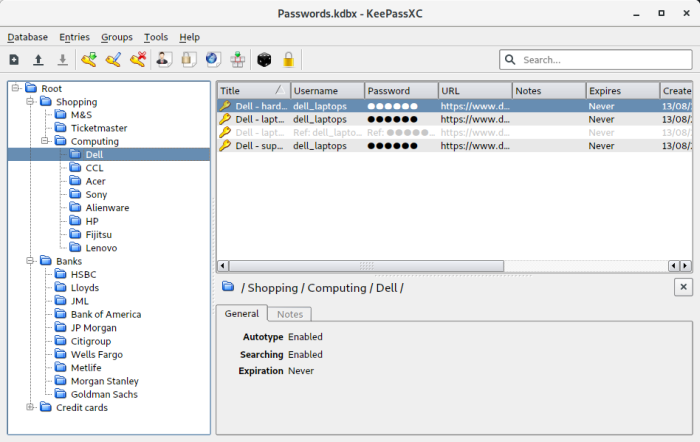
KeePassXC is a desktop password manager for securely storing passwords and other sensitive information. It uses the KeePass-compatible KDBX database format, keeping encrypted data under the user’s control rather than requiring a hosted cloud service.
Entries can contain usernames, passwords, URLs, notes, custom attributes, file attachments and one-time-password secrets. Databases are organized into groups and protected using a master password together with optional key files or hardware-token challenge-response authentication.
KeePassXC also integrates closely with the desktop and browser. KeePassXC-Browser can fill credentials and manage passkeys, while SSH Agent and FreeDesktop.org Secret Service integration allow the same encrypted database to supply credentials to other applications.
This is free and open source software.
Key Features
- Create, open and manage KeePass-compatible KDBX password databases.
- Protect databases using a master password, key file and YubiKey or OnlyKey challenge-response authentication.
- AES-256 encryption with optional Twofish and ChaCha20 database encryption.
- Password and passphrase generators with configurable character sets, word lists and strength estimates.
- Store and generate TOTP codes, including Steam-compatible one-time passwords.
- Browser integration with Firefox, Chromium, Chrome, Edge, Brave, Vivaldi and Tor Browser.
- Create, store and use passkeys through KeePassXC-Browser.
- Auto-Type credentials into applications without requiring browser integration.
- Password-health reports, database statistics and Have I Been Pwned checks help identify weak, reused or compromised credentials.
- Import data from CSV, 1Password, Bitwarden, Proton Pass and KeePass 1 databases.
- Export databases to CSV, XML and HTML.
- SSH Agent integration can load supported SSH keys from the database into an existing agent and remove them again when the database is locked.
- FreeDesktop.org Secret Service integration lets KeePassXC act as a desktop secrets provider over D-Bus.
- KeeShare supports importing, exporting and synchronizing selected groups between databases.
- Store file attachments and custom fields and retain entry history for recovering previous values.
- Command-line interface with keepassxc-cli for scripting and terminal workflows.
- Database merging and automatic reloading when a database changes on disk.
- Supports Auto-Type under Wayland on compatible Linux desktops.
- Configurable keyboard shortcuts and quick-unlock options on supported systems.
- Supports external database synchronization through configured tools.
- Cross-platform support – runs on Linux, macOS, and Windows.
Website: keepassxc.org
Support:
Developer: KeePassXC Team
License: GNU General Public License v2.0 / v3.0
KeePassXC is written in C++. Learn C++ with our recommended free books and free tutorials.
Related Software
| GUI Password Managers | |
|---|---|
| KeePassXC | Safely store passwords and auto-type them |
| Bitwarden | Password management for individuals, teams, and organizations |
| KeeWeb | Password manager compatible with KeePass |
| Secrets | Password manager which makes use of the KeePass v.4 format |
| Proton Pass | Encrypted password vault with passkeys, aliases and TOTP support |
| Password Safe | Password manager using wxWidgets |
| QtPass | Graphical User Interface for pass |
| AuthPass | KeePass-compatible password manager with cloud sync and TOTP |
| KWalletManager | Password management tool with Blowfish and GPG encryption |
| OneKeePass | Supports the KeePass-compatible database |
| SpicyPass | Lightweight password manager |
| Seahorse | GNOME front end for GnuPG |
| Pasaffe | Easy to use password manager for GNOME |
| Rotor | Stateless password manager |
| Identities | Modern password-store client made for GNOME |
| FMP | Password manager written in memory-safe Rust |
| Password Manager | Qt password manager with encrypted local files and TOTP codes |
| Passy | Offline password manager with cross-platform synchronization |
| Password Gorilla | Stores login credentials in a master password-protected database |
| Keycord | Browse and edit password stores |
| Keybox | Minimal, encrypted, local password manager |
| Key Rack | View and edit passwords |
Read our verdict in the software roundup.
 LinuxLinks helps you discover the best free and open source software for Linux. Explore our extensive collection of recommended applications, including alternatives to popular proprietary software. LinuxLinks helps you discover the best free and open source software for Linux. Explore our extensive collection of recommended applications, including alternatives to popular proprietary software.We also publish software reviews, Linux tutorials, hardware reviews, free programming books and articles covering the wider open source community. Browse our Linux resources to discover more. Know a useful free and open source Linux application we haven't covered? Suggest a program for inclusion. Has your software been featured on LinuxLinks? Display one of our Featured on LinuxLinks badges on your website or GitHub README. |
Please read our Comment Policy before commenting.
Or if my password manager is only on my home computer. Is it necessary to make additional security files, or is a complicated password enough?