

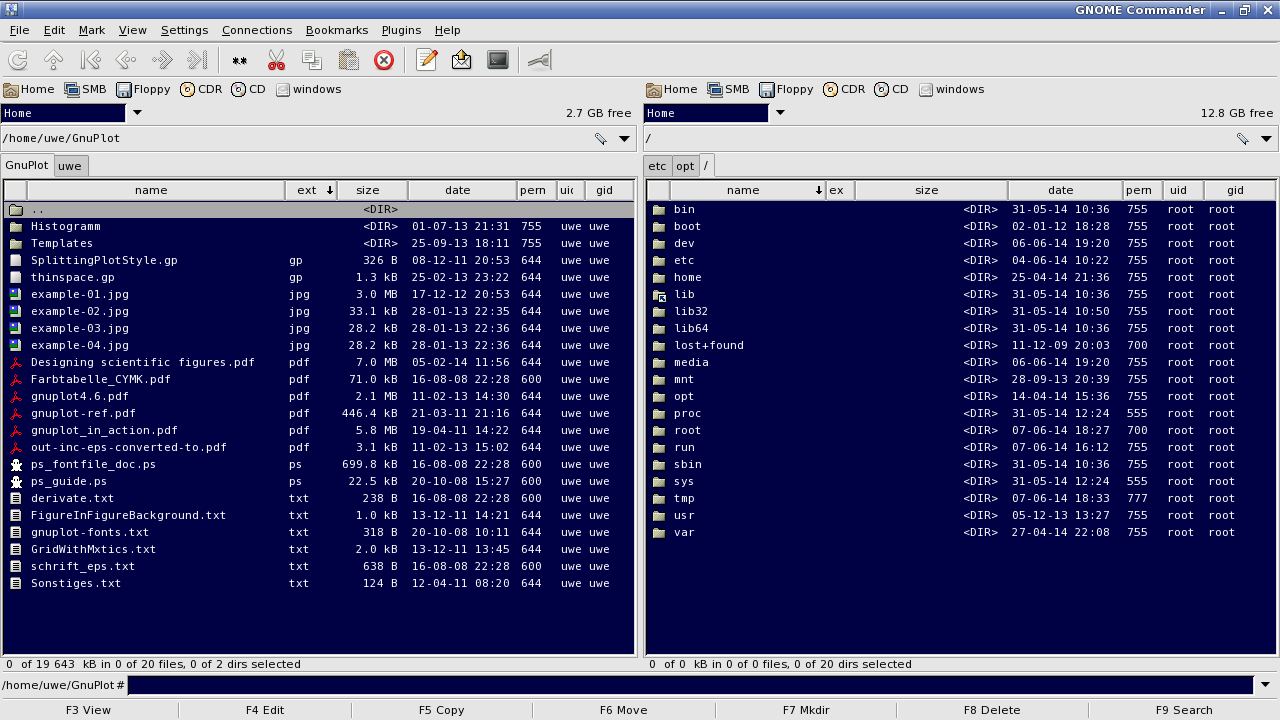
GNOME Commander is a fast and powerful graphical file manager for the GNOME desktop environment.
The user interface is based on the orthodox file manager (OFM) principle, also known as Commander-like file managers, the family of file managers based on the venerable Norton Commander interface, such as Midnight Commander.
The software is built on the GTK-toolkit and GnomeVFS. GNOME Commander aims to fulfill the demands of more advanced users who like to focus on file management, their work through special applications and running smart commands.
Key Features
- GTK-2 Graphical User Interface with standard mouse interactions.
- Tabbing support.
- GNOME mime types (MIME-Type management under development).
- Right click mouse menu with the usual file operations to run, open, open with, delete or rename files and folders, and also to set properties like ownership and permissions.
- Mouse context menu that easily can be extended by entries calling any kind of external application like viewers, editors or custom scripts to work on selected files or directories.
- Quick device access buttons with automatic mounting and unmounting.
- Latest accessed folder history.
- Fast file viewer for text, images and image meta data (Exif and IPTC).
- Tools for searching, quick file name search in current dir, symlinking, comparing directories.
- A tool for advanced renaming of files supporting various types of meta-data.
- Folder bookmarks.
- File compression.
- Plugin support.
- Integrated command line.
- Python scripting.
- Supports: SMB/CIFS, WebDAV, NFS, FTP (using GnomeVFS ftp module), and SSH.
- Support for PDF metatags in advanced file rename templates.
- Support for single-click open mode.
- One instance mode.
- Support for 40 languages.
Website: gitlab.gnome.org/GNOME/gnome-commander
Support:
Developer: GNOME Commander team
License: GNU General Public License v2.0
GNOME Commander is written in C++. Learn C++ with our recommended free books and free tutorials.
Related Software
| Orthodox File Managers | |
|---|---|
| Krusader | Advanced twin panel (commander style) file manager for KDE |
| Midnight Commander | User-friendly yet powerful text-mode file manager and visual shell |
| Double Commander | Inspired by Total Commander |
| Ranger | File manager with an ncurses frontend written in Python |
| GNOME Commander | Built on the GTK-toolkit and GnomeVFS |
| Xfe | Very similar to Windows Explorer but with twin panes |
| muCommander | Lightweight, cross-platform file manager |
| far2l | AR Manager fork bringing panels, plugins and archives to Linux |
| Vifm | Vim-style two-pane navigator with modal keyboard control |
| File Commander | Total Commander-like orthodox file manager |
| Sunflower | Small and highly customizable twin-panel file manager |
| trolCommander | Fork of muCommander |
| FileRunner | Simple and efficient file manager written in Tcl |
| F2 Commander | Lean text-mode commander for browsing and batch operations |
| Tux Commander | Uses the old GTK2 windowing toolkit |
| Midday Commander | Dual-pane console navigator with Midnight Commander-style flow |
| Worker | In the style of the Amiga's DirOpus |
| Waydir | Wayland-native desktop browser focused on speed and simplicity |
| WCMCommander | Mimicking the look-n-feel of Far Manager |
| gentoo | Two-pane file manager |
| emelFM2 | Orthodox file manager using GTK+ 2 |
Read our verdict in the software roundup.
 Explore our carefully curated directory of recommended free and open source software, covering every major software category. Explore our carefully curated directory of recommended free and open source software, covering every major software category.The directory forms part of our extensive collection of articles for Linux enthusiasts. It includes hundreds of detailed reviews, together with free and open source alternatives to proprietary software from companies such as Google, Microsoft, Apple, Adobe, IBM, Cisco, Oracle, and Autodesk. LinuxLinks also covers interesting projects worth exploring, Linux-compatible hardware, free programming books and tutorials, and much more. Know a useful free and open source Linux application that we haven’t covered? Tell us about it using our submission form. |
Please read our Comment Policy before commenting.