

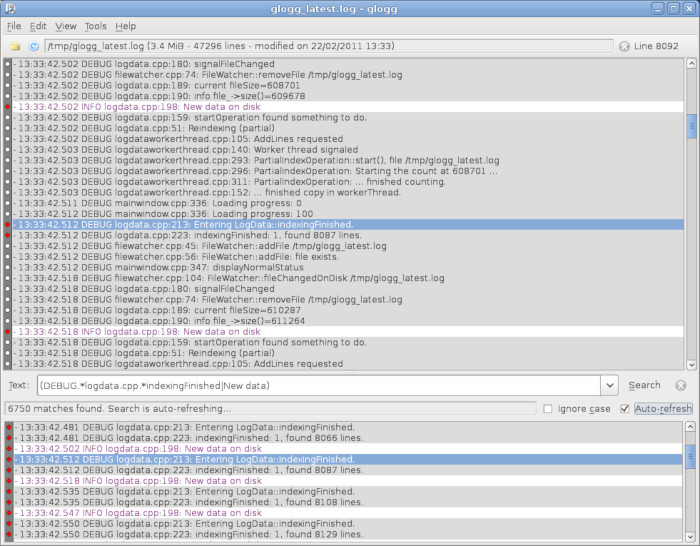
glogg is a multi-platform GUI application to browse and search through long or advanced log files.
It’s designed with programmers and system administrators in mind. glogg can be seen as a graphical, interactive combination of grep and less.
glogg can be started from the command line, optionally passing the file to open as an argument, or via the desktop environment’s menu or file association.
Key Features
- Fast and reads the file directly from disk, without loading it into memory.
- Provides a second window showing the result of the current search.
- Reads UTF-8 and ASCII / ISO-8859-1 files.
- Supports grep/egrep like regular expressions. There’s support for wildcards and fixed strings.
- QuickFind search types with incremental QuickFind.
- Colorizes the log and search results.
- Displays a context view of where in the log the lines of interest are.
- Configurable font family and size.
- Option to load your last session.
- Optional line numbers main and filtered views.
- Follow file mode – refreshes a growing log file.
- Cross-platform support – runs under Linux, macOS, and Windows systems.
Website: github.com/nickbnf/glogg
Support:
Developer: Nicolas Bonnefon and contributors
License: GNU General Public License v3.0
glogg is written in C++. Learn C++ with our recommended free books and free tutorials.
Related Software
| LogFile Viewers | |
|---|---|
| lnav | Curses-based utility for viewing and analyzing log files. |
| tailspin | Terminal log file highlighter designed for inspecting log output in the shell |
| journalctl | Query and display messages from the journal |
| hl | Inspect structured logs from the terminal |
| Nerdlog | Remote-first terminal log viewer |
| lazyjournal | Inspect logs from multiple sources |
| KSystemLog | System log viewer for KDE |
| Logdy | Lightweight log viewer that works just like grep, awk, sed, or jq |
| humanlog | Reads logs from stdin and prints them back to stdout, but prettier. |
| toolong | View, tail, merge, and search log files |
| Xlogmaster | GTK+ based program to keep track of logfiles and devices |
| QJournalctl | Graphical User Interface for systemd’s journalctl |
| logrifle | Designed to "rifle through" large logfiles |
| Gnome-logs | View and search logs with this graphical utility |
| frontail | Stream logs to your web browser |
| nless | Pager for exploring structured and semi-structured data |
| glogg | Qt graphical log explorer |
| Chipmunk | Fast logfile viewer that can deal with huge logfiles (>10 GB) |
| SEE | Inspect logs from systemd services |
| MultiTail | View multiple logfiles windowed on the console |
| Logria | Log aggregation tool |
| logana | Work efficiently with very large log files, including multi-GB logs |
| QLogExplorer | Qt-based tool for exploring log files |
| Grafito | Simple, self-contained web-based log viewer for journalctl |
| swatch | Logfile viewer with regexp matching, highlighting & hooks |
| logmaster-gtk-d | Log viewer for Linux built with GTK and D |
| LogLens | Linux equivalent to Windows Event Viewer |
Read our verdict in the software roundup.
 Explore our carefully curated directory of recommended free and open source software, covering every major software category. Explore our carefully curated directory of recommended free and open source software, covering every major software category.The directory forms part of our extensive collection of articles for Linux enthusiasts. It includes hundreds of detailed reviews, together with free and open source alternatives to proprietary software from companies such as Google, Microsoft, Apple, Adobe, IBM, Cisco, Oracle, and Autodesk. LinuxLinks also covers interesting projects worth exploring, Linux-compatible hardware, free programming books and tutorials, and much more. Know a useful free and open source Linux application that we haven’t covered? Tell us about it using our submission form. |
Please read our Comment Policy before commenting.