

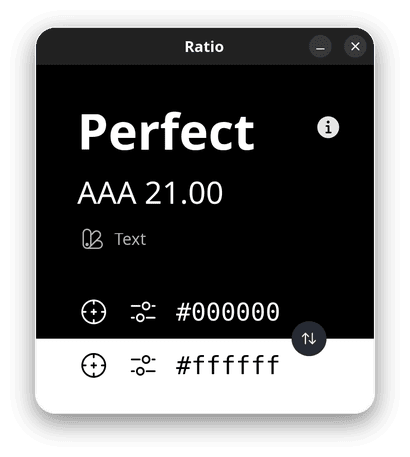
Ratio is a graphical colour-contrast validation tool intended for designers, developers and anyone checking an interface for accessibility problems. It applies the contrast calculations defined by the Web Content Accessibility Guidelines rather than relying on subjective visual judgement.
The program focuses on three specific WCAG success criteria. These cover the contrast of normal text, the visibility of non-text interface components and the appearance of keyboard focus indicators. This makes Ratio useful when choosing foreground and background colours for websites, applications and other interfaces where sufficient visual distinction matters.
This is free and open source software.
Key Features
- Calculate contrast between foreground and background colours.
- Validate colour combinations against WCAG requirements.
- Checks WCAG Success Criterion 1.4.3 for text contrast.
- Checks WCAG Success Criterion 1.4.11 for non-text interface elements.
- Checks WCAG Success Criterion 2.4.13 for focus appearance.
- Provides immediate feedback while experimenting with colour combinations.
- Useful for checking application and website interface designs.
- Focused graphical interface without broader design-suite complexity.
- Helps identify combinations which may be difficult for visually impaired users to distinguish.
Website: codeberg.org/markwyner/ratio-for-linux
Support:
Developer: Mark Wyner
License: GNU General Public License v3.0
Ratio is written in Python. Learn Python with our recommended free books and free tutorials.
Related Software
| Color Pickers | |
|---|---|
| pastel | Generate, analyze, convert and manipulate colors |
| Gpick | Advanced color picker and palette editor |
| hyprpicker | wlroots-compatible Wayland colour picker for Linux |
| Eyedropper | Pick and format colors; this tool is geared towards advanced users |
| KColorChooser | Color picker designed for KDE but runs on any desktop environment |
| Pick | Python-based color picker |
| Rickrack | User-friendly color editor. |
| Gcolor3 | Color selection dialog written in GTK+ 3 |
| xcolor | Lightweight color picker written in Rust |
| epick | Color picker for creating harmonic color palettes |
| Colorpicker | Minimal but complete colorpicker Electron-based desktop app |
| Picket | Screen color picker with magnifier and custom/user defined formats |
| Paleta | Generates color palettes with ease |
| Xgrabcolor | Basic color picker |
| sxcs | Minimal X11 color picker and magnifier |
| Pigment | Extracts color palettes from your images |
| delicolour | Lightweight color finder |
| Deepin Picker | Simple color picker |
| ColorSmith | Color picker tool |
| Bella | Simple eye dropper and color picker |
| pik | Terminal-based color picker |
| Piccolo | GTK4 colour picker with screen sampling and session history |
| Cherrypick | Screen colour picker with history and multiple output formats |
| wl-color-picker | Shell script for Wayland and wlroots sessions |
| Cpick | Extensive color picker for the terminal |
| Color Picker for COSMIC | Native COSMIC colour utility supporting six colour spaces |
| Coulr | Color box to help developers and designers |
| Wayland Color Picker | GTK4 application for Wayland desktops |
Read our verdict in the software roundup.
 Explore our carefully curated directory of recommended free and open source software, covering every major software category. Explore our carefully curated directory of recommended free and open source software, covering every major software category.The directory forms part of our extensive collection of articles for Linux enthusiasts. It includes hundreds of detailed reviews, together with free and open source alternatives to proprietary software from companies such as Google, Microsoft, Apple, Adobe, IBM, Cisco, Oracle, and Autodesk. LinuxLinks also covers interesting projects worth exploring, Linux-compatible hardware, free programming books and tutorials, and much more. Know a useful free and open source Linux application that we haven’t covered? Tell us about it using our submission form. |
Please read our Comment Policy before commenting.