

In Operation
To get started, click the + icon at the top left of the interface. This creates a new list.
Here’s an image of Errands in action. We’ve created 5 lists.
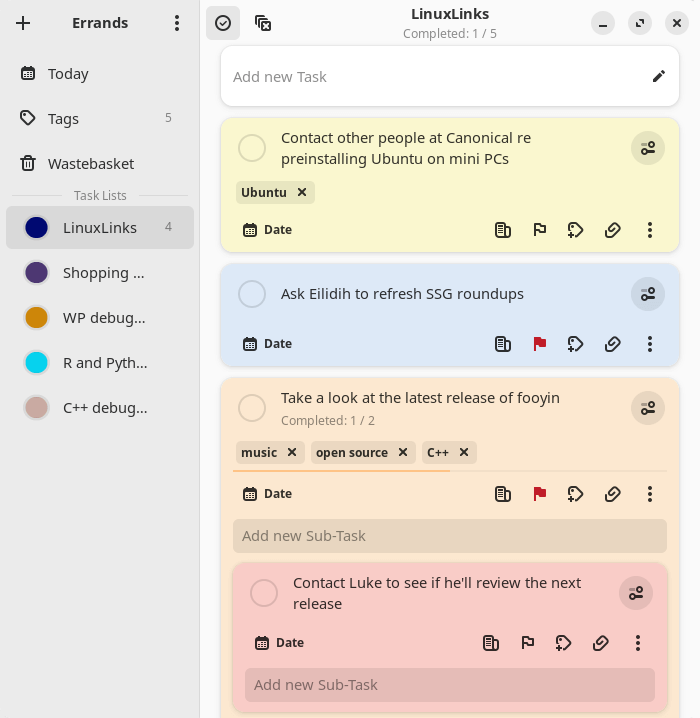
In the above image, we’ve added some tasks and sub-tasks. The software also lets you edit tasks and sub-tasks, as well as mark a task/sub-task as completed. For each task we’ve given a different accent colour which helps presentation.
Besides assigning a colour, we can add notes, set a priority (high, medium, low, none, or custom), add tags, and add attachments, to each task/sub-task.
What other functionality does Errands offer?
There’s support to sync tasks with Nextcloud or CalDAV providers. If you’re looking for a good open source CalDAV server, check out our roundup.
There’s support for drag and drop, as well as the ability to import .ics files (a calendar file saved in a universal calendar format used by several email and calendar programs). We can use a light, dark, or system theme, and configure whether new tasks are added at the top or bottom.
Summary
Errands is a simple but effective todo list manager. It only offers basic functionality, but what it does it does well.
Note, the developer has decided to rewrite Errands in C to improve the performance of the program and reduce the memory footprint. ps_mem reports memory usage is around 169MB which isn’t that excessive.
There are lots of other task managers available for Linux. Read our recommendations in this roundup.
Website: github.com/mrvladus/Errands
Support:
Developer: Vlad Krupinskii
License: MIT License
Errands is written in Python. Learn Python with our recommended free books and free tutorials.
Pages in this article:
Page 1 – Introduction and Installation
Page 2 – In Operation and Summary
Related Software
| Graphical Task Managers | |
|---|---|
| Super Productivity | Todo app with timeboxing & time tracking capabilities |
| Makagiga | To-do manager, RSS reader, notepad, widgets, image viewer |
| Vikunja | To-do app to organize your life |
| TreeSheets | Free form data organizer |
| Planify | Keep track of all your tasks, projects, and goals |
| Lotti | AI-powered context manager |
| Task Coach | Friendly useful todo manager with composite tasks support |
| Zanshin | KDE software to manage your day to day actions |
| sleek | todo manager based on the todo.txt syntax |
| GTG | Personal tasks and TODO list items organizer |
| Kanri | Modern offline Kanban board |
| OpenTodoList | Simple todo and task management |
| Mindwtr | Getting Things Done (GTD) productivity system |
| Endeavour | Personal task manager for GNOME |
| Errands | Manage your tasks |
| WHPH | Productivity app |
| cfait | Take control of your TODO list |
| Aion-Task | Cyclic TODO task manager |
| Progressive | Keep track of your tasks |
| Finitodo | Graphical task/todo list manager |
| Diurnals | Get daily Todoist notifications |
| Nottodbox | Organize notes, to-dos and diaries |
| KomoDo | Todo manager |
| Reminduck | Simple reminder app |
| TowDow | Tasks and process management |
| Progress | Simple Kanban board manager |
| FromScratch | Auto-saving scratchpad built with Electron |
| Done | To-do lists reimagined |
Read our verdict in the software roundup.
 Explore our comprehensive directory of recommended free and open source software. Our carefully curated collection spans every major software category. Explore our comprehensive directory of recommended free and open source software. Our carefully curated collection spans every major software category.This directory is part of our ongoing series of informative articles for Linux enthusiasts. It features hundreds of detailed reviews, along with open source alternatives to proprietary solutions from major corporations such as Google, Microsoft, Apple, Adobe, IBM, Cisco, Oracle, and Autodesk. You’ll also find interesting projects to try, hardware coverage, free programming books and tutorials, and much more. Discovered a useful open source Linux program that we haven’t covered yet? Let us know by completing this form. |
Please read our Comment Policy before commenting.