

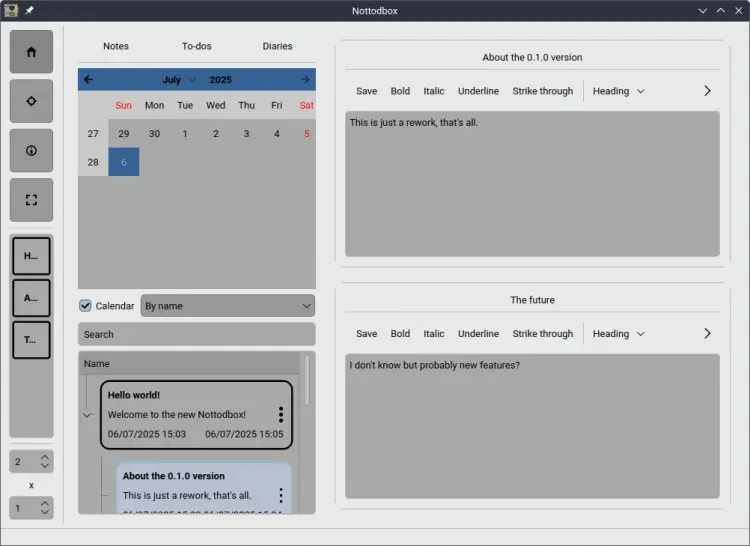
Nottodbox is a highly customizable WYSIWYG-like editor for notes, to-dos and diaries.
It lets you allows you to create and organize notes, to-dos, and diaries with rich text support in popular formats.
In today’s fast-paced world, we often have multiple tasks to handle simultaneously. That’s why you can open multiple documents at once in the desired row x column layout.
You can change the style and color scheme of the application to make it feel more like home.
All customization options for documents/notebooks:
- You can mark a to-do as completed or uncompleted.
- You can add a content lock to a document to turn it into a diary. This prevents the backup from being changed.
- Documents are automatically saved unless you are editing a outdated diary and have disabled this feature. Additionally, a backup of the old content is always retained. Furthermore, auto-saves do not overwrite backups, meaning your manual changes remain intact.
- Documents can be in three formats: Markdown, HTML, and plain-text.
- Documents can be exported in multiple formats to your ‘Documents’ or ‘Desktop’ folder if you enable this feature. This allows you to edit them in other applications as well.
- You can pin your favorite documents/notebooks to the sidebar for easy access.
- You can change the background, text, and border colors of the document/notebook in three different states: normal, hover, and click.
- All documents are associated with a notebook, and all options can follow it. All documents/notebooks can use the default settings or follow the global settings. With them, you can to customize so many things with ease.
This is free and open source software.
Website: github.com/mukonqi/nottodbox
Support:
Developer: Muhammed S.
License: GNU General Public License v3.0
Nottodbox is written in Python. Learn Python with our recommended free books and free tutorials.
Related Software
| Graphical Task Managers | |
|---|---|
| Super Productivity | Todo app with timeboxing & time tracking capabilities |
| Makagiga | To-do manager, RSS reader, notepad, widgets, image viewer |
| Vikunja | To-do app to organize your life |
| TreeSheets | Free form data organizer |
| Planify | Keep track of all your tasks, projects, and goals |
| Lotti | AI-powered context manager |
| Task Coach | Friendly useful todo manager with composite tasks support |
| Zanshin | KDE software to manage your day to day actions |
| sleek | todo manager based on the todo.txt syntax |
| GTG | Personal tasks and TODO list items organizer |
| Kanri | Modern offline Kanban board |
| OpenTodoList | Simple todo and task management |
| Mindwtr | Getting Things Done (GTD) productivity system |
| Endeavour | Personal task manager for GNOME |
| Errands | Manage your tasks |
| WHPH | Productivity app |
| cfait | Take control of your TODO list |
| Aion-Task | Cyclic TODO task manager |
| Progressive | Keep track of your tasks |
| Tasks | Simple COSMIC task manager with reminders, search and organised lists |
| Finitodo | Graphical task/todo list manager |
| Diurnals | Get daily Todoist notifications |
| Nottodbox | Organize notes, to-dos and diaries |
| KomoDo | Todo manager |
| Autasker | Flexible offline task manager with scheduling, habits and daily planning |
| Reminduck | Simple reminder app |
| TowDow | Tasks and process management |
| Progress | Simple Kanban board manager |
| FromScratch | Auto-saving scratchpad built with Electron |
| Done | To-do lists reimagined |
Read our verdict in the software roundup.
 Explore our carefully curated directory of recommended free and open source software, covering every major software category. Explore our carefully curated directory of recommended free and open source software, covering every major software category.The directory forms part of our extensive collection of articles for Linux enthusiasts. It includes hundreds of detailed reviews, together with free and open source alternatives to proprietary software from companies such as Google, Microsoft, Apple, Adobe, IBM, Cisco, Oracle, and Autodesk. LinuxLinks also covers interesting projects worth exploring, Linux-compatible hardware, free programming books and tutorials, and much more. Know a useful free and open source Linux application that we haven’t covered? Tell us about it using our submission form. |
Please read our Comment Policy before commenting.