

In the past few months the statement disk space is cheap and plentiful no longer applies. While large mechanical disks haven’t rocketed in price the same cannot be said for NVMe disks, mostly due to huge demands from AI.
Linux distributions come supplied with utilities to explore disk usage. For example, du is a popular tool used to estimate file space usage; space being used under a particular directory or files on a file system.
du shows directories which are taking up space. And you can combine du with other command-line utilities such as grep and sort to make the output more meaningful. But if you want a more visual experience, you don’t need to leave the terminal. One interesting alternative is cull, an interactive TUI disk space analyzer.
Installation
I evaluated cull using Manjaro, an Arch-based distro, as well as Ubuntu.
For Manjaro (and other Arch-based distros) there’s a package in the Arch User Repository. I installed that package using Pamac (Manjaro’s GUI package manager).
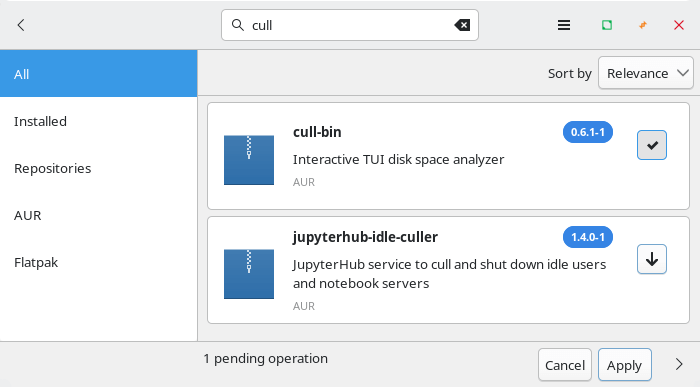
Installation proceeds without any issues on my test system.
In Operation
Here’s what you see when you issue the command cull.
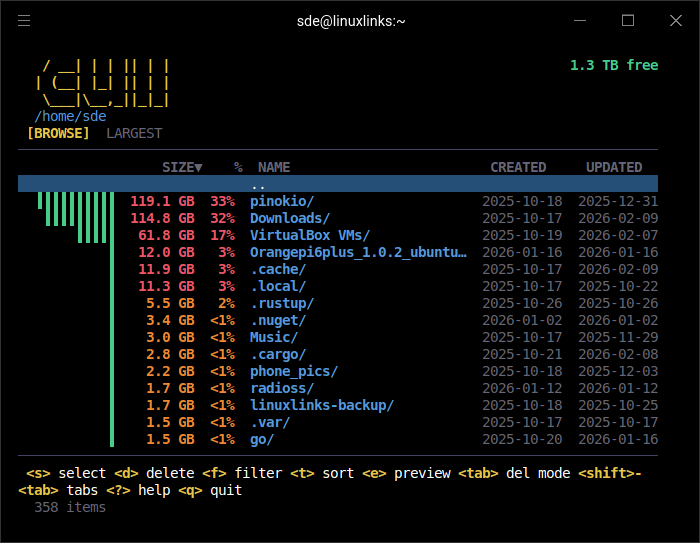
The program has traversed my home directory and reports the directories which are consuming the most disk space. Even with its TUI, you still get a good visual representative of what’s eating your disk.
Let’s look at the .cache directory.
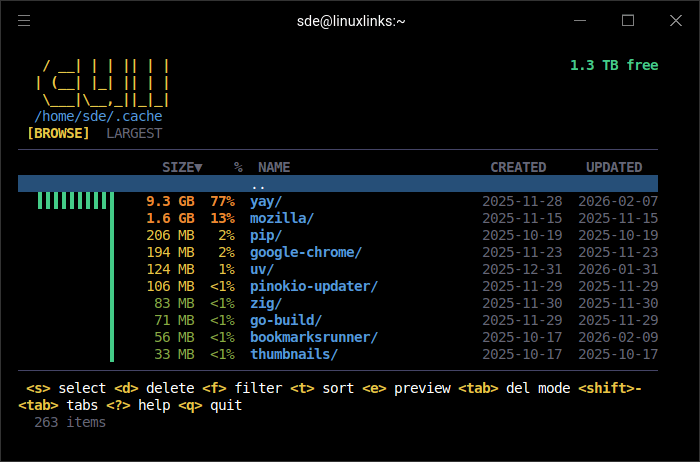
Yikes, the yay directory is consuming over 9GB. Yay (Yet Another Yogurt) is a popular, Go-written AUR helper for Arch Linux that streamlines installing, searching, and updating both official and Arch User Repository (AUR) packages.
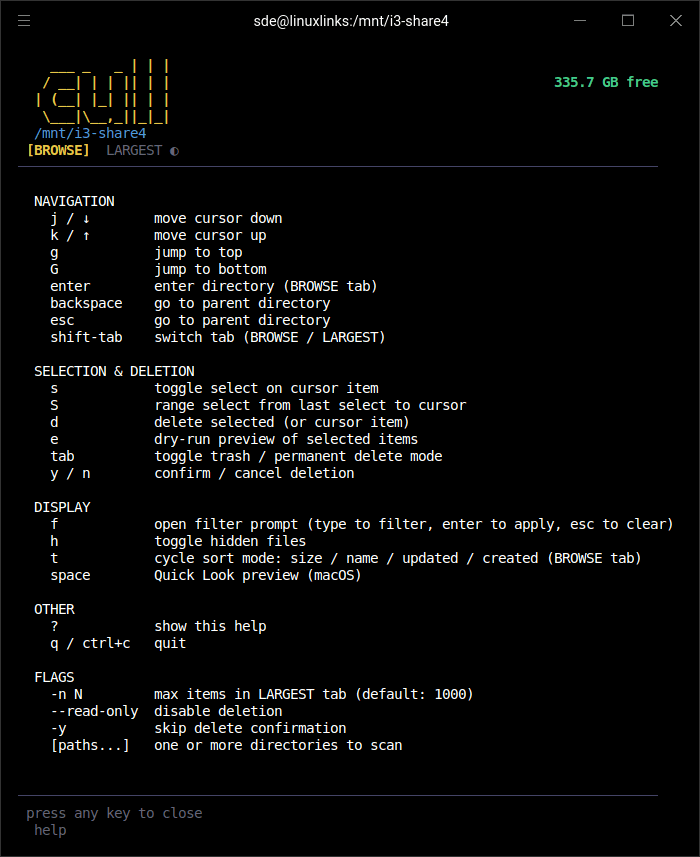
At the bottom of the screen are keyboard shortcuts. Press the d key and you can trash files or directories (the program prompts you to verify you want to delete). You can select multiple files at one time too.
There are filtering of options, the ability to sort (by size, name, creation date or last updated date), toggle hidden files, as well as a quick look preview (the latter only works with macOS).
Summary
cull is a great tool to help clean up your system. It’s extremely quick in traversing large file systems (including mechanical drives) and identify whales that are hogging disk space. It offers background scanning and caching too which helps improve the program’s fluidity.
If you like TUI software and want to root out disk hogs, you’ll find cull very useful. It gets my recommendation.
Here are the program’s shortcuts.
There are lots of other console-based software that helps you manage your disk usage. Check out my roundup of du replacements. Or if you prefer GUI here’s my GUI-specific roundup.
Website: github.com/legostin/cull
Support:
Developer: legostin
License: MIT License
cull is written in Go. Learn Go with our recommended free books and free tutorials.
Related Software
| du alternatives | Programming Language | License |
|---|---|---|
| dust | Rust | Apache License 2.0 |
| duf | Go | MIT License |
| Duc | C | GNU Lesser General Public License v3 |
| Ncdu | C | GNU GPL v2.0 License |
| gdu | Go | MIT License |
| cull | Go | MIT License |
| dua | Rust | MIT License |
| erdtree | Rust | MIT License |
| pdu | Rust | Apache License 2.0 |
| vizex | Python | MIT License |
| godu | Go | MIT License |
| dutree | Rust | GNU General Public License v3 |
| space | Rust | MIT License |
| darya | Rust | GNU General Public License v3.0 |
| diskus | Rust | MIT License or Apache License 2.0 |
| NoxDir | Go | MIT License |
| mcdu | Rust | MIT License |
| dirstat-rs | Rust | MIT License |
| diskonaut | Rust | MIT License |
| bonsai | C++ | GNU General Public License v3.0 |
| diskard | Rust | MIT License or Apache License 2.0 |
| cdu | Perl | GNU General Public License v2.0 |
| tdu | Go | GNU General Public License v2 |
| duviz | Python | MIT License |
| dut | C | GNU General Public License v3.0 |
| whalespotter | Rust | MIT License |
| sn | Rust | BSD 3-Clause “New” or “Revised” License |
Read our verdict in the software roundup.
 Explore our carefully curated directory of recommended free and open source software, covering every major software category. Explore our carefully curated directory of recommended free and open source software, covering every major software category.The directory forms part of our extensive collection of articles for Linux enthusiasts. It includes hundreds of detailed reviews, together with free and open source alternatives to proprietary software from companies such as Google, Microsoft, Apple, Adobe, IBM, Cisco, Oracle, and Autodesk. LinuxLinks also covers interesting projects worth exploring, Linux-compatible hardware, free programming books and tutorials, and much more. Know a useful free and open source Linux application that we haven’t covered? Tell us about it using our submission form. |
Please read our Comment Policy before commenting.
cull is surprisingly good.