
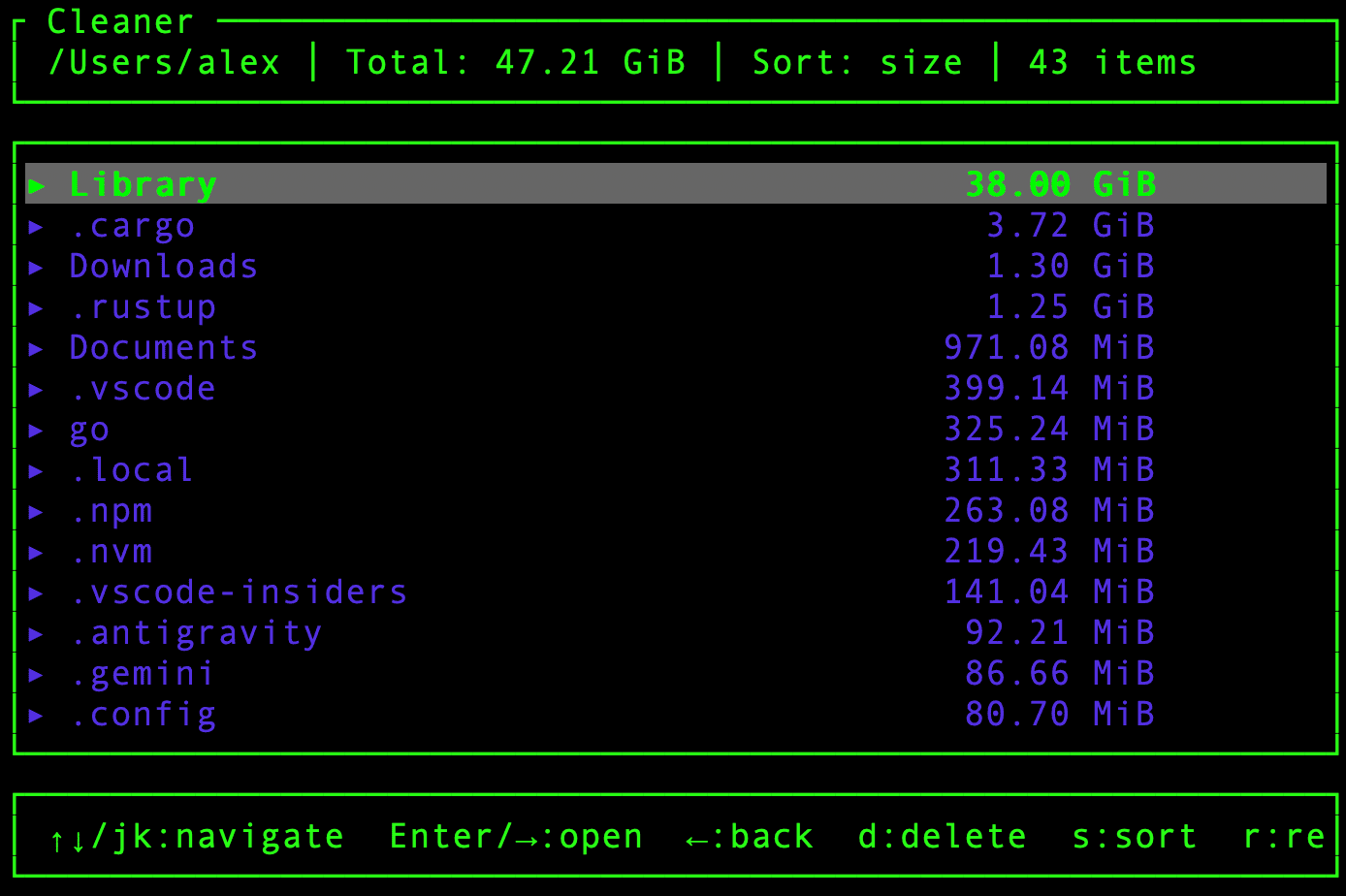
Cleaner is a disk usage analyzer and cleanup utility designed to help users investigate storage consumption and remove unnecessary files. It combines an interactive terminal interface with parallel filesystem scanning and targeted cleanup functions.
The application is particularly useful for developers whose systems accumulate build artefacts, temporary files, caches, and other data that can consume considerable storage over time. Unlike utilities concerned exclusively with displaying file sizes, Cleaner also provides tools for identifying common cleanup opportunities.
Safety controls are an important part of its approach. Users can inspect potential deletions before carrying them out, while protected-directory rules help reduce the risk of inadvertently removing important data.
This is free and open source software.
Key Features
- Parallel filesystem scanning distributes directory traversal across multiple CPU cores.
- Interactive terminal browser for examining directory sizes and storage consumption.
- Identifies common development artefacts, including node_modules, .terraform, target, and __pycache__ directories.
- Deep Clean mode examines known locations for development caches, browser data, editor caches, and other reclaimable storage.
- Checkbox-based cleanup interface displays individual candidates and their estimated storage requirements.
- Classifies cleanup targets by risk, with only safe cache categories selected automatically.
- Protects sensitive directories and important development toolchains from automatic cleanup.
- Dry-run mode allows users to inspect proposed changes without deleting files.
- Time-based filtering restricts cleanup operations to entries older than a specified number of days.
- Structured JSON output supports integration with scripts and system administration workflows.
- Configurable scanning threads, exclusion rules, and application preferences.
- Supports explicitly confirmed non-interactive deletion operations.
- Cross-platform support – runs on Linux, macOS, Windows, and FreeBSD.
Website: github.com/vyrti/cleaner
Support:
Developer: Aleksei Zaitsev
License: MIT License / Apache License 2.0
Cleaner is written in Rust. Learn Rust with our recommended free books and free tutorials.
Related Software
| du alternatives | Programming Language | License |
|---|---|---|
| dust | Rust | Apache License 2.0 |
| duf | Go | MIT License |
| Duc | C | GNU Lesser General Public License v3 |
| Ncdu | C | GNU GPL v2.0 License |
| gdu | Go | MIT License |
| cull | Go | MIT License |
| dua | Rust | MIT License |
| erdtree | Rust | MIT License |
| pdu | Rust | Apache License 2.0 |
| vizex | Python | MIT License |
| godu | Go | MIT License |
| dutree | Rust | GNU General Public License v3 |
| space | Rust | MIT License |
| darya | Rust | GNU General Public License v3.0 |
| diskus | Rust | MIT License or Apache License 2.0 |
| NoxDir | Go | MIT License |
| mcdu | Rust | MIT License |
| dirstat-rs | Rust | MIT License |
| diskonaut | Rust | MIT License |
| bonsai | C++ | GNU General Public License v3.0 |
| diskard | Rust | MIT License or Apache License 2.0 |
| cdu | Perl | GNU General Public License v2.0 |
| tdu | Go | GNU General Public License v2 |
| duviz | Python | MIT License |
| dut | C | GNU General Public License v3.0 |
| whalespotter | Rust | MIT License |
| sn | Rust | BSD 3-Clause “New” or “Revised” License |
Read our verdict in the software roundup.
 LinuxLinks helps you discover the best free and open source software for Linux. Explore our extensive collection of recommended applications, including alternatives to popular proprietary software. We also publish software reviews, Linux tutorials, hardware reviews, free programming books and articles covering the wider open source community. Browse our Linux resources to discover more. Know a useful free and open source Linux application we haven't covered? Suggest a program for inclusion. Has your software been featured on LinuxLinks? Display one of our Featured on LinuxLinks badges on your website or GitHub README. |
Please read our Comment Policy before commenting.