

Bacula is a set of computer programs for the backup, recovery, and verification of computer data across a network of computers of different kinds.
Bacula is relatively easy to use and efficient, while offering many advanced storage management features that make it easy to find and recover lost or damaged files.
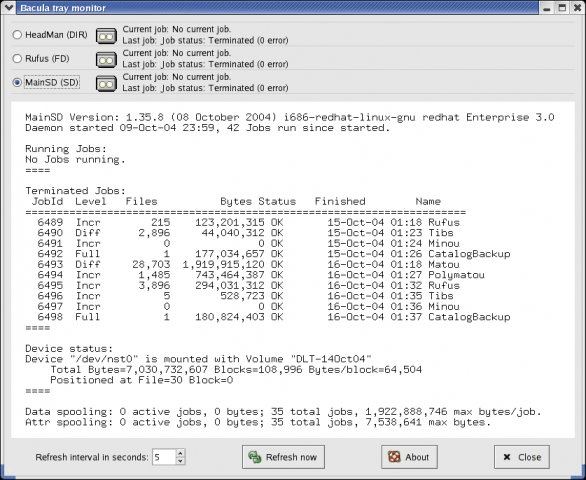
Bacula is made up of the following five major components or services: Director, Console, File, Storage, and Monitor services.
The Bacula Director service supervises all the backup, restore, verify and archive operations. The Bacula Console service allows the administrator or user to communicate with the Bacula Director Currently, the Bacula Console is available in three versions: text-based console interface, GNOME-based interface, and a wxWidgets graphical interface.
The Bacula File service (also known as the Client program) is installed on the machine to be backed up. The Bacula Storage services consist of the software programs that perform the storage and recovery of the file attributes and data to the physical backup media or volumes.
The Catalog services are comprised of the software programs responsible for maintaining the file indexes and volume databases for all files backed up.
Key Features
- Backup and restore clients of any type ensuring that all attributes of files are properly saved and restored.
- Multi-volume backups supported.
- A full comprehensive SQL standard database of all files backed up. This permits online viewing of files saved on any particular Volume.
- Automatic pruning of the database (removal of old records) thus simplifying database administration.
- Any SQL database engine can be used making Bacula very flexible. Drivers currently exist for MySQL, PostgreSQL, and SQLite.
- Built-in Job scheduler.
- Rescue CD for Linux systems
Features in more detail:
- Job Control
- Network backup/restore with centralized Director.
- Internal scheduler for automatic Job execution.
- Scheduling of multiple Jobs at the same time.
- You may run one Job at a time or multiple simultaneous Jobs (sometimes called multiplexing).
- Job sequencing using priorities.
- Console interface to the Director allowing complete control. A shell, GNOME
GUI and wxWidgets GUI versions of the Console program are available. Note, the GNOME GUI program currently offers very few additional features over the shell program. With version 2.2.0, a much more complete GUI interface has been written, which is called the Bacula Admistration Tool, or bat.
- Security
- Verification of files previously cataloged, permitting a Tripwire like capability (system break-in detection).
- CRAM-MD5 password authentication between each component (daemon).
- Configurable TLS (SSL) communications encryption between each component.
- Configurable Data (on Volume) encryption on a Client by Client basis.
- Computation of MD5 or SHA1 signatures of the file data if requested.
- Restore Features
- Restore of one or more files selected interactively either for the current backup or a backup prior to a specified time and date.
- Restore of a complete system starting from bare metal. This is mostly automated for Linux systems and partially automated for Solaris. See Disaster Recovery Using Bacula. This is also reported to work on Win2K/XP systems.
- Listing and Restoration of files using stand-alone bls and bextract tool programs. Among other things, this permits extraction of files when Bacula and/or the catalog are not available. Note, the recommended way to restore files is using the restore command in the Console. These programs are designed for use as a last resort.
- Ability to restore the catalog database rapidly by using bootstrap files (previously saved).
- Ability to recreate the catalog database by scanning backup Volumes using the bscan program.
- SQL Catalog
- Catalog database facility for remembering Volumes,
Pools, Jobs, and Files backed up. - Support for MySQL, PostgreSQL, and SQLite Catalog databases.
- User extensible queries to the MySQL, PostgreSQL and SQLite databases.
- Catalog database facility for remembering Volumes,
- Advanced Volume and Pool Management
- Labeled Volumes, preventing accidental overwriting (at least by Bacula).
- Any number of Jobs and Clients can be backed up to a single Volume. That is, you can backup and restore Linux, Unix, Sun, and Windows machines to the same Volume.
- Multi-volume saves. When a Volume is full, Bacula automatically requests the next Volume and continues the backup.
- Pool and Volume library management providing Volume flexibility (e.g. monthly, weekly, daily Volume sets, Volume sets segregated by Client, …).
- Machine independent Volume data format. Linux, Solaris, and Windows clients can all be backed up to the same Volume if desired.
- The Volume data format is upwards compatible so that old Volumes can always be read.
- A flexible message handler including routing of messages from any daemon back to the Director and automatic email reporting.
- Data spooling to disk during backup with subsequent write to tape from the spooled disk files. This prevents tape “shoe shine” during Incremental/Differential backups.
- Advanced Support for most Storage Devices
- Autochanger support using a simple shell interface that can interface to virtually any autoloader program. A script for mtx is provided.
- Support for autochanger barcodes — automatic tape labeling from barcodes.
- Automatic support for multiple autochanger magazines either using barcodes or by reading the tapes.
- Support for multiple drive autochangers.
- Raw device backup/restore. Restore must be to the same device.
- All Volume blocks (approximately 64K bytes) contain a data checksum.
- Migration support — move data from one Pool to another or one Volume to another.
- Supports writing to DVD.
- Miscellaneous
- Multi-threaded implementation.
- A comprehensive and extensible configuration file for each daemon.
Website: blog.bacula.org
Support: Documentation, GitLab Code Repository
Developer: Bacula Development Team
License: AGLP v3
Bacula is written in C and C++. Learn C with our recommended free books and free tutorials. Learn C++ with our recommended free books and free tutorials.
Related Software
| Backup Tools | |
|---|---|
| restic | Fast, efficient and secure backup software |
| Borg | Deduplicating backup software |
| Duplicity | Encrypted bandwidth-efficient backup |
| TimeShift | Takes regular incremental snapshots of the filesystem |
| Duplicati | Store encrypted backups online |
| bup | Backup a system based on the git packfile format |
| Déjà Dup | Hides the complexity of doing backups the Right Way |
| Bacula | Network backup, recovery and verification |
| Kopia | Secure backup/restore tool that allows you to create encrypted snapshots |
| Clonezilla | Offers similar functionality to Symantec Ghost |
| Bareos | Backup Archiving Recovery Open Sourced |
| rsync | Fast remote file copy program |
| BackupPC | High-performance, enterprise-grade system for backing up PCs |
| Vorta | Desktop client for Borg Backup |
| Backrest | Web UI and orchestrator for restic backup |
| Back in Time | Equivalent of OS X's Time Machine |
| UrBackup | Easy to setup open source client/server backup system |
| Rescuezilla | Easy backup, recovery & bare metal restore |
| Mondo Rescue | A powerful disaster recovery suite |
| KBackup | Backup program targeted at non-computer experts |
| rsnapshot | Local and remote filesystem snapshot utility |
| Amanda | Advanced Maryland Automatic Network Disk Archiver |
| FOG | Cloning / imaging solution / rescue suite |
| Partclone | Provides utilities to save and restore used blocks on a partition |
| XtraBackup | Backup tool for InnoDB and XtraDB databases |
| Plakar | Scalable backup solution |
| kup | Backup scheduler for the Plasma desktop |
| BURP | Uses librsync to save network traffic and space |
| Btrbk | Backup tool for btrfs subvolumes |
| Pika Backup | App focused on backups of personal data |
| PING | Also offers similar functionality to Symantec Ghost |
| dar | Full featured archiver with support for differential backups |
| tar | Tar archiving utility |
| Cedar Backup | Local and remote backups to CD or DVD media |
| shallow-backup | Git-integrated backup tool |
| ArchiveKeep | Keeps your files archived in multiple places |
| ZnapZend | ZFS centric backup tool |
| Vykar | Fast, encrypted, deduplicated backups in Rust |
Read our verdict in the software roundup.
 Explore our comprehensive directory of recommended free and open source software. Our carefully curated collection spans every major software category. Explore our comprehensive directory of recommended free and open source software. Our carefully curated collection spans every major software category.This directory is part of our ongoing series of informative articles for Linux enthusiasts. It features hundreds of detailed reviews, along with open source alternatives to proprietary solutions from major corporations such as Google, Microsoft, Apple, Adobe, IBM, Cisco, Oracle, and Autodesk. You’ll also find interesting projects to try, hardware coverage, free programming books and tutorials, and much more. Discovered a useful open source Linux program that we haven’t covered yet? Let us know by completing this form. |
Please read our Comment Policy before commenting.