

A console application is computer software which can be used with a text-only computer interface, the command line interface, or a text-based interface included within a graphical user interface operating system, such as a terminal emulator (such as GNOME Terminal or the aforementioned Terminator). Whereas a graphical user interface application generally involves using the mouse and keyboard (or touch control), with a console application the primary (and often only) input method is the keyboard. Many console applications are command line tools, but there is a wealth of software that has a text-based user interface making use of ncurses, a library which allow programmers to write text-based user interfaces.
 Console based applications are light on system resources (very useful on low specified machines), can be faster and more efficient than their graphical counterparts, they do not stop working when X is restarted, and are perfect for scripting purposes. When designed well, console applications offer a surprisingly improvement in productivity. The applications are leaner, faster, easier to maintain, and remove the need to have installed a whole raft of libraries.
The whole is greater than the sum of its parts is a very famous quote from Aristotle, a Greek philosopher and scientist. This quote is particularly pertinent to Linux. In my view, one of Linux’s biggest strengths is its synergy. The usefulness of Linux doesn’t derive only from the huge raft of open source (command line) utilities. Instead, it’s the synergy generated by using them together, sometimes in conjunction with larger applications.
So what does the command-line offer users? There is a wide range of console based software which provide the same or similar functionality to their graphical equivalents. In the field of system administration, Linux is blessed with a good range of graphical file managers. However, some users are in their comfort zone managing files from the shell, finding it the fastest way to navigate the file system and perform file operations. This is, in part, because console based file managers are more keyboard friendly, enabling users to perform file operations without using a mouse, and make it quicker to navigate the filesystem and issue commands in the console at the same time.
Some people may prefer to use the shell instead of a console file manager. We covered some great tools that let you navigate the file system quickly – check out our Best Command Line Navigation Tools.
To provide an insight into the quality of software that is available, we have compiled a list of 24 high quality console based open source file managers. Hopefully, there will be something of interest for anyone who wishes to revel in the power of the console.
Here’s our verdict on the file managers.
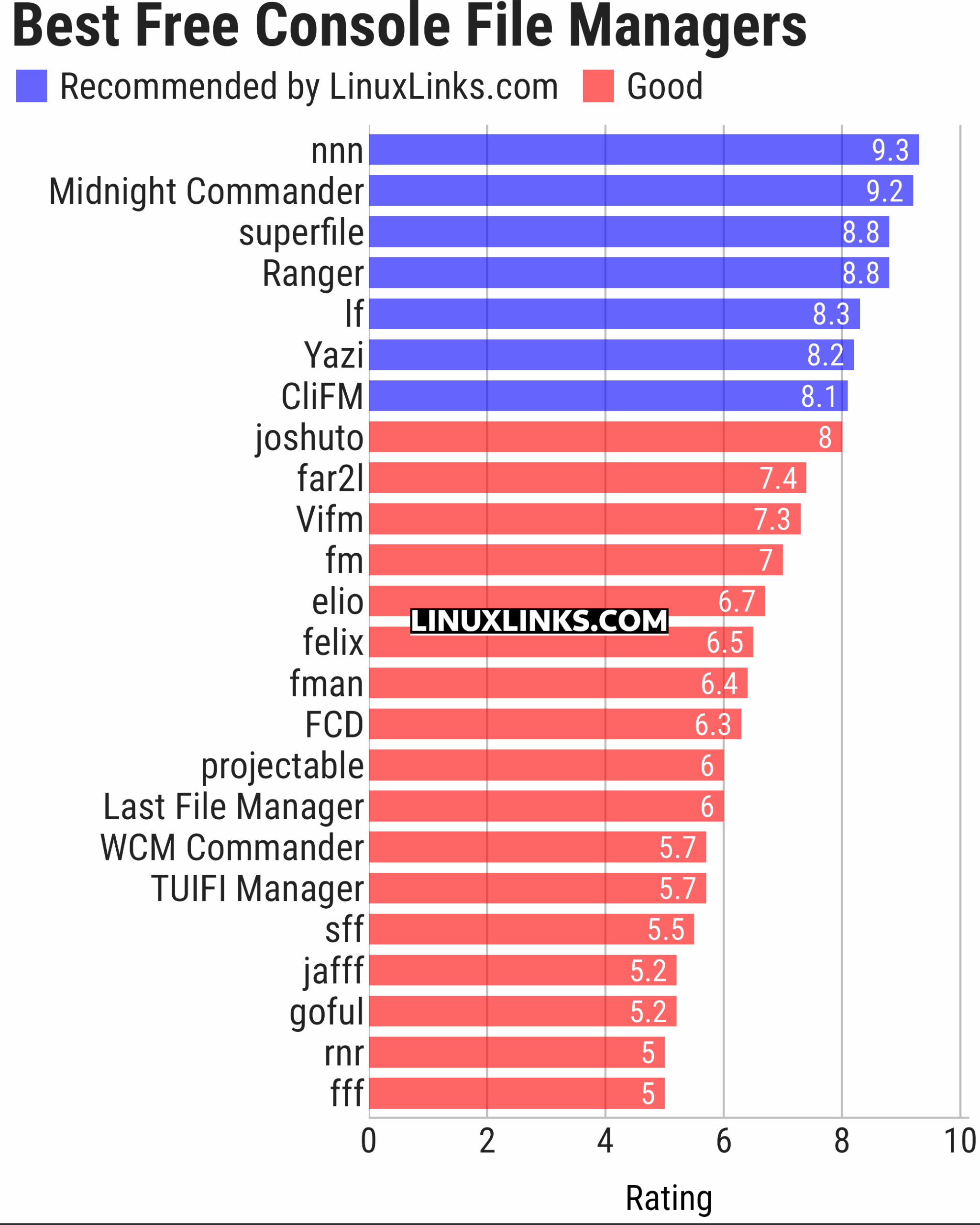
Click the links in the table below to learn more about each file manager.
| Console File Managers | |
|---|---|
| nnn | Fast and flexible file manager |
| Midnight Commander | User-friendly yet powerful orthodox file manager |
| superfile | Very fancy and modern terminal file manager |
| Ranger | File manager with an ncurses frontend written in Python |
| lf | Terminal file manager heavily inspired by ranger |
| Yazi | File manager with asynchronous support |
| CliFM | Shell-like, command line terminal file manager |
| joshuto | Ranger-like file manager |
| far2l | Linux fork of FAR Manager v2 |
| Vifm | ncurses based file manager with vi like keybindings |
| fm | Double pane file manager written in Go |
| elio | Fast file browsing with rich previews in three panes |
| felix | TUI file manager with Vim-like key mapping |
| fman | Uses Bubbletea, Lipgloss, Bubblezone, stickers, Chroma, and go-arg |
| FCD | Continuation of rnr |
| projectable | TUI file manager built for projects |
| Last File Manager | 1 or 2 pane Python based file manager |
| WCM Commander | A Far Manager clone |
| TUIFI Manager | Termux-oriented file manager |
| sff | Simple file finder |
| jafff | Just another f* fast file manager |
| goful | Another file manager written in Go |
| rnr | Combines the best features of Midnight Commander and Ranger |
| fff | Simple file manager |
This article has been updated to reflect the changes outlined in our recent announcement.
| Explore Linux | |
|---|---|
 | Best Free and Open Source Software - A huge collection of recommended free and open source software covering every major category. |
 | In-depth Linux Software Reviews - Detailed assessments of Linux software covering features, usability and overall quality. |
 | The Big List of Active Linux Distros - An extensive collection of actively developed Linux distributions. |
 | Open Source Alternatives - Alternatives to software and services from Google, Microsoft, Apple, Adobe, IBM, Autodesk, Oracle and others. |
 | Essential Linux System Tools - Indispensable utilities for monitoring, maintaining and managing Linux systems. |
 | Linux Productivity Tools - Useful utilities for improving productivity and streamlining everyday tasks. |
 | Alternatives to Popular CLI Tools - Modern alternatives to familiar command-line utilities supplied with Linux systems. |
 | Awesome Free Linux Game Tools - Tools, utilities and companion software that improve gaming on Linux. |
 | Machine Learning on Linux - Machine learning and deep learning software, self-hosted applications and practical tools. |
 | Saving Money with Linux - Practical ways to reduce electricity consumption and lower computing costs with Linux. |
 | Linux Candy - Fun, entertaining and sometimes delightfully quirky software from the lighter side of Linux. |
Please read our Comment Policy before commenting.
Haha time to add xplr to the list…
I’m not so sure. xplr is a file explorer rather than a file manager.
But it’s an interesting project that I started a review many months ago but never wrote it up. I’ll see what I can do.
Having looked into it, I remember why I put my review aside. xplr’s post installation is rather crude. For example, way too many steps just to get icons working. Things like this should already be set up for the user.
rnr has been discontinued. fcd is its successor.
We’ll take a look at fcd.
I forgot to add the fcd github link:
There’s no need to provide a link. In any event, we don’t allow external links in comments (see our comment FAQ for the reasons why).
“superfile” in 3rd place? The tool isn’t even able to create a link, except through the shell.
superfile is awesome. You make it sound like creating symbolic links is an essential feature for a file manager. It isn’t. In any event, the developer has plans to add the functionality, but there are more important things to work on.
This feature is essential for my workflow. The fact that it hasn’t been considered gives the impression that the implementation is somewhat incomplete.
It might be essential for your workflow, but it’s a mistake to assume that applies to the majority of users.
The feature has been considered for implementation. It’s scheduled for the next major release.
Hi, there’s another one you forgot about: Rat Commander.
Thanks.
Your comment was edited in line with our Comment FAQ. We do not allow external hyperlinks in comments.
How did we forget Rat Commander? It only saw its first public release a few days ago and our roundup was updated last month.
We’ll take a look at Rat Commander at the next scheduled update.
And if you want to make software suggestions, we have a form to complete. There’s a link to the form on (almost) every article on the site.