

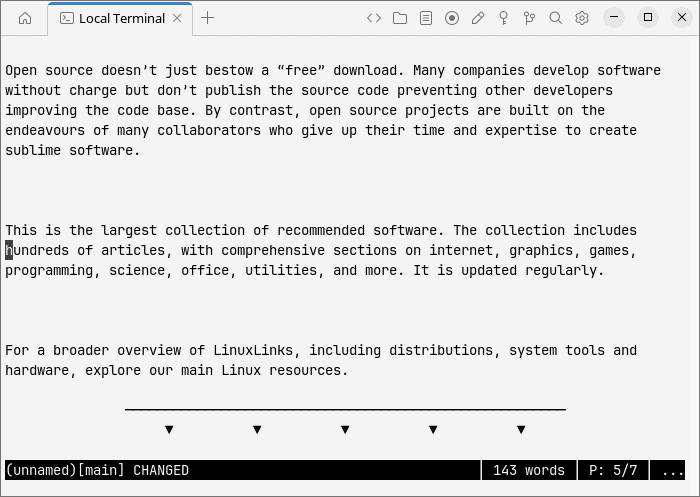
WordGrinder is a lightweight, Unicode-aware word processor designed to let you concentrate on writing rather than formatting. It runs directly in a terminal, offering a predominantly keyboard-driven interface with menus that make commands accessible without having to memorise complicated keyboard shortcuts.
Unlike conventional word processors, WordGrinder is not a WYSIWYG editor or desktop publishing application. Its emphasis is on creating and editing text, with enough formatting capabilities to organise longer documents without introducing unnecessary complexity.
Documents can contain headings, lists, basic paragraph styles, and character formatting. Multiple documents can be stored within a single document set, making it practical to organise related writing projects. A table of contents provides navigation between headings, while word and page counts help track writing progress.
WordGrinder uses a text-based native file format that works with standard diff tools. It also supports importing and exporting documents in several common formats. An optional OpenGL graphical interface provides an alternative to the terminal environment.
This is free and open source software.
Key Features
- Unicode-aware word processing with a keyboard-driven interface.
- Basic character formatting, including bold, italic, and underline.
- Paragraph styles supporting headings, lists, and other document structures.
- Multiple documents within a single document set.
- Table of contents navigation for structured documents.
- Import plain text, OpenDocument, HTML, and Markdown documents.
- Export to plain text, OpenDocument, HTML, Markdown, LaTeX, troff, and Emacs Org mode.
- Undo and redo, search and replace, and text selection.
- Word and page counts, including counts for selected text.
- Spell checking with support for system and user dictionaries.
- Configurable automatic saving of timestamped document snapshots.
- Customisable keyboard shortcuts and reusable document templates.
- Support for smart quotes, mouse input, and multiple scrolling modes.
- Command-line scripting through the embedded Luau interpreter.
- Optional OpenGL graphical interface with configurable fonts and colours.
- Cross-platform support – runs on Linux, macOS, and Windows.
Website: github.com/davidgiven/wordgrinder
Support:
Developer: David Given
License: MIT License
WordGrinder uses Luau, a derivative of Lua. Learn Lua with our recommended free books and free tutorials.
Related Software
| Distraction-Free Tools for Writers | |
|---|---|
| FocusWriter | Simple, distraction-free word processor |
| Mark Text | Simple and elegant Markdown editor |
| Zettlr | Markdown editor for the 21st Century |
| novelWriter | Plain text editor designed for writing novels |
| Apostrophe | Editor that stays out your way |
| Quoll Writer | Desktop writing application written in Java |
| Manuskript | Tool for those writer who like to organize and plan everything before writing |
| ghostwriter | Distraction-free writing experience offering a clean interface |
| Bibisco | Novel writing software |
| PanWriter | Distraction-free Markdown writing environment |
| Abricotine | Markdown editor built for the desktop with inline preview functionality |
| Dawn | Distraction-free writing environment with live markdown rendering |
| Story Architect | Reinventing the screenwriting software |
| TextRoom | Basic full-screen rich text editor for writers |
| PyRoom | Editor that stays out of your way |
Read our verdict in the software roundup.
 LinuxLinks helps you discover the best free and open source software for Linux. Explore our extensive collection of recommended applications, including alternatives to popular proprietary software. LinuxLinks helps you discover the best free and open source software for Linux. Explore our extensive collection of recommended applications, including alternatives to popular proprietary software.We also publish software reviews, Linux tutorials, hardware reviews, free programming books and articles covering the wider open source community. Browse our Linux resources to discover more. Know a useful free and open source Linux application we haven't covered? Suggest a program for inclusion. Has your software been featured on LinuxLinks? Display one of our Featured on LinuxLinks badges on your website or GitHub README. |
Please read our Comment Policy before commenting.