

Technology has its limits. No one becomes a master chef just by buying chef-endorsed saucepans, premium ingredients, or a shelf full of coveted recipes. Productivity software is no different. A diary app can help you record your day, but it won’t magically bring order to chaos. A time tracker can measure where the hours go, but only if you remember to start it.
That doesn’t mean we’re sceptical about productivity tools. Far from it. We’ve a real soft spot for small, focused utilities that do one job well. Lean tools that remove friction can make a genuine difference to how you spend your time. Bloated productivity suites often do the opposite, adding complexity, maintenance, and yet another thing to manage.
The applications featured here are firmly in the first camp. They’re small, fast, and efficient tools designed to cut down the time spent hunting for snippets of text.
Linux has a healthy selection of capable clipboard managers, including both graphical and terminal-based tools. This article focuses on the latter: TUI clipboard managers designed for users who prefer working from the terminal. GUI clipboard managers are covered separately.
Clipboard managers let you copy, search, manage, and reuse items stored on the clipboard. They’re particularly useful for anyone who regularly works with snippets of text, commands, URLs, or other reusable fragments. Some tools go further, supporting images, HTML, and even synchronising clippings between computers, but the applications featured here keep the focus on fast, keyboard-driven clipboard management in the terminal.
Here’s our verdict, presented in a legendary LinuxLinks-style ratings chart. To qualify for inclusion, software must be both free and open source.
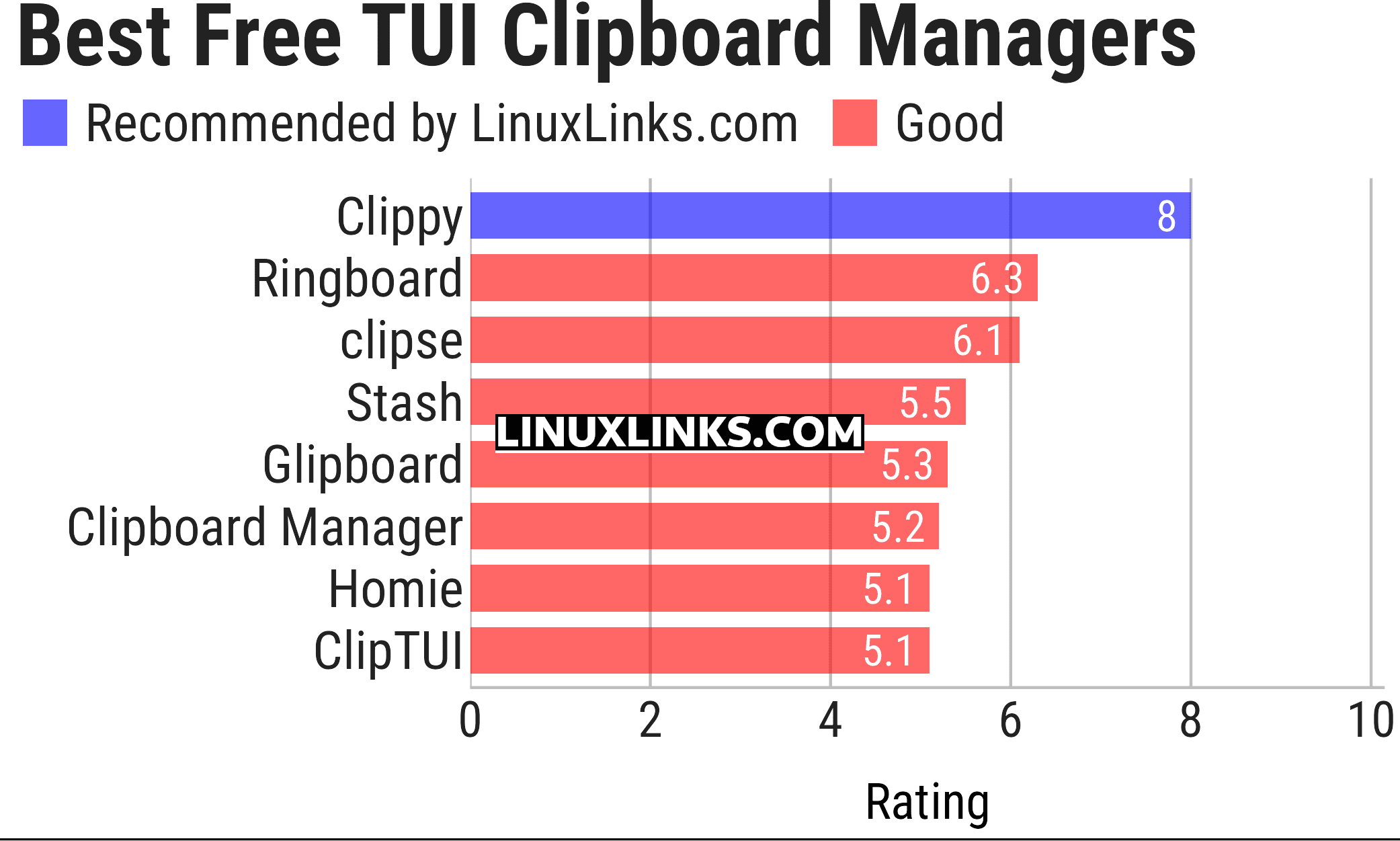
Let’s explore the clipboard managers at hand. For each title we have compiled its own portal page, a full description with an in-depth analysis of its features, a screenshot, together with links to relevant resources.
| TUI Clipboard Managers | |
|---|---|
| Clippy | Lightweight terminal-based clipboard history manager |
| Ringboard | Clipboard history manager with graphical and terminal interfaces |
| clipse | TUI-based clipboard manager application written in Go |
| Stash | Wayland clipboard manager written in Rust |
| Glipboard | Terminal-based clipboard manager supporting text and images |
| Clipboard Manager | Designed for tiling window managers |
| Homie | Clipboard manager written in Go |
| ClipTUI | Runs as a background daemon, recording clipboard entries locally |
 LinuxLinks helps you discover the best free and open source software for Linux. Explore our extensive collection of recommended applications, including alternatives to popular proprietary software. We also publish software reviews, Linux tutorials, hardware reviews, free programming books and articles covering the wider open source community. Browse our Linux resources to discover more. Know a useful free and open source Linux application we haven't covered? Suggest a program for inclusion. Has your software been featured on LinuxLinks? Display one of our Featured on LinuxLinks badges on your website or GitHub README. |
Please read our Comment Policy before commenting.
I can vouch for Clippy. Top app.