

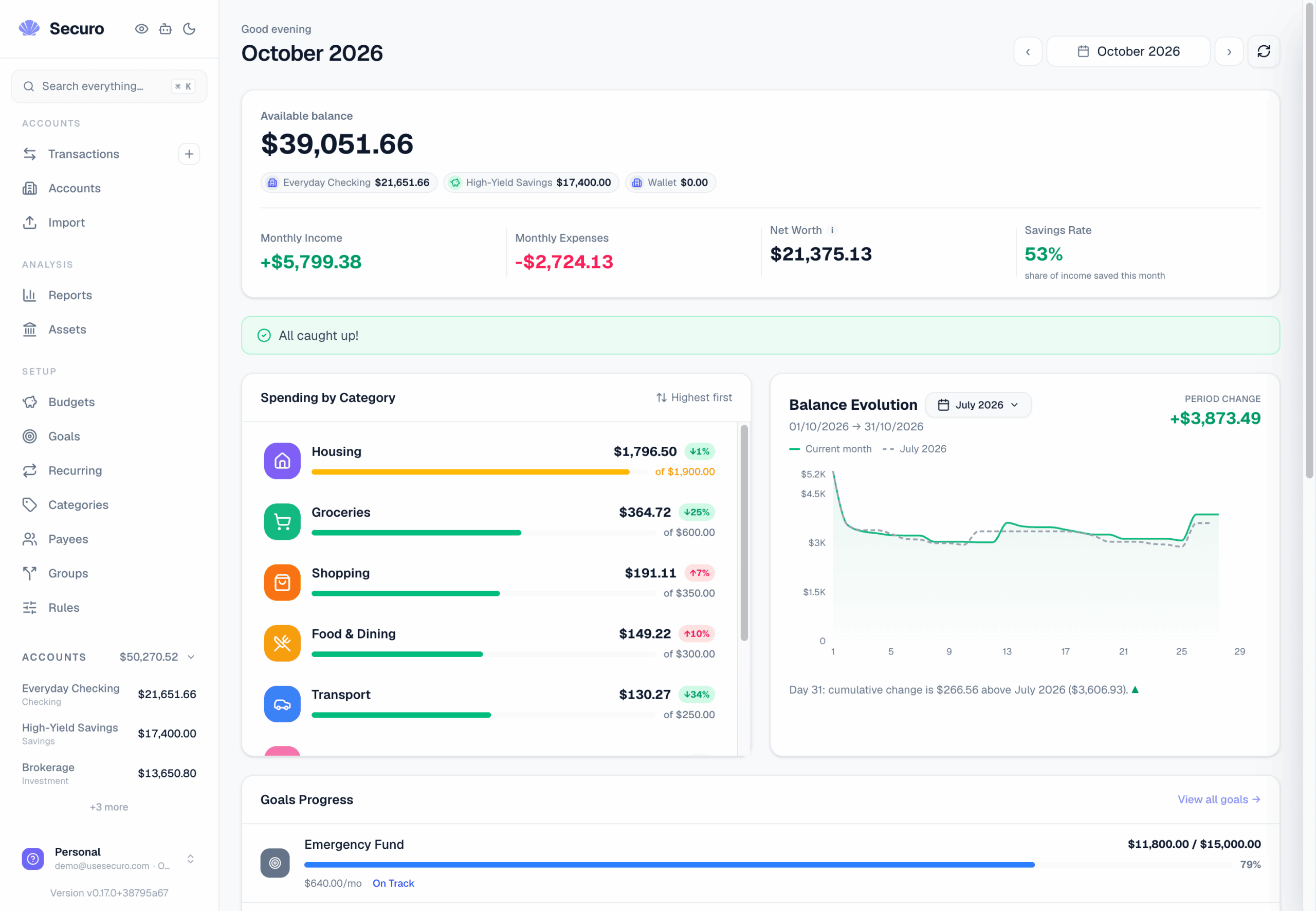
Securo is a self-hosted personal finance manager that brings financial information together in a single web interface. It provides tools for organising income, expenditure, accounts and financial commitments without relying on a third-party service to store your financial records.
The application caters for everyday money management as well as longer-term financial planning. Users can work with individual accounts, examine their financial position and maintain records covering different types of assets and liabilities.
Securo supports both individual users and groups sharing financial information. Its workspace-based approach allows financial records to be separated, while optional integrations can connect the application to external banking services. The software runs on infrastructure controlled by the user.
This is free and open source software.
Key Features
- Manage multiple financial accounts with running balances and transaction histories.
- Search and filter transactions, with support for CSV exports.
- Import financial transactions from OFX, QIF, CAMT and CSV files.
- Automatically categorise transactions using configurable rules.
- Split individual transactions across multiple spending categories.
- Set budgets, manage recurring transactions and track loans, instalments and other financing.
- Create savings goals and monitor progress towards financial targets.
- Track assets with valuation histories and configurable growth rules.
- Generate net worth and income-versus-expenses reports, including category sparklines.
- Handle multiple currencies with optional automatic exchange-rate conversion.
- Support multiple users with separate workspaces, access roles and administrative controls.
- Secure account access with passkeys, TOTP two-factor authentication and OIDC single sign-on.
- Synchronise banking transactions through Pluggy, Enable Banking and SimpleFIN integrations.
- Install community-provided categories and transaction rules through an optional plugin catalogue.
- Use optional self-hosted AI assistants with financial data access and configurable knowledge bases.
Website: github.com/securo-finance/securo
Support:
Developer: Tássio Noronha and contributors
License: GNU Affero General Public License v3.0
Securo is written in Python and TypeScript. Learn Python with our recommended free books and free tutorials. Learn TypeScript with our recommended free books and free tutorials.
Related Software
| Self-Hosted Personal Finance Tools | |
|---|---|
| Firefly III | Supports the use of budgets, categories and tags |
| Actual Budget | Fast budgeting app focused on privacy |
| Paisa | Personal finance dashboard for accounts |
| Sure | Personal finance app for daily tracking |
| ezBookkeeping | Bookkeeping, budgets, and expenses in one web app |
| ExpenseOwl | Lightweight expense tracking for where your money goes |
| WYGIWYH | Self-hosted finance tracker for clarity |
| OpenBudgeteer | Bucket-based budgeting for personal finance |
| Kresus | Private web app for managing your money |
| BudgetBee | Simple self-hosted personal budgeting |
| Ocular | Self-hosted budgeting with clear views |
| MyFin | Budgets, bills, and balances in one place |
| Cashlytics | Self-hosted budget and finance planner |
| Econumo | Household money planning and shared budgets |
| YAFFA | Web-based accounts, budgets, and reports |
| Savvy | Expense tracking for personal finances |
| FinanzPilot | Browser-based control over budgets, accounts, and bills |
Read our verdict in the software roundup.
 LinuxLinks helps you discover the best free and open source software for Linux. Explore our extensive collection of recommended applications, including alternatives to popular proprietary software. We also publish software reviews, Linux tutorials, hardware reviews, free programming books and articles covering the wider open source community. Browse our Linux resources to discover more. Know a useful free and open source Linux application we haven't covered? Suggest a program for inclusion. Has your software been featured on LinuxLinks? Display one of our Featured on LinuxLinks badges on your website or GitHub README. |
Please read our Comment Policy before commenting.