

Technology has its limits. No one becomes a master chef just by buying chef-endorsed saucepans, premium ingredients, or a shelf full of coveted recipes. Productivity software is no different. A diary app can help you record your day, but it won’t magically bring order to chaos. A time tracker can measure where the hours go, but only if you remember to start it.
That doesn’t mean we’re sceptical about productivity tools. Far from it. We’ve a real soft spot for small, focused utilities that do one job well. Lean tools that remove friction can make a genuine difference to how you spend your time. Bloated productivity suites often do the opposite, adding complexity, maintenance, and yet another thing to manage.
The applications featured here are firmly in the first camp. They’re small, fast, and efficient tools designed to cut down the time spent hunting for snippets of text.
Linux has a healthy selection of capable clipboard managers, including both graphical and terminal-based tools. This article focuses on the latter: CLI clipboard managers designed for users who prefer working from the terminal. TUI and GUI clipboard managers are covered separately.
Clipboard managers let you copy, search, manage, and reuse items stored on the clipboard. They’re particularly useful for anyone who regularly works with snippets of text, commands, URLs, or other reusable fragments. Some tools go further, supporting images, HTML, and even synchronising clippings between computers, but the applications featured here keep the focus on fast, keyboard-driven clipboard management in the terminal.
Here’s our verdict, presented in a legendary LinuxLinks-style ratings chart. To qualify for inclusion, software must be both free and open source.
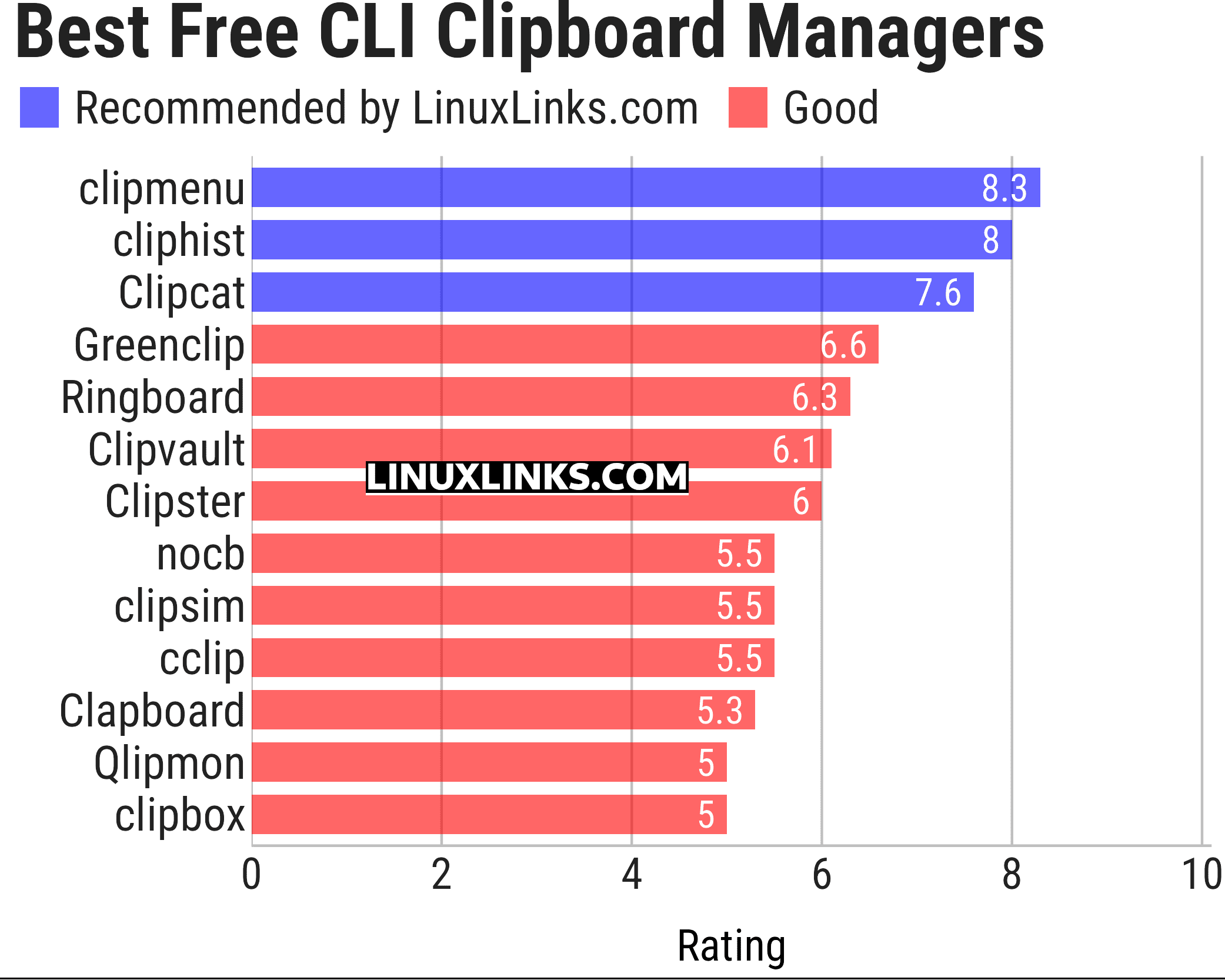
Click the links below to learn more about each clipboard manager.
| CLI Clipboard Managers | |
|---|---|
| clipmenu | Simple clipboard manager using dmenu (or rofi) and xsel |
| cliphist | Clipboard history manager for Wayland |
| Clipcat | Uses a client-server architecture |
| Greenclip | Recycle your clipboard selections |
| Ringboard | Clipboard manager built around a client-server architecture |
| Clipvault | Clipboard history manager for Wayland |
| Clipster | Simple clipboard manager which aims to be lightweight |
| nocb | Nearly optimal clipboard manager |
| clipsim | Simple and fast X clipboard manager |
| cclip | Cipboard manager for Wayland |
| Clapboard | Clipboard manager for Wayland written in Rust |
| Qlipmon | Clipboard history saver with native rofi plugin and DBUS interface |
| clipbox | Clipboard manager for Wayland |
 Explore our comprehensive directory of recommended free and open source software. Our carefully curated collection spans every major software category. Explore our comprehensive directory of recommended free and open source software. Our carefully curated collection spans every major software category.This directory is part of our ongoing series of informative articles for Linux enthusiasts. It features hundreds of detailed reviews, along with open source alternatives to proprietary solutions from major corporations such as Google, Microsoft, Apple, Adobe, IBM, Cisco, Oracle, and Autodesk. You’ll also find interesting projects to try, hardware coverage, free programming books and tutorials, and much more. Know a useful open source Linux program that we haven’t covered yet? Let us know by completing this form. |
Please read our Comment Policy before commenting.
Just my 2c but I think Ringboard is underrated here. It has a much broader feature set than the rating suggests, especially with X11 and Wayland support, CLI/TUI/GUI clients, image and binary clipboard support, and a client/server design. I’d expect it to sit closer to Clipcat than below Greenclip.
Clipvault also looks a little harshly scored. It may not be as mature as cliphist, but the extra controls around item limits, ignore rules, previews, and relative positions make it more capable than a 6.1 rating implies.