

SpeedCrunch is a fast, high precision and powerful open source desktop calculator.
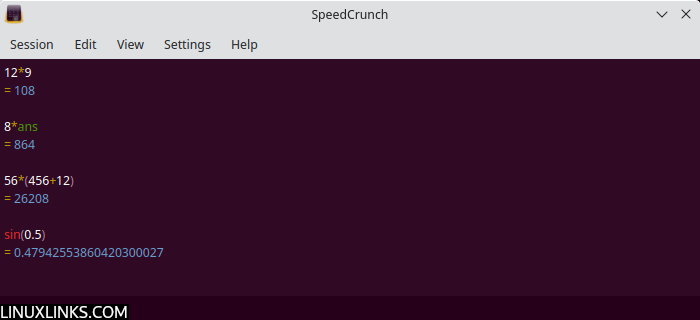
SpeedCrunch is easy to use, just type the expression that you want to calculate and press Enter. The result is shown in the scrollable display. You can quickly copy the last calculation result to the clipboard using Ctrl+R.
Beside standard algebraic operators like + (addition), – (subtraction), * (multiplication), * (division), ^ or ** (power), there is support for other functions for example sin, log, abs, and many more.
Advanced calculation sometimes needs a memory feature. SpeedCrunch therefore allows a variable to hold a calculation result.
Key Features
- Scrollable display.
- Up to 50 decimal precisions to ensure fewer rounding errors.
- Unlimited variable storage.
- Intelligent automatic completion of functions and variables.
- Full keyboard-friendly with keyboard shortcuts to speed up tasks.
- More than 150 built-in maths function including abs, sqrt, pi, log, exp, ln, sin, cos, tan, sinh, cosh, tanh, asin, acos, atan, arsinh, arcosh, and artanh.
- Supports calculations involving complex numbers
- Includes a powerful system for units and unit conversions. It provides an extensive list of built-in units and easily allows you to define your own.
- Built-in formula book allows to you to review and insert commonly used formulas, such as the volume of a cone.
- Optional keypad.
- On-the-fly calculation.
- Customizable appearance.
- Syntax highlight, with parentheses matching.
- History of last expressions.
- A special variable ‘ans’ holds the last calculation result.
- Angle mode: Alt+D for degrees, Alt+R for radians.
- Inside an immediate tooltip, calculate the result of the selected text.
- Save and restore sessions.
- Dock windows serving as a browsable mathematics manual, with geometry figures, quadratic equation etc.
- Uses a simple JSON-based file format for colour scheme definitions.
- Cross-platform support – Linux, macOS and Windows supported.
Website: speedcrunch.org
Support: User Guide, Blog, Bitbucket
Developer: The SpeedCrunch Developers
License: GNU General Public License v2.0
SpeedCrunch is written in C++. Learn C++ with our recommended free books and free tutorials.
Related Software
| Calculators | |
|---|---|
| Qalculate! | Powerful and easy to use multi-purpose desktop calculator |
| Genius | Desktop calculator, an educational tool in mathematics, and for research |
| SpeedCrunch | High precision and powerful desktop calculator |
| KCalc | Scientific calculator designed for KDE |
| Calculator | Simple and easy to use calculator |
| KAlgebra | Replace your graphing calculator |
| rpCalc | Simple RPN calculator |
| Kalk | Cross-platform application built with the Kirigami framework |
| Modular Calculator | Aimed at scientific, engineering or computing work |
| Nonpareil | High-Fidelity calculator simulator |
| Wombat | High-precision scientific calculator |
| Uno Calculator | Port of Windows calculator |
| SwitchCalc | GTK4 calculator |
| Schulrechner | Calculator you know from school |
| Pebbles | GTK-based app |
| Cuneo | Widget-like calculator and conversion tool |
| RCalc | RPN calculator |
| galculator | RPN and algebraic calculator |
| Extcalc | Multifunctional scientific graphic calculator |
| gdcalc | Financial, scientific, statistical and programming calculator |
| Sums | Postfix calculator designed for quick calculations |
| Free42 | HP-42S calculator simulator |
| Yesser Calculator | Extensible calculator |
| xcalc | Simple scientific calculator that can emulate a TI-30 or an HP-10C |
| x48ng | Reboot of the HP 48 emulator |
| tCalc | Simple calculator written in core Tcl/Tk |
| OxiCalc | Small, simple calculator. It uses GTK4. |
| MCalc | Perform simple mathematical operations |
| Eigen | GTK4 matrix calculator |
Read our verdict in the software roundup.
 Explore our comprehensive directory of recommended free and open source software. Our carefully curated collection spans every major software category. Explore our comprehensive directory of recommended free and open source software. Our carefully curated collection spans every major software category.This directory is part of our ongoing series of informative articles for Linux enthusiasts. It features hundreds of detailed reviews, along with open source alternatives to proprietary solutions from major corporations such as Google, Microsoft, Apple, Adobe, IBM, Cisco, Oracle, and Autodesk. You’ll also find interesting projects to try, hardware coverage, free programming books and tutorials, and much more. Discovered a useful open source Linux program that we haven’t covered yet? Let us know by completing this form. |
Please read our Comment Policy before commenting.
I’m trying to perform matrix calculation is there any way to perform matrix calculation, if not please add this features