
When I looked at SparkPlayer, I was impressed by its presentation, breadth of format support and excellent collection of visualizers. But there was one omission which stopped me from regarding it as a genuinely good music player: gapless playback.
That was not a minor complaint. SparkPlayer previously waited for the current track to finish before opening and starting the next one. The resulting pause might pass unnoticed when shuffling unrelated songs, but it is immediately obvious with albums designed to flow continuously. I specifically highlighted this weakness in the original review.
The developer has now addressed it. SparkPlayer 1.3.2, released on 18 August 2026, adds gapless playback and updates its dependencies, including FFmpeg.
Installation
The installation process remains straightforward.
There are pre-built Linux packages for x86-64, ARM64 and ARMv7, including Debian packages, although building from source remains an easy option provided the development dependencies are installed.
Clone the project’s repository with the command:
$ git clone https://github.com/dividebysandwich/sparkplayer
Change into the newly created directory:
$ cd sparkplayer
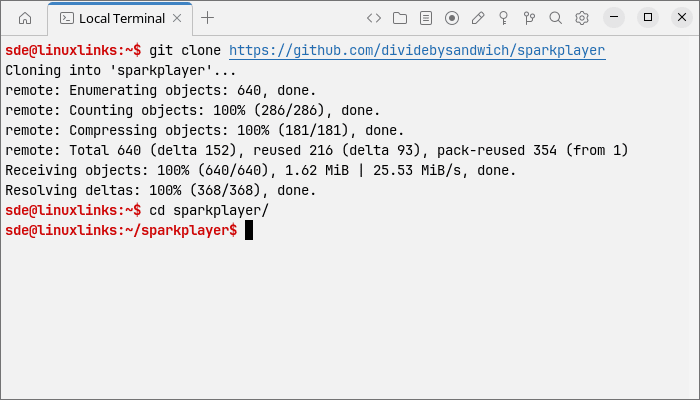
Then build the program:
$ cargo build --release
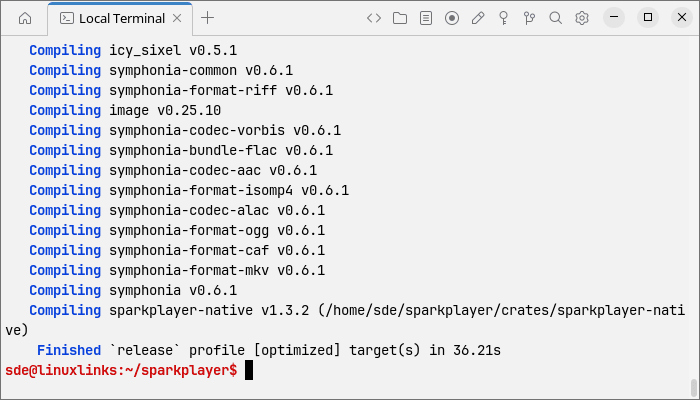
The binary is placed in `target/release/sparkplayer`.
SparkPlayer requires Rust 1.85 or newer. On Linux, you’ll also need the ALSA development headers together with the FFmpeg development libraries.
In Operation
The interface is essentially unchanged from my previous review. That’s no bad thing. SparkPlayer remains one of the most visually striking terminal-based media players around, with album artwork, video playback and a large selection of colourful audio visualizers.
The significant change is taking place underneath the interface.
With gapless playback enabled, SparkPlayer prepares the following audio track before the currently playing track reaches its end. The next source is queued in the audio backend so playback can cross the track boundary without stopping to open and initialise another decoder. If the two files use different sample rates, the queued track is converted to the format of the currently playing track in advance.
Gapless playback is enabled by default. It can be switched on or off from the `Esc` menu, and SparkPlayer remembers the setting between sessions. The feature applies to audio; video continues to use the conventional track transition because the video and subtitle pipelines need rebuilding.
There’s even some attention to the visual side of the transition. SparkPlayer keeps the existing waveform sample history when a queued track takes over rather than resetting the audio sample buffer. This prevents the visualizers from displaying an artificial hole at precisely the point where the audio itself is playing continuously.
This is an important improvement.
Gapless playback is sometimes treated as a specialist feature, but for a serious music player I regard it as close to essential. Plenty of music is mastered without silence between individual tracks. Live albums are the obvious example: applause, crowd noise and ambience should continue naturally rather than being interrupted by a brief digital pause. The same applies to DJ mixes, concept albums, progressive rock, ambient works and classical recordings where movements or sections may be stored as separate files.
Even a very short interruption is distracting because it isn’t part of the recording.
Crossfading isn’t a substitute either. Crossfading deliberately overlaps the end of one track with the beginning of another and therefore changes the intended transition. True gapless playback simply removes the unwanted silence introduced by the player. If the producer intended one track to run directly into the next, that’s what you hear.
This was SparkPlayer’s biggest weakness as a music player when I originally reviewed it. Its removal materially changes my opinion of the software.
That’s actually refreshing. Gapless playback is more valuable to me than another handful of visual effects.
Summary
SparkPlayer was already a polished and unusually attractive terminal media player. Its combination of audio and video playback, terminal graphics, album art and visualizers gave it considerable appeal.
But in my previous review I couldn’t regard it as a credible music player while it inserted a pause between consecutive tracks. For anyone who listens to albums rather than isolated songs, that deficiency was too important to ignore.
The current version fixes the problem properly. The next audio stream is prepared in advance, differing sample rates are handled, the setting persists between sessions and even the visualizer’s sample history is carried through the transition. This isn’t merely a checkbox implementation of gapless playback.
As a result, SparkPlayer moves up the pecking order. Some of my earlier reservations remain. It is still fundamentally folder-oriented rather than a sophisticated music-library manager, and its enthusiasm for visualizers won’t suit everyone. Video quality and smoothness also remain heavily dependent on the capabilities of your terminal. I also note that some terminal emulators exhibit very high CPU usage even when playing music. Termora is one example.
There’s one other aspect of the project worth mentioning. There are signals consistent with AI-assisted development.
The gapless implementation arrived as a single substantial commit touching the application state, audio backend, configuration system, user interface, documentation and native playback engine. The newly added code contains a very high density of explanatory comments describing implementation choices, edge cases and internal state transitions. The wider history also contains bursts where several substantial features were implemented in unusually short succession.
Those characteristics can be seen in projects developed with tools such as coding agents or LLM assistants, but they don’t prove AI usage. I didn’t see any explicit Claude or Copilot references in the repository searches, nor an obvious AI attribution associated with the work.
Whatever development tools are being used, the gapless implementation addresses precisely the issue that most limited SparkPlayer in my original review. It’s a small item on a feature list, but in actual music playback it represents a major improvement.
Website: github.com/dividebysandwich/sparkplayer
Support:
Developer: dividebysandwich
License: GNU General Public License v2.0
SparkPlayer is written in Rust. Learn Rust with our recommended free books and free tutorials.
Related Software
| Terminal-Based Music Players | |
|---|---|
| musikcube | Sublime audio engine, library, player and server written in C++ |
| tap | The lightest music player with gapless playback |
| Tizonia | Powerful cloud music player based on OpenMAX IL 1.2 written in C and C++ |
| cmus | Great set of features including the essential gapless playback |
| CLIAMP | Winamp-inspired retro player bursting with nostalgic character |
| termusic | Music Player TUI written in Rust |
| kew | Music player written in C |
| Trix | Straightforward Linux player with a clean design and low overhead |
| koan | Purist audio player created for focused, high-fidelity listening |
| NoctaVox | Atmospheric local library player with fluid, intuitive navigation |
| spectrum | Simple and intuitive music player for tech enthusiasts |
| ncmpc | Frugal Music Player Daemon client |
| ncmpy | Music Player Daemon client |
| MOC | Designed to be powerful and easy to use |
| RMuP | Simple music player lacking gapless playback |
| Siren | Extremely frugal with system resources |
| grump | CLI audio player written in Go |
| SparkPlayer | Eye-catching media player blending rich visuals with easy playback |
| Gomu | Another Go music player |
| BM | Distraction-free player with crisp controls and a deliberately sparse UI |
| mpvc | mpc-like control interface for mpv |
| mplay | No-fuss command-line player for launching tracks in an instant |
| MECOMP | Ambitious library player with flexible playback and organisation |
| tmuzika | Lean, responsive player for browsing albums and queuing tracks |
| RustPlayer | Audio and radio player written in Rust |
| namp | Keyboard-led audio player with playlists and vivid visual effects |
| daph | Sleek text-based player built for speed and effortless control |
Read our verdict in the software roundup.
 Explore our carefully curated directory of recommended free and open source software, covering every major software category. Explore our carefully curated directory of recommended free and open source software, covering every major software category.The directory forms part of our extensive collection of articles for Linux enthusiasts. It includes hundreds of detailed reviews, together with free and open source alternatives to proprietary software from companies such as Google, Microsoft, Apple, Adobe, IBM, Cisco, Oracle, and Autodesk. LinuxLinks also covers interesting projects worth exploring, Linux-compatible hardware, free programming books and tutorials, and much more. Know a useful free and open source Linux application that we haven’t covered? Tell us about it using our submission form. |
Please read our Comment Policy before commenting.