

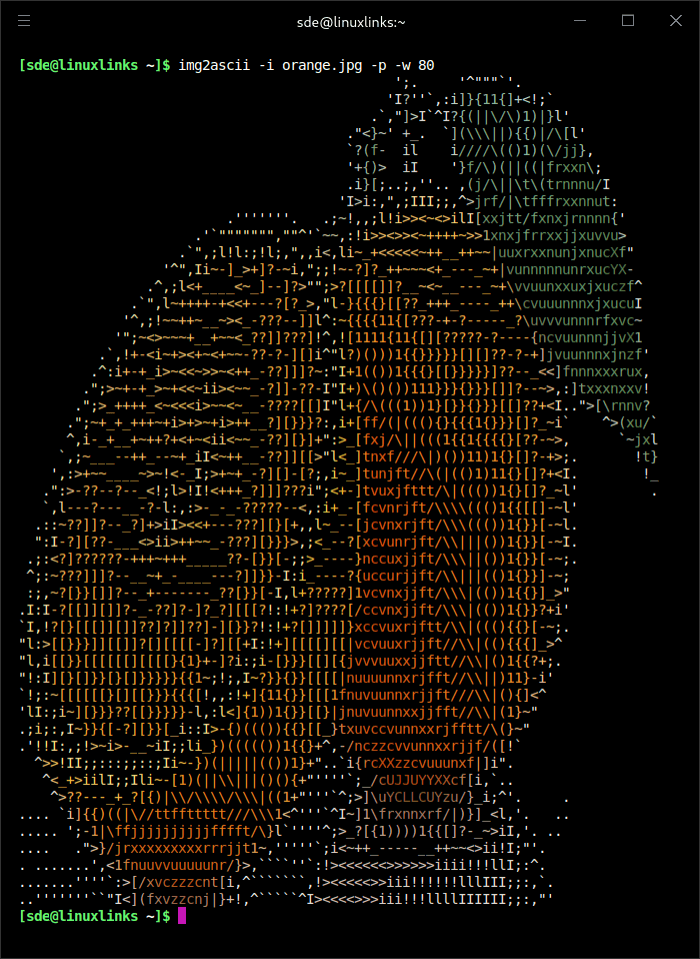
img2ascii is a command-line utility written in C that converts image files into character-based artwork. It replaces the visual information in a picture with text characters that approximate the original image’s shapes and shading.
The application supports common image formats including PNG, JPEG and BMP. Its output can be displayed directly in a terminal or written to a text file for later use.
img2ascii is designed for straightforward image conversion. Users can adjust the output width and supply a custom character set to change how different brightness levels are represented.
The ability to reverse the selected character sequence provides another way to modify the appearance of the result. This can be useful when displaying artwork against different terminal backgrounds.
The program is particularly suitable for experimenting with character representations of photographs and illustrations without requiring a graphical editor.
This is free and open source software.
Key Features
- Converts PNG, JPEG and BMP images into ASCII artwork.
- Uses characters of different densities to represent image shading.
- Provides a command-line interface for selecting source images.
- Allows the output width to be specified.
- Supports custom character sets.
- Reverses the character sequence used during conversion.
- Displays generated artwork directly in the terminal.
- Saves converted artwork to a text file.
- Supports processing different source images with individual settings.
- Cross-platform support – runs on Linux and Windows.
Website: github.com/JosefVesely/img2ascii
Support:
Developer: Josef Vesely
License: MIT License

img2ascii is written in C. Learn C with our recommended free books and free tutorials.
Related Software
| ASCII Art Tools | |
|---|---|
| gif-for-cli | Convert media to animated ASCII art |
| ASCIIQuarium | Embrace marine life from the terminal with beautiful ASCII art |
| Calligraphy | Converts short texts into large, imposing banners |
| CMatrix | Terminal based “The Matrix” |
| Diagon | Transforms markdown-style expression into an ascii-art representation |
| Aewan | Ascii-art Editor Without a Name |
| Steam Locomotive | C program written in 295 lines. It's harmless fun |
| boxes | ASCII box drawing |
| Durdraw | ASCII, Unicode and ANSI art editor |
| FIGlet | Make large letters out of ordinary screen characters |
| pipes.sh | Animated pipes terminal screensaver |
| jp2a | Convert JPEG images to ASCII |
| asciify | Turn images into attractive ASCII art |
| lolcat | Rainbows and unicorns |
| Artem | Convert images to ASCII art |
| TOIlet | Similar in many ways to FIGlet with additional features |
| textdraw | Draw geometric figures and text |
| PyBonsai | Generates procedural ASCII art trees |
| No More Secrets | Recreates the data decryption effect seen in the 1992 film Sneakers |
| Letterpress | Converts your images into a picture made up of ASCII characters |
| draw | Simple drawing tool for the terminal |
| ASCII Art Converter | Converts images into ASCII art |
| cbonsai | Generate bonsai trees |
| cadubi | Creative ASCII drawing utility |
| cacafire | Color ASCII Fire |
| cowsay | Generates ASCII pictures of a cow with a message in a speech bubble |
| Mezzotone | Convert images into ASCII art |
| img2ascii | Command-line tool for converting images to ASCII art |
| gti | Typo-based curio inspired by Steam Locomotive |
| ctree | Christmas tree on your terminal |
| ASCII Draw | Sketch anything using characters |
| catspeak | Like cowsay but catty |
Read our verdict in the software roundup.
 LinuxLinks helps you discover the best free and open source software for Linux. Explore our extensive collection of recommended applications, including alternatives to popular proprietary software. LinuxLinks helps you discover the best free and open source software for Linux. Explore our extensive collection of recommended applications, including alternatives to popular proprietary software.We also publish software reviews, Linux tutorials, hardware reviews, free programming books and articles covering the wider open source community. Browse our Linux resources to discover more. Know a useful free and open source Linux application we haven't covered? Suggest a program for inclusion. Has your software been featured on LinuxLinks? Display one of our Featured on LinuxLinks badges on your website or GitHub README. |
Please read our Comment Policy before commenting.