

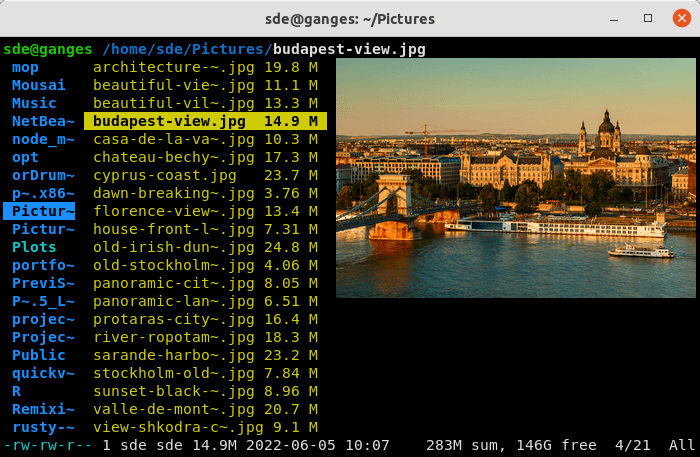
Ranger is an open source console based file manager that gives users greater flexibility and a good overview of files without having to leave the *nix console. It visualizes the directory tree in two dimensions: the directory hierarchy on one, lists of files on the other, with a preview to the right so you know where you will be going.
The default keys are similar to those of Vim, Emacs and Midnight Commander, though Ranger is easily controllable with just the arrow keys or the mouse.
After starting Ranger, you can use the arrow keys (or hjkl) to navigate, Enter to open a file or type Q to quit. The third column shows a preview of the current file. The second is the main column and the first shows the parent directory. The program is written in Python and uses curses for the text-based user interface.
It comes bundled with rifle, a file launcher that automatically determines which program to use for each file type.
Key Features
- Quick way to switch directories and browse the file system.
- Multi-pane view. It displays the current directory of all the open tabs next to each other.
- Integration into the unix shell.
- Multi-column display.
- Preview of the selected file/directory.
- Common file operations (create / chmod / copy / delete /…).
- VIM-like console and hotkeys.
- Macros which can be used in commands to abbreviate things.
- Automatically determine file types and run them with correct programs.
- Change the directory of your shell after exiting Ranger.
- Tags.
- Bookmarks.
- Mouse support.
- Midnight Commander-like bindings.
- Change the directory of your shell after exiting Ranger.
- UTF-8 Support.
- Run Ranger in a Docker container.
Website: ranger.github.io
Support: GitHub Code Repository
Developer: Wojciech Siewierski, nfnty, Toon Nolten, hut, and many other contributors
License: GNU General Public License v3.0
Ranger is written in Python. Learn Python with our recommended free books and free tutorials.
Related Software
| Orthodox File Managers | |
|---|---|
| Krusader | Advanced twin panel (commander style) file manager for KDE |
| Midnight Commander | User-friendly yet powerful text-mode file manager and visual shell |
| Double Commander | Inspired by Total Commander |
| Ranger | File manager with an ncurses frontend written in Python |
| GNOME Commander | Built on the GTK-toolkit and GnomeVFS |
| Xfe | Very similar to Windows Explorer but with twin panes |
| muCommander | Lightweight, cross-platform file manager |
| far2l | AR Manager fork bringing panels, plugins and archives to Linux |
| Vifm | Vim-style two-pane navigator with modal keyboard control |
| File Commander | Total Commander-like orthodox file manager |
| Sunflower | Small and highly customizable twin-panel file manager |
| trolCommander | Fork of muCommander |
| FileRunner | Simple and efficient file manager written in Tcl |
| F2 Commander | Lean text-mode commander for browsing and batch operations |
| Tux Commander | Uses the old GTK2 windowing toolkit |
| Midday Commander | Dual-pane console navigator with Midnight Commander-style flow |
| Worker | In the style of the Amiga's DirOpus |
| Waydir | Wayland-native desktop browser focused on speed and simplicity |
| WCMCommander | Mimicking the look-n-feel of Far Manager |
| gentoo | Two-pane file manager |
| emelFM2 | Orthodox file manager using GTK+ 2 |
Read our verdict in the software roundup.
| Console File Managers | |
|---|---|
| nnn | Fast and flexible file manager |
| Midnight Commander | User-friendly yet powerful orthodox file manager |
| superfile | Very fancy and modern terminal file manager |
| Ranger | File manager with an ncurses frontend written in Python |
| lf | Terminal file manager heavily inspired by ranger |
| Yazi | File manager with asynchronous support |
| CliFM | Shell-like, command line terminal file manager |
| joshuto | Ranger-like file manager |
| far2l | Linux fork of FAR Manager v2 |
| Vifm | ncurses based file manager with vi like keybindings |
| fm | Double pane file manager written in Go |
| elio | Fast file browsing with rich previews in three panes |
| felix | TUI file manager with Vim-like key mapping |
| fman | Uses Bubbletea, Lipgloss, Bubblezone, stickers, Chroma, and go-arg |
| FCD | Continuation of rnr |
| projectable | TUI file manager built for projects |
| Last File Manager | 1 or 2 pane Python based file manager |
| WCM Commander | A Far Manager clone |
| TUIFI Manager | Termux-oriented file manager |
| sff | Simple file finder |
| jafff | Just another f* fast file manager |
| goful | Another file manager written in Go |
| rnr | Combines the best features of Midnight Commander and Ranger |
| fff | Simple file manager |
Read our verdict in the software roundup.
| Terminal-Based Image Viewers | |
|---|---|
| timg | Image and video viewer with good range of features. Written in C++ |
| Chafa | Character Art Facsimile |
| viu | Rust-based image viewer |
| vv | Image viewer for sixel terminals |
| TIV | Tiny C++ program that displays images in a terminal |
| Ranger | Terminal-based file manager supporting high quality previews of image files |
| mcat | Extended cat command |
| icat | Cat like utility can specify multiple image files and/or directories |
| PixelTerm-C | High-performance terminal image browser written in C |
| pho | Lightweight image viewer |
| catimg | Renders images in the terminal |
| PTUI | Real-time image preview capabilities |
| imv | X11/Wayland image viewer |
| iv | Image viewer using terminal graphics |
| ucollage | Extensible command line image viewer |
| TermVisage | Front-end to the term-image library |
| Foto | Simple image viewer |
| rsimg | Uses crossterm and zune as dependencies |
| pxv | Instant feature rich terminal image viewer |
| imgcat | Displays images and gifs in your terminal emulator. |
Read our verdict in the software roundup.
 Explore our carefully curated directory of recommended free and open source software, covering every major software category. Explore our carefully curated directory of recommended free and open source software, covering every major software category.The directory forms part of our extensive collection of articles for Linux enthusiasts. It includes hundreds of detailed reviews, together with free and open source alternatives to proprietary software from companies such as Google, Microsoft, Apple, Adobe, IBM, Cisco, Oracle, and Autodesk. LinuxLinks also covers interesting projects worth exploring, Linux-compatible hardware, free programming books and tutorials, and much more. Know a useful free and open source Linux application that we haven’t covered? Tell us about it using our submission form. |
Please read our Comment Policy before commenting.