

Git History UI is a local-first application for exploring and analysing Git repository history through a web browser. It provides a graphical alternative to navigating lengthy command-line logs, making it easier to understand how a project has evolved, investigate individual changes and identify patterns in development activity.
The application operates against a local repository and runs its own web interface. It works independently of a particular code editor, allowing developers to inspect their projects without relying on editor extensions or a remote hosting service. Repository analysis and reporting are performed locally.
Git History UI goes beyond conventional commit browsing by combining historical inspection with repository analytics and reporting. It can be useful when investigating regressions, reviewing changes made by contributors or understanding how modifications affect different parts of a codebase.
Optional AI-powered explanations are available through externally configured providers. These features are separate from the ordinary Git analysis tools and send relevant repository information to the selected provider when invoked.
This is free and open source software.
Key Features
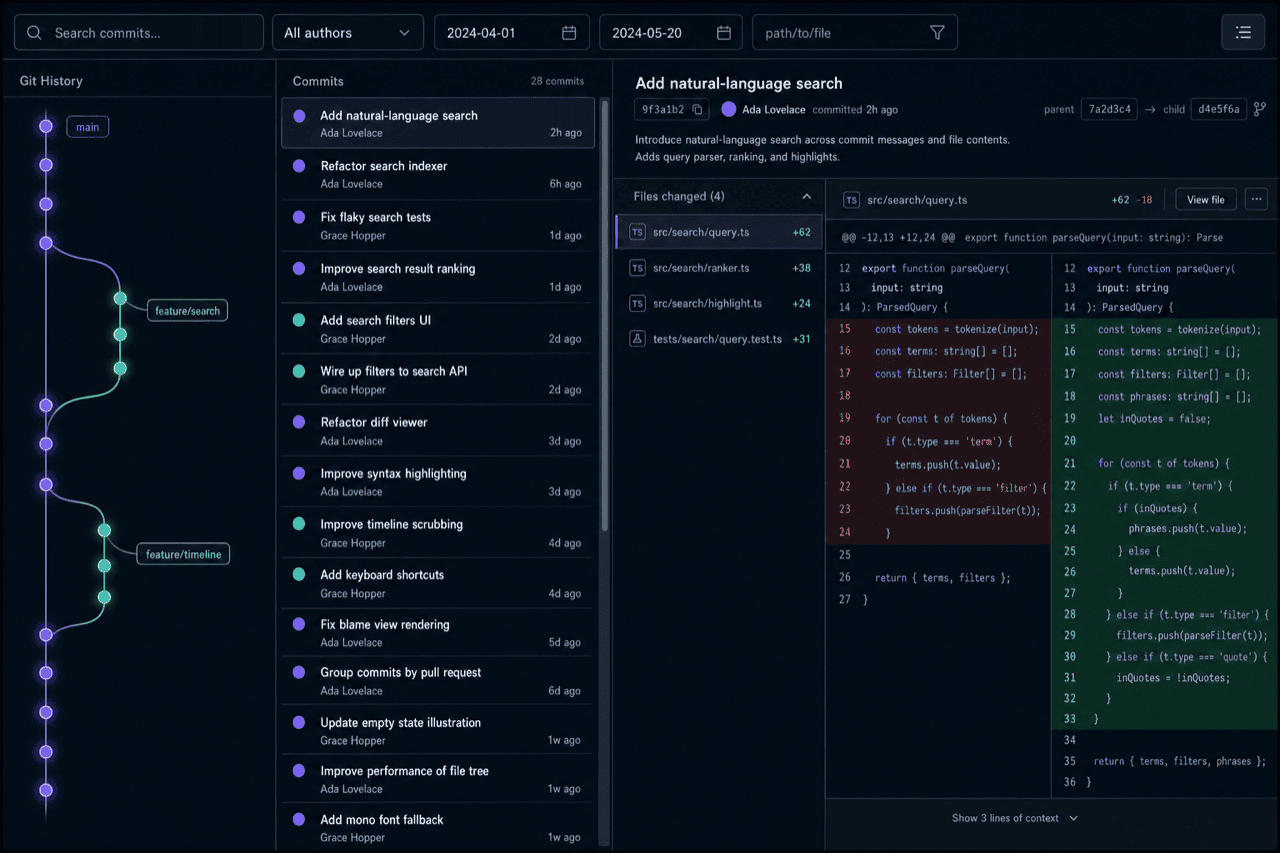
- Interactive commit graph showing branches, commits and repository references.
- Filter history by author, date, commit text and file path.
- Search for commits that added or removed particular strings using Git pickaxe searches.
- View unified and side-by-side diffs with syntax highlighting and word-level change indicators.
- Inspect individual file histories and Git blame information.
- Compare branches and tags, and explore stashes and reflog entries.
- Group commits by pull request, with optional GitHub metadata enrichment.
- Analyse contributor activity, code churn, frequently modified files and repository hotspots.
- Display commit impact information, including affected modules and dependency relationships.
- Add local annotations to individual commits.
- Build an optional SQLite full-text search index for faster history searches.
- Export commit data and analysis reports in CSV, JSON and Markdown formats.
- Generate Git Wrapped summaries of repository and contributor activity.
- Produce pull request impact reports for continuous integration workflows.
- Supports dark, light and system-matched interface themes.
Website: github.com/beingmartinbmc/git-history-ui
Support:
Developer: Ankit Sharma
License: MIT License
Git History UI is written in TypeScript. Learn TypeScript with our recommended free books and free tutorials.
Related Software
| Git Tools for Diff Review and Repository History | |
|---|---|
| difftastic | Structural diff tool that compares files based on their syntax |
| git-filter-repo | Quickly rewrite git repository history |
| onefetch | Displays information about a local Git repository |
| git-stats | Local git statistics including GitHub-like contributions calendars |
| diff-so-fancy | Attractive diffs with diff-highlight and more |
| BFG Repo-Cleaner | Clean unwanted data from Git repository history |
| git-delta | Viewer for git and diff output |
| gitlogue | Cinematic Git commit replay tool |
| git-quick-stats | Access various statistics in a git repository |
| git-who | Command-line Git analysis tool |
| git-standup | Recall what you did on the last working day |
| git-of-theseus | Analyze how a Git repo grows over time |
| git-sizer | Compute various size metrics for a git repository |
| diffnav | Git diff pager based on delta but with a file tree, à la GitHub |
| critique | Terminal UI for reviewing git diffs |
| git-big-picture | Visualization tool for Git repositories |
| hercules | Gain advanced insights from Git repository history |
| keifu | TUI that visualizes Git commit graphs |
| git-fame | Git repository collaborators sorted by contributions |
| needle | Highlights GitHub PRs |
| mergiraf | Git merge driver |
| git-history | Analyze Git history using SQLite |
| ec | Terminal Git mergetool |
| diffr | Word-by-word diff highlighting utility |
| git-scope | Fast TUI dashboard to view the git status of all your repositories |
| mamediff | Manages unstaged and staged Git diffs |
| deadbranch | Keep Git repositories tidy |
| GitTop | Lightweight desktop client for GitHub notifications |
| git-heatmap | Generates a customizable heatmap |
Read our verdict in the software roundup.
 LinuxLinks helps you discover the best free and open source software for Linux. Explore our extensive collection of recommended applications, including alternatives to popular proprietary software. We also publish software reviews, Linux tutorials, hardware reviews, free programming books and articles covering the wider open source community. Browse our Linux resources to discover more. Know a useful free and open source Linux application we haven't covered? Suggest a program for inclusion. Has your software been featured on LinuxLinks? Display one of our Featured on LinuxLinks badges on your website or GitHub README. |
Please read our Comment Policy before commenting.