

In Operation
Gaia Sky lets you buzz around deep space, exploring imagery of planets, stars, asteriods, clusters, nebulae, and more.
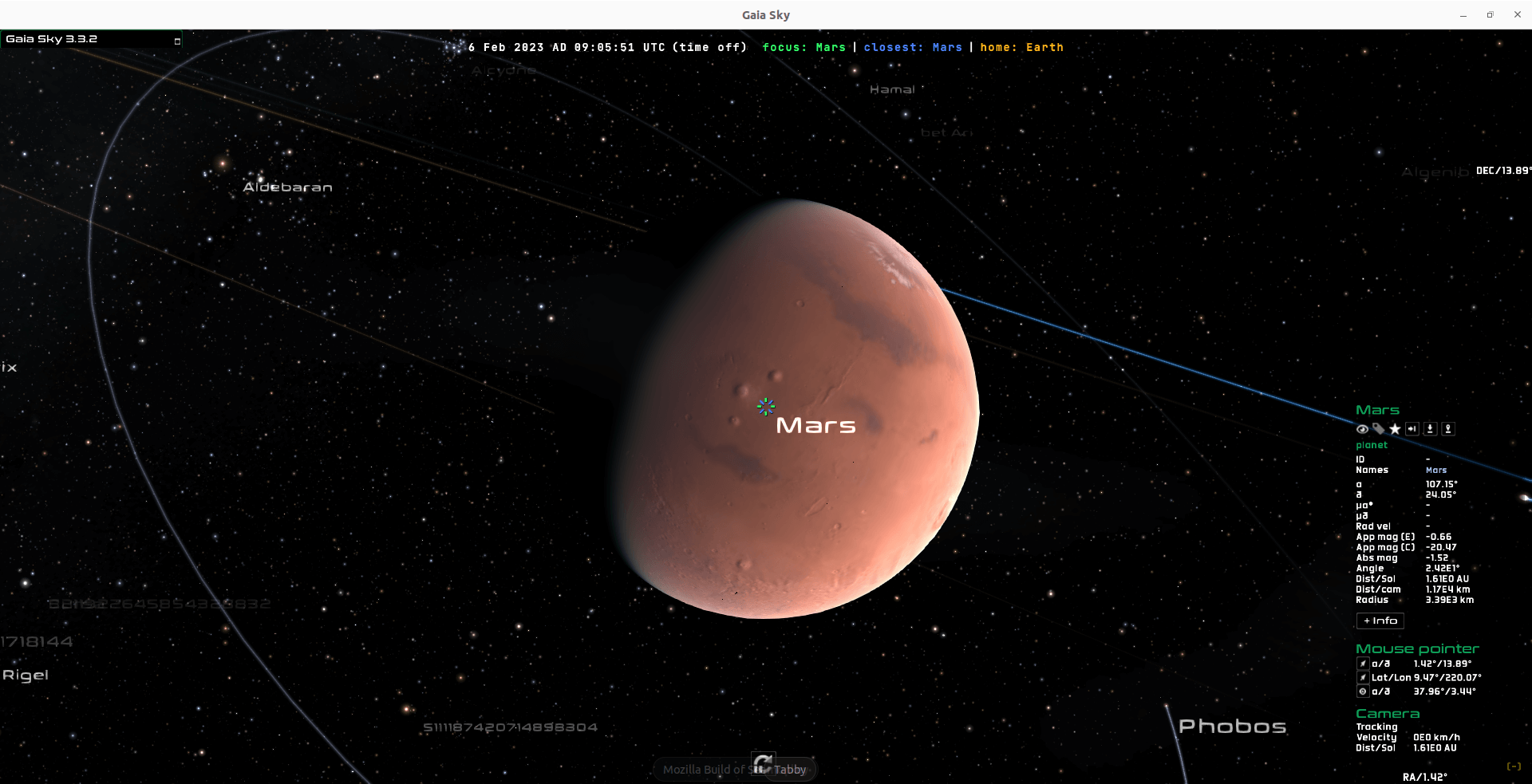
You’ll first want to locate a few familiar planets. Let’s see Mars. Press f to bring up a search box. Type in Mars. Click the close button, and press Ctrl + G to jump to the planet.
What does Gaia Sky offer?
- Virtual Reality – Visit the whole Universe in VR!
- 4 camera modes:
- Focus mode – this is the default mode. The camera movement is locked to a focus object.
- Object tracking – track a different object while still having our position linked to the focus object.
- Free mode – does not lock the camera to a focus object but it lets it roam free in space.
- Game mode – maps the standard control system for most games (wasd + Mouse look) .
- 6D exploration – Observe star positions but also proper motions and radial velocities, if available.
- Planetary surfaces – Explore surfaces with elevation maps (using tessellation, if available).
- Procedural planets – Procedurally generate planet surfaces, clouds and atmospheres.
- Advanced graphics – Screen space reflections, shadows, HDR, ray-marched distance fields, dynamic resolution, etc.
- 3D-ready – 6 stereoscopic modes: Anaglyph 3D (red-cyan), VR headset, 3DTV (H and V), crosseye and parallel view. The 3D mode outputs two images each intended for each eye, creating the illusion of depth.
- 360 mode – Spherical (equirectangular), cylindrical and Hammer projections available.
- 2 Planetarium projection modes with partial support MPCDI for real-time usage in multi-projector systems. Ready to produce videos for full domes from the desktop app.
- Gaia – Observe Gaia in its orbit and discover its movement in the sky and its attitude.
- Use your data – Download pre-packed datasets (Gaia eDR3, NBG, SDSS, OCDR2, etc.) or use your own, in VOTable, FITS, CSV and other formats (using the STIL library).
- Real-time filters – Filter any dataset by distance, magnitude, galactic, ecliptic, equatorial coordinates, and more.
- SAMP aware – Use SAMP to interoperate with SAMP-ready software such as Topcat and Aladin. The current implementation only allows using Gaia Sky as a SAMP client.
- Camera paths – Record and play camera paths off-the-shelf.
- Create an additional window with an external view of the current scene and no user interface controls.
There are plenty of configuration options, especially for the graphics. You’re able to tweak many aspects such as star brightness, size, ambient light, and much more.
Summary
Gaia Sky is impressive open source software. The planetarium projection mode is great for creating videos for use with spherical full-dome projection systems.
The software offers a wide array of features with the ability to extend its functionality courtesy of Python scripting (you’ll need a Python 3.5+ interpreter). There’s also a REST server feature that exposes the scripting API over the network.
Gaia Sky needs a fairly beefy computer. The software starts fairly slowly even on a 12th or 13th generation Intel machine. On a 6th generation laptop with only 8GB of RAM the program is sluggish. Gaia Sky uses OpenGL to render advanced graphics. There’s also support for multithreading.
Website: gaiasky.space
Support: Documentation, Code Repository
Developer: Toni Sagristà Sellés
License: Mozilla Public License
Gaia Sky is written in Java. Learn Java with our recommended free books and free tutorials.
Pages in this article:
Page 1 – Introduction and Installation
Page 2 – In Operation and Summary
Related Software
| Astronomy Software | |
|---|---|
| Stellarium | A virtual planetarium |
| Gaia Sky | Astronomy visualization desktop and VR program |
| Celestia | Real-time space simulation |
| AstroImageJ | Tool for astronomical image analysis and precise photometry |
| Skychart | Prepare different sky maps for a particular observation |
| KStars | Desktop planetarium for KDE |
| OpenSpace | Interactive data visualization software |
| Aladin Desktop | Interactive sky atlas |
| Virtual Moon Atlas | Real-time moon observation |
| Ginga | FITS image viewer and toolkit |
| Digital Universe Atlas | Standalone 4-dimensional space visualization application |
| XEphem | Motif based ephemeris and planetarium program |
| mars-sim | General purpose simulator |
| Cosmonium | 3D astronomy and space exploration program |
| Tenmon | FITS and XISF image viewer, converter and indexer |
| Kosmorro | Calculate your ephemerides |
| Astra | Observatory control system |
| astroterm | Terminal-based star map |
| Skyviewer | Displays HEALPix-based skymaps |
| skyterm | Terminal-based astronomy program |
| ORSA | Framework for celestial mechanics investigations |
Read our verdict in the software roundup.
 Explore our carefully curated directory of recommended free and open source software, covering every major software category. Explore our carefully curated directory of recommended free and open source software, covering every major software category.The directory forms part of our extensive collection of articles for Linux enthusiasts. It includes hundreds of detailed reviews, together with free and open source alternatives to proprietary software from companies such as Google, Microsoft, Apple, Adobe, IBM, Cisco, Oracle, and Autodesk. LinuxLinks also covers interesting projects worth exploring, Linux-compatible hardware, free programming books and tutorials, and much more. Know a useful free and open source Linux application that we haven’t covered? Tell us about it using our submission form. |
Please read our Comment Policy before commenting.