

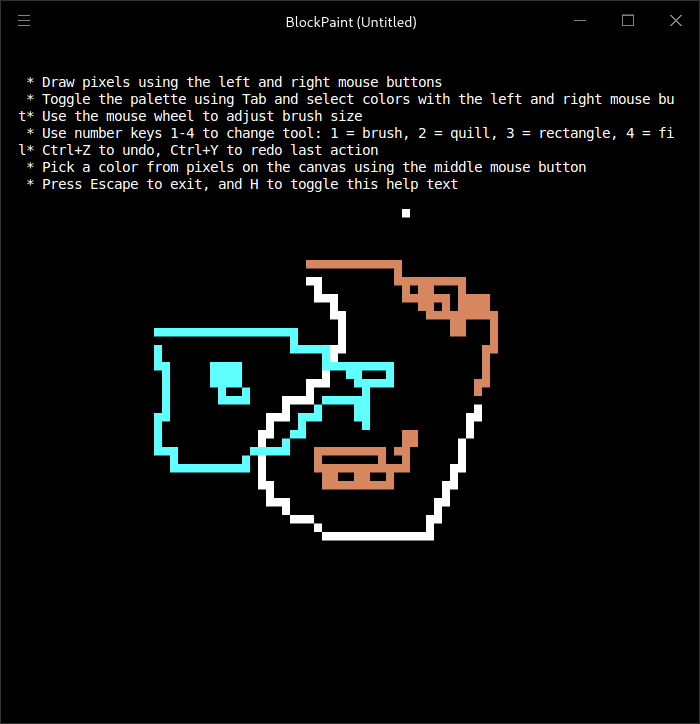
BlockPaint is a terminal-based painting application that allows users to create pixel graphics using a mouse. Rather than opening a conventional graphical drawing window, it provides a drawing surface within the terminal itself. Users can select colours and apply drawing tools directly to the terminal canvas.
The application includes brushes of different sizes, a quill tool and a fill bucket for colouring regions. An undo and redo system makes it possible to reverse drawing operations, while on-screen help provides information about the available controls. BlockPaint is suited to simple pixel-style artwork and experimentation with terminal graphics.
This is free and open source software.
Key Features
- Draw pixel graphics directly inside a terminal window.
- Use the mouse to interact with the drawing canvas.
- Select drawing colours from a colour palette.
- Paint using a brush tool.
- Use a quill tool for drawing.
- Fill regions using a bucket fill tool.
- Adjust brush sizes.
- Undo and redo drawing operations.
- Access on-screen help for the available controls.
Website: lib.rs/crates/blockpaint
Support:
Developer: Wooster
License: MIT License
BlockPaint is written in Rust. Learn Rust with our recommended free books and free tutorials
Related Software
| Painting Tools | |
|---|---|
| Krita | Edit and paint images; part of the KOffice office suite |
| MyPaint | Paint program with dynamic brushes for graphic tablets |
| GIMP | GNU Image Manipulation Program |
| Drawpile | Draw, paint, sketch and animate |
| AzPainter | Full color painting software |
| Tux Paint | Drawing and painting software designed for children |
| Milton | Infinite-canvas paint program |
| Vara | Minimalist digital painting tool |
| CorePaint | Paint app for C Suite |
| InfiniPaint | Collaborative, infinite space, infinite zoom, canvas note-taking/drawing app |
| BlockPaint | Terminal-based painting tool |
| Alchemy | Non-orthodox painting tool experimenting with alternative ways of drawing |
Read our verdict in the software roundup.
 LinuxLinks helps you discover the best free and open source software for Linux. Explore our extensive collection of recommended applications, including alternatives to popular proprietary software. We also publish software reviews, Linux tutorials, hardware reviews, free programming books and articles covering the wider open source community. Browse our Linux resources to discover more. Know a useful free and open source Linux application we haven't covered? Suggest a program for inclusion. Has your software been featured on LinuxLinks? Display one of our Featured on LinuxLinks badges on your website or GitHub README. |
Please read our Comment Policy before commenting.