

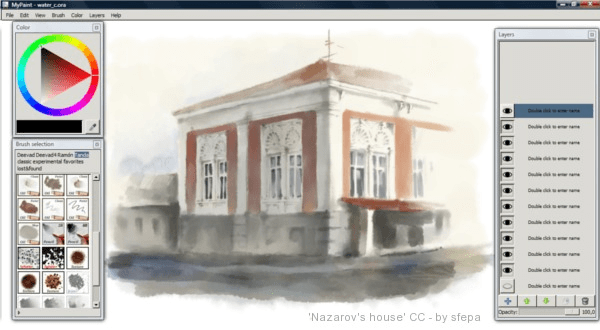
MyPaint is an open source paint program with dynamic brushes for graphic tablets.
This is a pressure sensitive Wacom tablet paint program.
It comes with a large brush collection including charcoal and ink to emulate real media, but the highly configurable brush engine allows you to experiment with your own brushes and with not-quite-natural painting.
Key Features
- Designed for pressure sensitive graphics tablets.
- Simple and minimalistic user interface.
- Large brush collection including charcoal and ink to emulate real media, but the highly configurable brush engine allows you to experiment with your own brushes and with not-quite-natural painting.
- Extensive brush creation and configuration options.
- Unlimited canvas.
- Layer management.
- Basic layer support.
- Flood fill tool.
Website: github.com/mypaint/mypaint
Support: Wiki
Developer: Martin Renold
License: GNU General Public License v2.0
MyPaint is written in C++ and Python. Learn C++ with our recommended free books and free tutorials. Learn Python with our recommended free books and free tutorials.
Related Software
| Painting Tools | |
|---|---|
| Krita | Edit and paint images; part of the KOffice office suite |
| MyPaint | Paint program with dynamic brushes for graphic tablets |
| GIMP | GNU Image Manipulation Program |
| Drawpile | Draw, paint, sketch and animate |
| AzPainter | Full color painting software |
| Tux Paint | Drawing and painting software designed for children |
| Milton | Infinite-canvas paint program |
| Vara | Minimalist digital painting tool |
| CorePaint | Paint app for C Suite |
| InfiniPaint | Collaborative, infinite space, infinite zoom, canvas note-taking/drawing app |
| BlockPaint | Terminal-based painting tool |
| Alchemy | Non-orthodox painting tool experimenting with alternative ways of drawing |
Read our verdict in the software roundup.
 Explore our carefully curated directory of recommended free and open source software, covering every major software category. Explore our carefully curated directory of recommended free and open source software, covering every major software category.The directory forms part of our extensive collection of articles for Linux enthusiasts. It includes hundreds of detailed reviews, together with free and open source alternatives to proprietary software from companies such as Google, Microsoft, Apple, Adobe, IBM, Cisco, Oracle, and Autodesk. LinuxLinks also covers interesting projects worth exploring, Linux-compatible hardware, free programming books and tutorials, and much more. Know a useful free and open source Linux application that we haven’t covered? Tell us about it using our submission form. |
Please read our Comment Policy before commenting.